


- Click and collect lets shoppers buy online and pick the order up at a store, locker or collection point instead of waiting for delivery.
- In the US it is usually called BOPIS (buy online, pick up in store). Curbside pickup and lockers are variations of the same idea.
- Retailers skip the cost of last-mile delivery and often make extra sales when customers come in to collect.
- It only works with accurate store-level inventory and a ready message sent once the order is really staged.
Where AmICited fits
Pickup options only reach AI answers when agents can read them. AmICited’s AI Accessibility audit checks your site’s llms.txt, crawler access in robots.txt, accessibility tree, sitemaps and agentic commerce support in one report.
See the AI Accessibility audit
What Is Click and Collect?
Click and collect is a way of fulfilling online orders where the customer comes to get them. They browse and pay on the website or app, choose a store or collection point, and pick up when the order is ready. No home delivery, no waiting in for a courier.
The term is most common in the UK, Ireland and Australia, where retailers such as Argos, John Lewis and supermarket chains made it standard. In the US, the same service is usually called BOPIS (buy online, pick up in store), and retailers like Target, Walmart and Home Depot run it at scale. Platforms such as Shopify support local pickup as a shipping option, and Google Merchant Center lets retailers show pickup options in local inventory ads. It is a core piece of omnichannel retail.
How Click and Collect Works
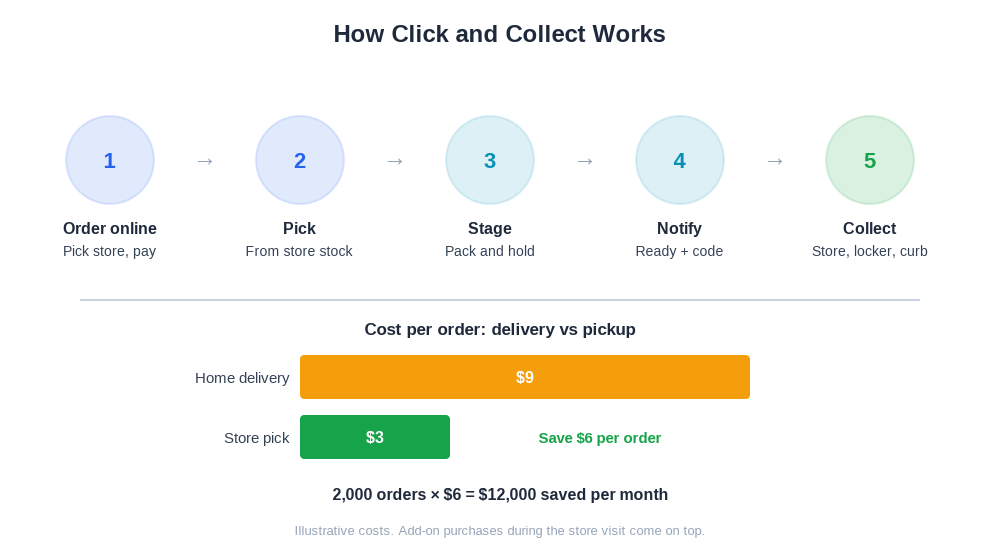
A typical click and collect order runs through these steps:
- Order. The shopper sees live stock for a chosen store, selects pickup at checkout and pays.
- Pick. Store staff pick the items from shelves or a back room, or the order is sent from a warehouse to the store.
- Stage. The order is packed, labeled and placed in a holding area, locker or pickup bay.
- Notify. The shopper gets an email, SMS or app message that the order is ready, with a code.
- Collect. The shopper shows the code at the counter, opens the locker or checks in for curbside.
The economics mostly come from skipping last-mile delivery. Say home delivery costs you $9 per order and an in-store pick costs $3 in staff time. On 2,000 orders a month moved from delivery to pickup, you save ($9 − $3) × 2,000 = $12,000 a month. Then add any extra items bought during the visit. If 1 in 5 pickup customers buys something else for $20, that’s 400 × $20 = $8,000 in extra sales.
Types of Click and Collect
| Type | How the customer collects | Best for | Main requirement |
|---|---|---|---|
| In-store pickup (BOPIS) | Counter or service desk inside the store | General retail, electronics | Accurate store inventory |
| Curbside pickup | Staff bring the order to the car | Grocery, bulky items, quick trips | Parking bays, arrival check-in |
| Pickup lockers | Code opens a locker, in store or outside | High volume, after-hours pickup | Locker hardware, size limits |
| Third-party collection points | Partner shop, post office or locker network | Online-only brands, rural areas | Carrier or network partner |
| Ship to store | Item shipped from a warehouse to the store | Items not stocked locally | Store receiving process, longer wait |
Click and Collect vs BOPIS vs Curbside
These terms overlap. BOPIS strictly means the item is in stock at that store and picked from its shelves, so pickup can be same day. Click and collect often includes ship-to-store and lockers, where the item may come from a warehouse and take a few days. Curbside pickup is a delivery style for the last few meters: the order is ready the same way, but staff carry it out to the car.
If you’re writing for a US audience, use “BOPIS” or “buy online, pick up in store” alongside “click and collect”, since US shoppers search with both.

Stay Updated on AI Visibility Trends
Get the latest insights on AI mentions, brand monitoring, and optimization strategies.
Click and Collect and AI Search
When someone asks an AI assistant “where can I pick up a printer today near me?”, the answer depends on local inventory data the engine can reach. Google’s shopping surfaces read pickup and stock signals from Merchant Center local inventory feeds, and assistants that browse the web read store pages. If your store-level stock and pickup options aren’t published in structured, crawlable form, AI answers can’t mention them.
Keep pickup terms on a clear policy page, keep feeds current, and make sure product pages show availability in text, not only in a JavaScript widget. AmICited’s AI Accessibility audit checks whether AI agents can read your pages and move through your site.
Best Practices for Click and Collect
- Show real-time store stock on product pages and at checkout, and hold a buffer so you don’t sell the last unit twice.
- Set a clear ready time (for example “ready in 2 hours”) and send the notification only when the order is truly staged.
- Put pickup at the front of the store, with signage, so the visit takes minutes.
- Hold orders for a set number of days, then cancel and refund automatically, so stock doesn’t sit in limbo.
- Track pickup-to-ready time, uncollected order rate and add-on sales per pickup.
- Train staff to check ID or codes consistently, since pickup is a known route for fraud with stolen cards.
Common Click and Collect Mistakes
The most common failure is inaccurate store inventory, usually a gap in inventory management between the stock system and the shelf. A shopper orders, drives over, and the item isn’t there, which is worse than not offering pickup at all. Close behind is sending “ready” messages before the order is actually staged, leading to queues and searches in the back room.
Retailers also bury the pickup point at the back of the store, hoping for impulse buys, and end up with annoyed customers instead. Others treat collection as a store task without giving stores credit for the online sale, so staff see pickup as extra work and service drops. Finally, many sites hide pickup options until the last checkout step, when showing them on the product page would win more orders.