


- Sponsored Products are cost-per-click ads that promote one product listing inside a marketplace’s search results and product pages, marked only by a small “Sponsored” label. They are the most common Amazon ad type.
- A campaign is built from the products (ASINs) you advertise, automatic or manual targeting, a daily budget with bids, and negative keywords. A listing usually needs the featured offer (Buy Box) for the ad to show.
- ACoS (ad spend ÷ attributed sales × 100) is the core metric. Set a target per product from its own margin, and watch TACoS to see whether ads lift organic sales.
- Paying for Sponsored Products does not buy a mention in AI answers from Rufus, ChatGPT or Perplexity.
Where AmICited fits
AmICited’s Shopping report shows which products and sellers appear on AI product cards for the shopping prompts you track, with appearances, average position, price and rating, so you can compare your paid shelf space with your place in AI answers.
See prompt tracking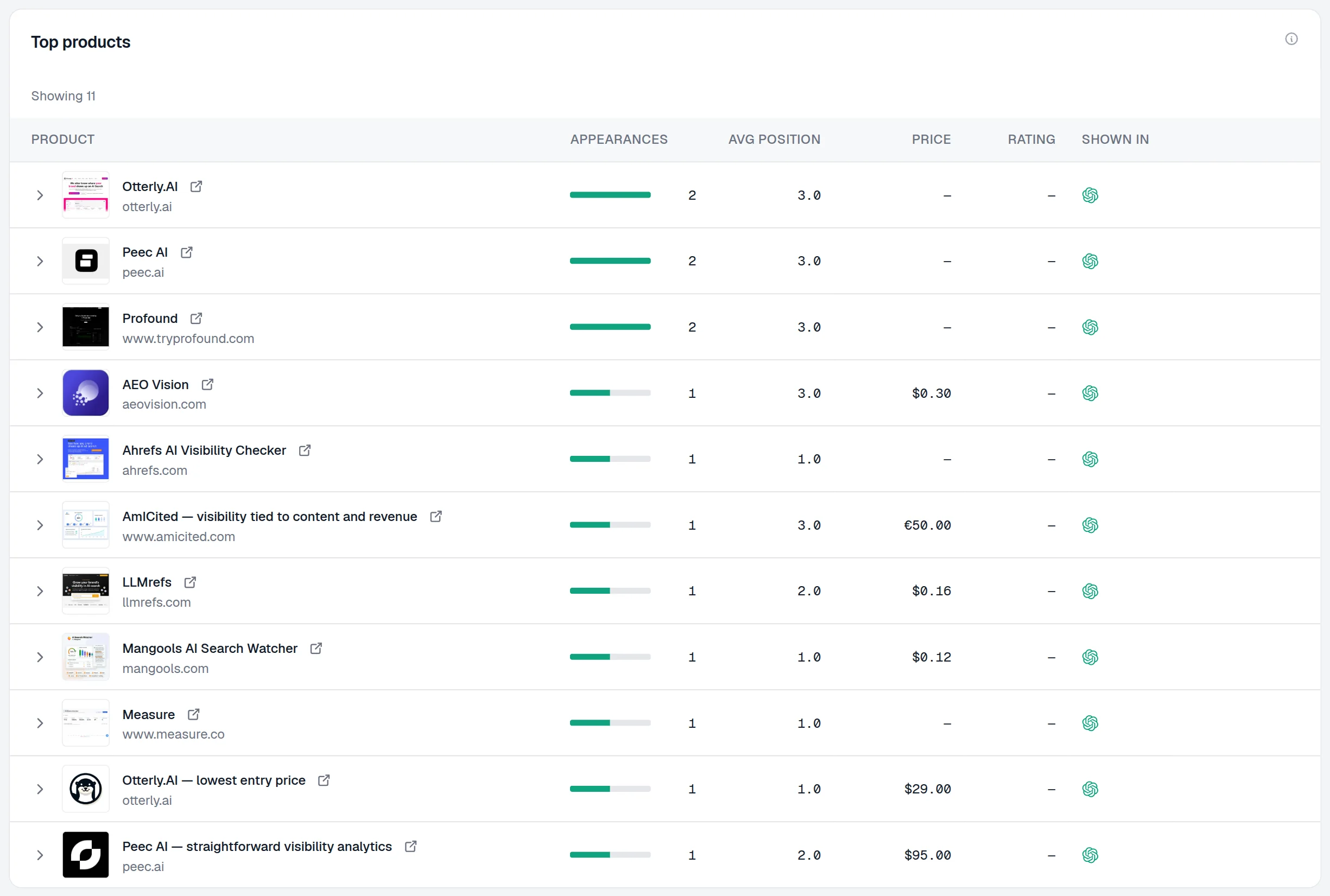
What Are Sponsored Products?
Sponsored Products are cost-per-click ads that promote a single product listing inside a marketplace. On Amazon, they appear among search results and on product detail pages, and they look almost identical to organic listings apart from a small “Sponsored” label. Clicking the ad takes the shopper directly to that product’s page.
Amazon Sponsored Products are the most common ad type for both third-party sellers and vendors, and they are the format most people mean by “Amazon PPC”. Walmart, Target, Instacart and other retail media networks sell similar formats under similar names. You manage them in Amazon Ads (the advertising console linked to Seller Central or Vendor Central).
How Sponsored Products Work
A Sponsored Products campaign has a few building blocks:
- Products. You choose which listings, identified by ASIN, to advertise. A listing usually needs to be the featured offer, often called the Buy Box, for the ad to show.
- Targeting. Automatic targeting lets Amazon match the ad to searches and products. Manual targeting lets you choose keywords, with broad, phrase and exact match types, or target specific products and categories.
- Bids and budget. You set a daily budget and a default bid. Amazon offers bidding strategies such as dynamic bids (down only), dynamic bids (up and down) and fixed bids, plus bid adjustments by placement, such as top of search.
- Negative targeting. You exclude keywords or products that waste spend.
Each time a shopper searches, an auction decides which sponsored listings show and in which order, based on bid and relevance. You pay when someone clicks.
The core metric is ACoS, advertising cost of sales:
ACoS = Ad spend ÷ Attributed sales × 100
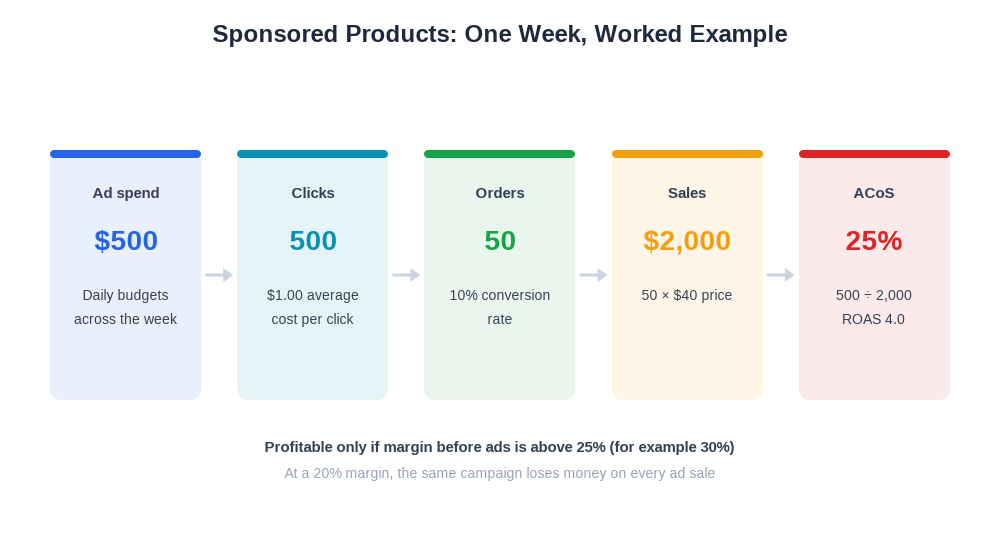
Suppose a campaign spends $500 in a week at an average cost per click of $1.00. That buys 500 clicks. If 10% of clicks lead to an order, you get 50 orders. At a $40 price, attributed sales are 50 × 40 = $2,000. ACoS is 500 ÷ 2,000 = 25%, and ROAS is 4.0. If your margin before ad costs is 30%, this campaign is profitable on attributed sales. If it is 20%, it loses money on every ad sale unless the ads lift organic sales too.
Sponsored Products vs Sponsored Brands vs Sponsored Display
Amazon’s three self-serve ad types do different jobs.
| Sponsored Products | Sponsored Brands | Sponsored Display | |
|---|---|---|---|
| Promotes | One product listing | Brand, several products or a video | One product listing |
| Where it shows | Search results, product pages | Top of and within search results | Product pages, Amazon and off-Amazon sites and apps |
| Targeting | Keywords, products, categories | Keywords, products, categories | Audiences, products, categories |
| Pricing | CPC | CPC or CPM (vCPM) | CPC or vCPM |
| Requires brand registration | No | Yes | Yes for sellers |
| Main job | Sales on high-intent searches | Brand awareness and consideration | Retargeting and competitor conquesting |
Most accounts start with Sponsored Products because they convert closest to the point of purchase. Sponsored Brands and Sponsored Display are added once the core campaigns are profitable.
Walmart’s Sponsored Products work in a similar way: cost-per-click listings in search results and on item pages, with automatic and manual campaigns. The main differences are the auction mechanics and reporting windows, so do not copy Amazon targets across without checking your own numbers.
Sponsored Products and AI Search
Amazon’s Rufus assistant and general AI engines like ChatGPT and Perplexity now answer questions such as “best running shoes for flat feet”. Those answers are shaped by product content, reviews and third-party sources. Paying for Sponsored Products does not buy a mention in an AI answer. Good listing content, strong reviews and coverage in reviews and forums help both your organic rank and your chance of being named.
AmICited’s Prompt Tracking runs the shopping prompts you care about on a schedule and records which brands get named, so you can compare your paid shelf space with your presence in AI answers.

Stay Updated on AI Visibility Trends
Get the latest insights on AI mentions, brand monitoring, and optimization strategies.
Best Practices for Sponsored Products
- Fix the listing first: title, main image, bullet points, price and reviews decide whether paid clicks convert.
- Run an automatic campaign for discovery and move proven search terms into manual exact-match campaigns.
- Add negative keywords weekly from the search term report.
- Set target ACoS per product from its own margin, not one number for the whole catalog.
- Separate branded, generic and competitor keywords into different campaigns.
- Pause ads on products that are low in stock or have lost the featured offer.
- Watch TACoS (ad spend ÷ total sales) to see whether ads are lifting organic sales over time.
Common Sponsored Products Mistakes
The most common mistake is putting every product and keyword into one campaign. Budget then flows to whatever the algorithm likes, and you cannot see which product or keyword is profitable. Another is setting one target ACoS for the whole catalog, which overspends on low-margin products and holds back high-margin ones.
Sellers also forget negative keywords, so a “kids water bottle” campaign pays for clicks on “kids water bottle stickers”. Others raise bids on ads that are not showing, when the real issue is a lost Buy Box or a stockout. And many judge campaigns on ACoS alone. A campaign with a high ACoS on a new product can still be worth running if it builds the sales history and reviews that lift Amazon SEO rankings.