


Generate AI Prompts from a URL
Let AmICited analyze a page and suggest buyer questions to track as prompts.

Not sure which questions to track? Let AmICited do the thinking.
Quick Steps
- Click + New prompt, then open the Generate from URL tab in the Add prompts dialog.
- Paste a page URL and click Generate; AmICited analyzes the page and proposes candidate prompts.
- Review the suggestions and keep only the ones a real buyer would actually ask.
- Set AI providers, country, tag, and schedule for the batch, then click Add prompts.
- Prune off-topic suggestions and revisit the generator whenever you publish new pages.
What is prompt generation from a URL?
A prompt in this context is any natural-language question a person might type into ChatGPT, Perplexity, Gemini, or Google AI Overviews, “best project management tool for a 10-person agency,” “is Brand X worth it,” “alternatives to Brand Y.” These are the queries that make up your prompt library: the set of questions an AI visibility platform runs on a schedule to see whether, and how, your brand gets mentioned in the answer. Building that list by hand is slow and easy to get wrong; you either guess at phrasing that no real buyer uses, or you miss the questions that actually drive AI visibility.
Generating prompts from a URL flips the process around. Instead of starting from a blank text box, you point the tool at a page you already own (a product page, a comparison page, a category page) and it reads that page the way an AI model would, then proposes the prompts a buyer researching that topic is statistically likely to ask. The underlying idea is close to how search engines have long inferred search intent from a page’s content and structure, except the output here isn’t a ranking prediction, it’s a candidate list of actual queries. Because the page itself is the input, the suggestions inherit its buyer intent: a product page tends to surface bottom-of-funnel comparison and “is it worth it” questions, while an educational blog post tends to surface earlier, definitional questions.
This matters for generative engine optimization (GEO) because prompt selection is the foundation everything else is measured against. Your AI visibility score, your share of voice against competitors, and every citation you track are all computed against the specific prompts in your library. A prompt set that’s too generic, too narrow, or simply mismatched to what real buyers ask will under- or over-report your actual visibility; the metric is only as good as the questions feeding it. Generating prompts from a page you already know converts well is a fast, low-effort way to seed a prompt set that’s grounded in real buyer language rather than guesswork.
The trade-off to understand upfront: this is a starting point, not a finished prompt set. The model proposes plausible buyer questions based on the page’s content, but it doesn’t know your market as well as you do, so some suggestions will be off-topic, too broad, or duplicative of prompts you’re already tracking. Treat the output as a draft to prune, not a final list to accept wholesale.
It’s also worth being clear about what this feature is not. It isn’t a keyword tool that spits out search terms; the output is full, conversational questions phrased the way someone actually talks to an AI assistant, because that’s what these platforms are trained to respond to. And it isn’t a one-time setup step you do once and forget; as your product pages evolve and your competitors change how they’re described in AI answers, revisiting the prompts a given page generates can surface new angles you hadn’t tracked before.
Where to find it in AmICited
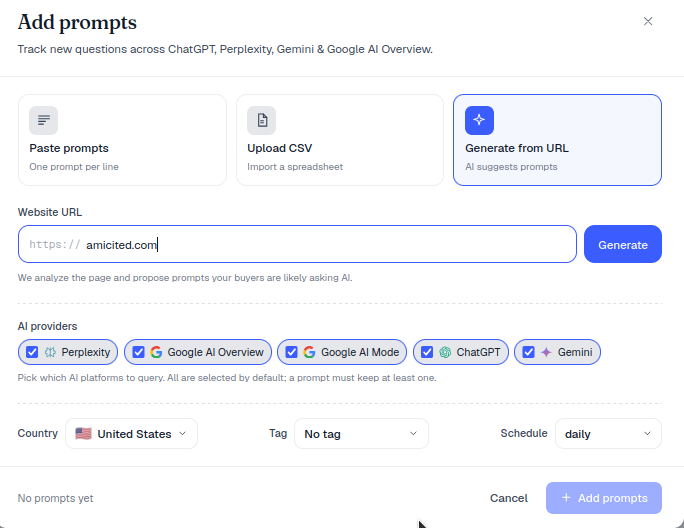
Click + New prompt (top right of the Prompts page) to open the Add prompts dialog, then choose the Generate from URL tab, labelled “AI suggests prompts.” This sits alongside the other prompt-creation methods in the same dialog, so you can mix generated prompts with a pasted list or manually typed questions in a single project.
Step by step
- Paste a page URL into the Website URL field (e.g.
https://amicited.com). - Click Generate. AmICited analyzes the page and proposes prompts, as the helper text says, “We analyze the page and propose prompts your buyers are likely asking AI.” The analysis looks at the page’s actual content (headings, product descriptions, comparison language), not just the URL slug, so a page that clearly explains what a product does and who it’s for gives the model more to work with.
- Review the suggestions and keep the ones that match real buyer questions. Read each one as if you were the buyer: would you actually type this into ChatGPT? If not, discard it.
- Set the AI providers, Country, Tag and Schedule for the batch. Providers determine which AI assistants (ChatGPT, Perplexity, Gemini, Google AI Overviews) run the prompt; country lets you localize results for markets where AI answers vary by region; tags group prompts for reporting; schedule controls how often the AI rank tracker re-runs the prompt to catch drift over time.
- Click Add prompts to start tracking them.
What it produces, and what it doesn’t
The output is a list of candidate prompts, not a guarantee of citations. Adding a prompt to your tracker means AmICited will start checking whether your brand appears in the AI’s answer to that question; it doesn’t influence what the AI actually says. Some generated prompts will return strong results immediately; others will surface gaps where your brand isn’t mentioned at all, which is useful information in its own right. A prompt that never cites you is a signal to go look at what’s missing from the underlying page, or from your broader content, rather than a reason to delete the prompt.
It’s also worth understanding what the generator is optimizing for: relevance to the page’s subject matter, not volume. It won’t manufacture dozens of near-duplicate prompts just to pad your count; the suggestions are meant to be a tight, on-topic starting set that you extend deliberately, not a firehose you filter down from hundreds.
Tips for good results
- Use your best pages. Pages that clearly describe a product, use case or problem produce the most relevant prompts. A thin or generic page returns thin or generic prompts; the model can only work with what’s on the page.
- Prune before adding. You don’t have to keep every suggestion; remove anything off-topic so your metrics stay meaningful. A bloated prompt set full of irrelevant questions dilutes your visibility score and makes trend reporting noisier than it needs to be.
- Combine methods. Generate a starter set from a URL, then add your own known questions by pasting a list. This is especially useful once you’ve done manual research into which queries matter most in your category, since it lets you merge generated coverage with hand-picked strategic prompts in one project.
- Revisit periodically. As you publish new pages or launch new products, run the generator again on the new URLs. Prompt sets that never grow tend to miss the questions buyers are asking about your newest offerings.
- Watch for pattern gaps. If every generated prompt for a page comes back phrased the same way (“what is X,” “how does X work”), that’s often a sign the source page itself is repetitive or thin, a useful diagnostic that goes beyond prompt generation into your content strategy.
This is the quickest way to go from an empty project to a relevant, buyer-focused prompt set in a couple of clicks, and because the prompts are pulled from real page content rather than invented from scratch, they tend to track closer to how actual buyers phrase questions than a manually brainstormed list. If you’re setting up tracking for the first time, pairing this with a short read on building a prompt library for AI visibility tracking will help you decide how big a prompt set to aim for and how to organize it with tags before you scale up to more pages, more markets, or, if you’re managing this across multiple client accounts, a setup built for agencies.
Frequently asked questions
Click + New prompt, open the Generate from URL tab in the Add prompts dialog, and paste a page URL into the Website URL field. Click Generate, and AmICited analyzes the page's actual content and proposes candidate prompts a buyer researching that topic is likely to ask.
No. The output is a list of candidate prompts to track, not a guarantee of citations. Adding a prompt means AmICited starts checking whether your brand appears in the AI's answer; it doesn't influence what the AI actually says. Some suggestions will surface real gaps where you're not mentioned at all, which is useful information on its own.
Use a specific, focused page rather than your homepage, ideally one that clearly describes a product, use case, or problem. A thin or generic page returns thin or generic prompt suggestions, since the model can only work with what's actually on the page you give it.
No. Treat the output as a draft to prune, not a final list to accept wholesale. Review each suggestion and ask whether a real buyer would actually type it into ChatGPT; discard anything off-topic, too broad, or duplicative of prompts you're already tracking, since a bloated prompt set dilutes your visibility metrics.
More tutorials in this section
 How to Use the Tracked Prompts Table
Learn how to read, search and filter the AmICited Tracked Prompts table, including each prompt’s citations, …
Read guide →
How to Use the Tracked Prompts Table
Learn how to read, search and filter the AmICited Tracked Prompts table, including each prompt’s citations, …
Read guide →
 How to Add Prompts by Pasting a List
Already have a list of questions to track? Paste them straight into AmICited, one per line.
Read guide →
How to Add Prompts by Pasting a List
Already have a list of questions to track? Paste them straight into AmICited, one per line.
Read guide →
 How to Add Prompts by Uploading a CSV
Import prompts into AmICited from a CSV file with this guide to the upload option and required file format.
Read guide →
How to Add Prompts by Uploading a CSV
Import prompts into AmICited from a CSV file with this guide to the upload option and required file format.
Read guide →Ready to put it into practice?
Free check · 7-day trial · card required