


How to Add Prompts by Uploading a CSV
Import prompts into AmICited from a CSV file with this guide to the upload option and required file format.
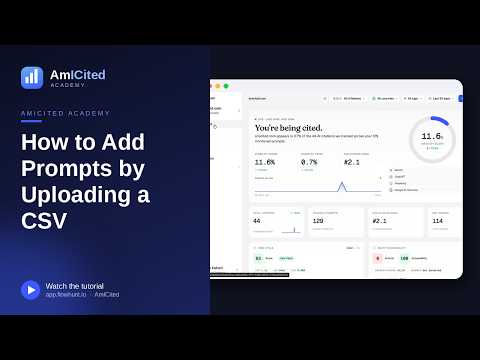
Got a big list of questions in a spreadsheet? Upload CSV lets you import them all at once, ideal for migrating an existing prompt library or handing off a list built by your team.
Quick Steps
- Click + New prompt on the Prompts page and choose the Upload CSV tab.
- Optionally grab the Download template for the correct format.
- Drop or browse to your file; it needs a single
promptcolumn, UTF-8 encoded, up to 1000 rows. - Set AI providers, country, tag, and schedule for the whole batch.
- Click Add prompts to import and start tracking every row.
What is a prompt library, and why upload one in bulk?
A prompt library is the set of real user questions a brand tracks to see how often AI assistants mention it in their answers. In generative engine optimization (GEO), prompts are the equivalent of keywords in traditional SEO: each one represents a query a potential customer might type into ChatGPT, Perplexity, Gemini, or ask Google’s AI Overviews. Where keyword tracking watches a ranking position on a results page, prompt tracking watches whether, and how, a brand gets cited inside a generated answer. The distinction matters because AI assistants don’t return ten blue links; they synthesize a single response, and being named (or left out) in that response is now a measurable, trackable event.
Most teams don’t start a prompt library from zero. They already have one, in some form, before they ever open a monitoring tool. It might be a list of “questions customers ask us” collected by support or sales, a keyword-research export from an SEO project, a set of queries a content team is targeting, or a spreadsheet another AI-visibility tool produced before a migration. Rebuilding that list by typing or pasting one question at a time is slow and error-prone once you’re past a handful of entries. A CSV upload turns that existing spreadsheet directly into a tracked, monitored dataset: no manual retyping, no risk of missing rows.
This matters more the larger and more established a brand’s tracked footprint gets. A team monitoring AI search visibility across dozens of product lines, service categories, or client accounts typically ends up with prompt lists numbering in the hundreds. At that scale, the file format and the batch settings applied at import time (which AI providers to run each prompt against, which country to simulate, how prompts get tagged, and how often they’re re-checked) determine how usable the resulting data is. Getting the import right the first time avoids having to clean up mislabeled or duplicate prompts later.
Uploading a CSV is also the fastest way to formalize research that already exists elsewhere. If your team has been doing prompt research manually (testing questions directly in ChatGPT or Perplexity and recording what comes back), a CSV upload converts that ad hoc list into an ongoing, automated tracking set in a single step, rather than one prompt added at a time.
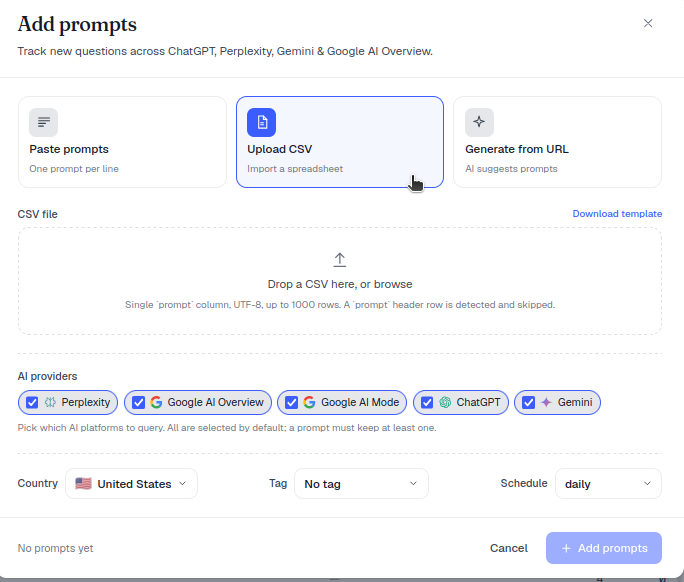
prompt column, UTF-8 encoded, up to 1000 rows. A prompt header row is detected and skipped automatically. Grab the Download template link to start from the correct format.Where to find it
Click + New prompt on the Prompts page, then choose the Upload CSV tab (“Import a spreadsheet”).
Step by step
- (Optional) Click Download template to get a correctly formatted starter file. This is the fastest way to confirm the exact column name and layout AmICited expects before you touch your own data.
- Drop your CSV onto the upload area, or click browse to pick it: “Drop a CSV here, or browse.”
- AmICited reads the file and detects your prompts (skipping the header row if present).
- Choose the AI providers, Country, Tag and Schedule for the batch.
- Click Add prompts to import and start tracking.
Because these settings apply to the whole batch, a CSV upload is also a natural point to segment a large prompt list. If your spreadsheet mixes prompts meant for different markets or different AI providers, it’s worth splitting it into separate files before uploading, so each batch gets the country and provider settings that actually apply to it, rather than importing everything under one generic configuration and re-editing prompts individually afterward.
What each import setting controls
- AI providers: which assistants (ChatGPT, Perplexity, Gemini, AI Overviews, and others AmICited supports) will actually be asked each prompt. Choosing providers here determines where you’ll see citation data appear once tracking starts.
- Country: simulates the prompt being asked from a specific market, since AI answers, and the sources they cite, can vary by locale. This is especially relevant for brands with region-specific competitors or geo-restricted offerings.
- Tag: a label applied to every prompt in the batch, useful for grouping an imported list by product line, funnel stage, client, or campaign so it’s filterable later on the Prompts page.
- Schedule: how often AmICited re-runs each prompt to check for a new answer. This is what turns a one-time snapshot into ongoing monitoring, letting you see when a brand starts or stops being cited over time rather than relying on a single check.
File requirements at a glance
- One column named
prompt, one question per row. - UTF-8 encoding (so accented characters and symbols import cleanly).
- Up to 1000 rows per file: split larger lists into multiple uploads.
Sticking to these three rules avoids the most common import failures. A second or third column beyond prompt is simply ignored rather than causing an error, but keeping the file to a single column makes it easier to spot formatting mistakes before upload. Encoding problems tend to surface as garbled accented characters or symbols after import; re-saving the file as UTF-8 CSV from your spreadsheet tool before uploading again usually fixes this. And because the row cap is a hard limit, a very large prompt list (say, one built from a full content gap analysis
or an extensive keyword-to-prompt conversion) should be split by tag, market, or product line into multiple sub-1000-row files rather than trimmed arbitrarily.
Building a prompt list worth uploading
A CSV upload is only as useful as the prompts inside it. The strongest prompt libraries mix a few different query types: direct branded questions (“What is [brand] used for?”), comparison questions ("[Brand] vs [competitor]"), and unbranded category questions where a brand should ideally appear but isn’t guaranteed to (“best tools for [category]”). This last group is usually where the most valuable visibility gaps show up, because it reflects how a prospect who doesn’t yet know your brand name is actually searching. Teams that haven’t yet built this kind of list from scratch can start by learning how to find which prompts trigger AI to mention a brand , or by reviewing how keyword research differs from prompt research when building the initial spreadsheet that eventually becomes the CSV.
When to use CSV vs paste
- CSV shines for large lists, or when the source already lives in a spreadsheet.
- For a handful of questions, pasting a list is quicker.
- To discover questions you haven’t thought of, generate them from a URL .
Once a batch is imported, it behaves exactly like any other tracked prompt set: each entry gets checked on the schedule you set, and results roll up into the same AI share of voice and citation metrics as prompts added individually. For teams migrating a large existing list, for example moving off a spreadsheet-based process, or consolidating prompt tracking after evaluating options with a resource like 15 AI search visibility platforms compared , CSV upload is usually the difference between an afternoon of setup and a week of manual entry. Agencies managing prompt libraries across multiple client accounts get the same benefit multiplied across workspaces, since each client’s list can be prepared, tagged, and uploaded as its own file; see AmICited for agencies for how that maps onto a multi-client workflow. However the list arrives, once it’s tracked you’ll see it feed the same AI rank tracker views and citation history as every other prompt in the account, so the real work shifts from data entry to reading what the results say.
Frequently asked questions
It needs a single column named prompt, one question per row, UTF-8 encoded, with up to 1000 rows per file. A prompt header row is detected and skipped automatically. You can click Download template in the Upload CSV tab to start from a correctly formatted file.
Click + New prompt on the Prompts page, choose the Upload CSV tab, and drop or browse to your file. Once AmICited detects your prompts, choose the AI providers, country, tag, and schedule for the whole batch, then click Add prompts to import and start tracking every row.
The 1000-row cap is a hard limit per file, so a larger list needs to be split into multiple uploads. Splitting by tag, market, or product line into several sub-1000-row files is better than trimming the list arbitrarily, since it also lets each batch keep its own country and provider settings.
CSV upload is better for large lists or when your questions already live in a spreadsheet, since the settings apply to the whole batch at once. For just a handful of questions, pasting a list is quicker. If you haven't drafted questions yet, generating them from a URL can help discover ones you haven't thought of.
More tutorials in this section
 How to Use the Tracked Prompts Table
Learn how to read, search and filter the AmICited Tracked Prompts table, including each prompt’s citations, …
Read guide →
How to Use the Tracked Prompts Table
Learn how to read, search and filter the AmICited Tracked Prompts table, including each prompt’s citations, …
Read guide →
 Generate AI Prompts from a URL
Let AmICited analyze a page and suggest buyer questions to track as prompts.
Read guide →
Generate AI Prompts from a URL
Let AmICited analyze a page and suggest buyer questions to track as prompts.
Read guide →
 How to Add Prompts by Pasting a List
Already have a list of questions to track? Paste them straight into AmICited, one per line.
Read guide →
How to Add Prompts by Pasting a List
Already have a list of questions to track? Paste them straight into AmICited, one per line.
Read guide →Ready to put it into practice?
Free check · 7-day trial · card required