


How to Schedule Prompt Tracking
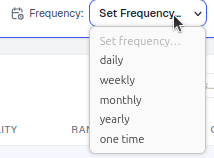
Set prompt tracking frequency in AmICited: daily, weekly, monthly, yearly or one-time, individually or in bulk.

AI answers change over time, so tracking is only useful if it repeats.
Quick Steps
- Every tracked prompt has a frequency: daily, weekly, monthly, yearly, or one time.
- Set it when adding prompts via the Schedule dropdown, or in bulk from the Tracked prompts table.
- Use
dailyfor competitive, fast-moving prompts;weeklyas a solid default;monthly/yearlyfor stable topics. - Match cadence to how fast an answer actually changes, and watch your run quota so you’re not overspending on stable prompts.
- Revisit schedules periodically as a prompt’s competitive importance shifts.
What is prompt scheduling?
Prompt tracking is the practice of repeatedly asking AI assistants (ChatGPT, Perplexity, Gemini, Google AI Overviews) the same realistic question over time and recording whether, where, and how they mention your brand. A single check tells you whether you were cited on that one day, under that one set of conditions. It cannot tell you whether that citation is typical, improving, declining, or a fluke caused by a model update. Scheduling is what turns a one-off snapshot into a trend.
Every scheduled prompt in AmICited has a frequency: the cadence at which the platform re-submits that exact question to your selected engines and logs a fresh result. Think of it as the AI-search equivalent of a keyword rank tracker refreshing search engine results pages: instead of polling Google’s rankings, you’re polling what a language model says out loud when someone asks it a question your buyers actually ask. This is the mechanical foundation of AI visibility measurement. Without a schedule, there is no time series, no trend line, and no reliable way to prove that a piece of content, a schema change, or a PR mention moved the needle.
Scheduling matters for a structural reason specific to generative engines: their outputs are not static. A model’s answer to “best project management software for small teams” can shift week to week as the underlying index refreshes, as the model itself is updated, or simply because these systems are probabilistic and don’t return the identical answer every time they’re asked. Traditional rank tracking assumes a page either ranks or it doesn’t, checked on a schedule that rarely needs to be faster than daily. AI citation tracking has the same daily cadence need, but for a noisier signal: one answer on one day tells you almost nothing about whether you’re reliably recommended.
This is also why frequency choices double as a budgeting decision. Every scheduled run consumes part of your account’s execution quota, so cadence isn’t just “how curious am I”: it’s “how much does the answer to this specific question change, and how much does it cost me to find out.” A well-tuned schedule spends your run budget on the prompts where volatility and business value are both high, and conserves it on prompts that are stable or peripheral.
daily so you catch movement fast, and drop stable or low-priority ones to weekly/monthly to conserve runs.Where to set it
You can set the schedule in two places:
- When adding prompts: the Schedule dropdown (default
daily) in the Add prompts dialog, next to Country and Tag, applies to the whole batch. This is the fastest path when you’re building out a new prompt set and already know which topics are volatile versus stable. - In bulk afterwards: select prompts in the Tracked prompts table and use the Frequency control in the bulk action bar to change them together. Nothing about a prompt’s schedule is locked in at creation time; as your understanding of which questions matter improves, you can edit multiple prompts at once to reassign cadence in a single action instead of clicking through prompts one by one.
Both paths write to the same underlying setting, so a prompt added with weekly and later bulk-changed to daily behaves identically to one that was set to daily from the start; the only difference is how much run history it has already accumulated.
The frequency options
- daily: re-run every day; best for competitive, fast-moving questions where you’re actively contesting a citation or share of voice with named competitors.
- weekly: a good default for most prompts. Weekly is frequent enough to catch meaningful drift in a model’s answer without burning through your run allowance on noise.
- monthly: for stable topics you just want to keep an eye on. Suitable for category-definition questions or long-tail prompts where the answer rarely changes.
- yearly: for very slow-moving reference questions, such as “what is [broad industry term],” where the AI’s framing is unlikely to shift meaningfully inside a quarter.
- one time: run once, no repeat (handy for a quick spot-check, testing a new prompt idea, or validating that a prompt returns the kind of answer you expected before committing it to a recurring schedule).
What It Measures, and Why Cadence Matters
The frequency you choose doesn’t just control how often data arrives, it changes what kind of question the data can answer. A prompt run once tells you about a single moment. A prompt run daily builds a time series you can use to detect an AI citation , measure how consistently it recurs, and correlate a change in AI mentions with something you did: publishing a new page, fixing a technical accessibility issue, earning a third-party review. Without that repeated cadence, you’re left guessing whether a good or bad result was representative or a one-off draw from a probabilistic model.
This is the same logic behind generative engine optimization
work generally: you can’t optimize what you can’t reliably measure, and you can’t reliably measure a moving target with a single sample. A daily schedule on your most competitive prompts gives you the resolution to see, for example, that a competitor started appearing in an AI Overview the same week they published a comparison page, a pattern invisible if you only checked in once a month. Reviewing real-time versus periodic monitoring
approaches can help you decide how aggressively to schedule prompts where speed of detection genuinely matters to your business, versus where it doesn’t.
The Runs column in the Tracked prompts table shows how many times each prompt has executed, so you can confirm your schedule is doing what you expect and spot prompts that have quietly been running longer, or less often, than intended.
How to choose a cadence
- Match frequency to how fast the answer changes. Hot comparison and pricing questions move often because they’re exactly the queries competitors are actively targeting with new content and PR; evergreen definitions rarely do. If you’re unsure where a given prompt falls, start it on
weeklyand watch whether the answer text and cited sources actually change between runs. If they don’t, drop it tomonthly; if they shift noticeably, bump it todaily. - Mind your run quota. Every run counts: daily tracking across many prompts and engines adds up fast, so reserve
dailyfor the prompts that matter most to revenue or competitive positioning, not for every prompt in the library by default. A common mistake teams make when automating AI visibility monitoring is setting everything to the highest frequency out of caution, which burns quota on prompts that were never going to move. - Revisit periodically. As a prompt’s importance changes (a product launch makes a category suddenly contested, or a topic cools off after a campaign ends), bump its frequency up or down using the bulk actions in the Tracked prompts table rather than leaving stale schedules in place.
- Segment by engine behavior, not just topic. Some engines refresh their underlying answers faster than others. If you’re tracking the same prompt across ChatGPT, Perplexity, Gemini, and AI Overviews, it’s reasonable to keep the schedule uniform for simplicity, but be aware that the volatility you observe may come as much from which engine you’re polling as from the prompt itself.
- Weight cadence toward your share of voice battlegrounds. Prompts where you’re neck-and-neck with a named competitor for citation are the ones where a
dailycadence pays for itself. You want to know within a day, not within a month, if you’ve lost or gained ground.
Getting this rhythm right is less about a fixed rule and more about ongoing tuning: an AI rank tracker is only as useful as the schedule feeding it, and a schedule that’s too sparse will hide the exact volatility you’re trying to catch, while one that’s uniformly maxed out just burns budget without adding insight. If you manage prompt tracking across multiple client accounts, the same tuning logic applies per client. Agencies running AmICited for agencies typically set a shared default cadence per workspace and then override it prompt-by-prompt as each client’s competitive prompts are identified. Once your schedules are dialled in, the numbers they produce roll up into the reporting rhythm your team, or your clients, can actually act on.
Frequently asked questions
Five: daily, weekly, monthly, yearly, and one time. Daily suits competitive, fast-moving prompts where you're actively contesting a citation. Weekly is a solid default for most prompts. Monthly and yearly fit stable, slow-changing topics, and one time is for a single spot-check or testing a new prompt idea.
Set it when adding prompts via the Schedule dropdown in the Add prompts dialog, which applies to the whole batch. To change existing prompts, select them in the Tracked prompts table and use the Frequency control in the bulk action bar to reassign cadence for multiple prompts at once.
AI answers aren't static: a model's response to the same question can shift week to week as retrieval sources update, the model changes, or simply because these systems are probabilistic. A single check only tells you about one moment. A recurring schedule builds the time series needed to tell whether a citation is typical, improving, or just a one-off fluke.
Match frequency to how fast the answer actually changes: start unsure prompts on weekly and watch whether the text and cited sources shift between runs, then bump to daily if they move or drop to monthly if they don't. Reserve daily for high-value, competitive prompts, since every run consumes part of your account's execution quota.
More tutorials in this section
 How to Use the Tracked Prompts Table
Learn how to read, search and filter the AmICited Tracked Prompts table, including each prompt’s citations, …
Read guide →
How to Use the Tracked Prompts Table
Learn how to read, search and filter the AmICited Tracked Prompts table, including each prompt’s citations, …
Read guide →
 Generate AI Prompts from a URL
Let AmICited analyze a page and suggest buyer questions to track as prompts.
Read guide →
Generate AI Prompts from a URL
Let AmICited analyze a page and suggest buyer questions to track as prompts.
Read guide →
 How to Add Prompts by Pasting a List
Already have a list of questions to track? Paste them straight into AmICited, one per line.
Read guide →
How to Add Prompts by Pasting a List
Already have a list of questions to track? Paste them straight into AmICited, one per line.
Read guide →Ready to put it into practice?
Free check · 7-day trial · card required