


Preview Tracked AI Prompts in Your Dashboard
Preview scheduled prompts in AmICited to see their run frequency and AI citation status.
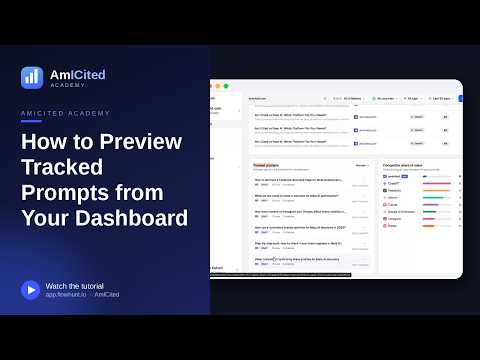
The Tracked prompts widget gives you a quick preview of the prompts AmICited is running on a schedule for your domain, without leaving the dashboard. It’s a shortcut into your monitoring setup and a fast way to spot prompts that aren’t earning citations.
Quick Steps
- Find the Tracked prompts card on the Dashboard, below the visibility summary.
- Each row shows the prompt text, country, run frequency, run count, citations, and a ranked status badge.
- Scan for NOT RANKED badges: prompts already running that haven’t earned a citation yet.
- Check that your most important prompts are running on a fast enough cadence (e.g. DAILY).
- Click Manage → to jump into the full Prompts section and act on what you see.
What is prompt tracking?
Prompt tracking is the practice of monitoring a fixed set of real-world questions (prompts) against AI assistants like ChatGPT, Perplexity, Gemini, and Google AI Overviews on a recurring schedule, then recording whether and how your brand shows up in the answer. It is the AI-search equivalent of keyword rank tracking in traditional SEO, except the unit being tracked isn’t a search term matched against a ranked list of blue links: it’s a natural-language question matched against a generated answer that may or may not mention you at all.
Each tracked prompt represents a moment where a potential customer could be asking an AI assistant something related to your product, category, or competitors. A prompt like “what’s the best project management tool for small teams” gets run automatically at a set cadence, and the resulting answer is parsed for AI citations : instances where your brand, domain, or content is referenced, linked, or recommended in the response. Over time, this produces a record of how consistently you appear, which prompts favor you, and which ones consistently favor competitors instead.
This matters because AI answers are not static. The same prompt run today and run again next week can produce a different answer, cite different sources, or recommend different brands, depending on model updates, new content being indexed, and shifts in what the underlying search layer surfaces. A single manual check in ChatGPT tells you almost nothing reliable: it’s a snapshot of one model’s mood on one day. Running the same prompt daily or weekly, and logging the result, is what turns that snapshot into a trend you can actually act on. That accumulated history is also what feeds higher-level metrics like your AI visibility score and share of voice relative to competitors: both are essentially rollups of citation outcomes across your full set of tracked prompts.
Because AI assistants answer conversationally rather than returning a ranked list, “tracking” a prompt also means tracking context: where in the answer you’re mentioned, whether it’s a direct recommendation or a passing reference, and what sources the model cites alongside you. This is different enough from classic keyword tracking that it’s worth treating as its own discipline: choosing the right prompts to monitor, running them at a sensible frequency, and reviewing results regularly is what separates teams that are actually managing their AI presence from teams that only find out they’re invisible when a prospect mentions it.
The Tracked prompts widget on your AmICited dashboard is the fastest place to check the current state of that monitoring: a live summary of what’s running, how often, and whether it’s paying off.
Where to find it
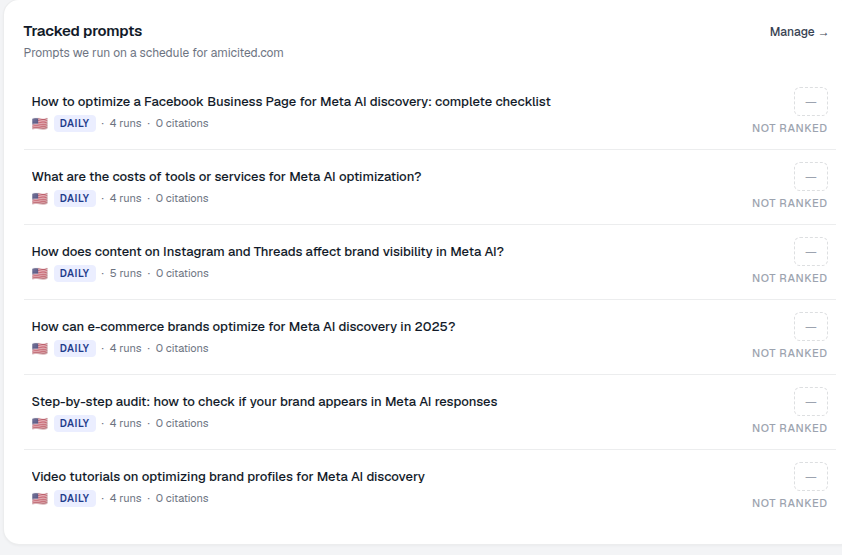
Scroll down the Dashboard to the Tracked prompts card, subtitled “Prompts we run on a schedule for [your domain].” A Manage → link takes you to the full Prompts section.
The widget is deliberately positioned as a summary, not a control panel: it’s meant to be the first thing you glance at when you log in, before you decide whether anything needs your attention. If nothing looks off, you move on. If something does (a cluster of NOT RANKED badges, a prompt that hasn’t run in a while), that’s your cue to click through and dig deeper.
What each row shows
Each row is one scheduled prompt with its status at a glance:
- The prompt text: the exact question being monitored. This is worded the way a real user would type it into ChatGPT or ask a voice assistant, not a keyword fragment, and that’s the whole point of prompt-based tracking versus keyword-based tracking.
- A country flag: the market or locale the prompt is run for. AI assistants can return meaningfully different answers depending on region, language, and local competitor set, so the same underlying question may be tracked separately per market.
- Frequency: how often it runs (e.g. DAILY). This controls how quickly you’ll notice a change in the answer, such as a shift in which competitor gets cited, or a new source entering the mix.
- Runs: how many times it has been executed (e.g. 4 runs). A low run count usually just means the prompt was added recently; give it time to accumulate enough history before drawing conclusions from it.
- Citations: how many citations it has earned (e.g. 0 citations). This is a running total, not a per-run figure, so it reflects the prompt’s entire tracked history.
- Ranked status: a badge such as NOT RANKED when your brand hasn’t been cited for that prompt yet. This is the single fastest signal on the widget for triage.
What it measures
Underneath each row, AmICited is running the actual prompt against the target AI assistants on the schedule you’ve set, then scanning the response for your brand, domain, and content. A prompt showing citations means at least one of those runs resulted in your brand being referenced in the AI’s answer, whether as a named recommendation, a linked source, or a quoted mention. A prompt showing NOT RANKED means every run so far has produced an answer that left you out, even though the topic is directly relevant to your business.
This distinction is what makes the widget useful for prioritization rather than just reporting. A prompt with high run count, daily frequency, and zero citations is a confirmed, persistent gap: the AI is being asked this question repeatedly and consistently choosing not to mention you. That’s a very different situation from a brand-new prompt with two runs and no citations yet, which simply hasn’t had enough time to tell you anything. Reading frequency and run count alongside the citation count is what lets you tell the two apart at a glance instead of guessing.
How to use it
- Scan for
NOT RANKEDprompts. These are running but not yet winning you citations: your immediate opportunities. Open one to see what’s being cited instead, which tells you what kind of content or source type the AI is preferring over yours for that question. - Check the cadence. Make sure your most important prompts are running often enough (e.g. DAILY) to catch changes quickly. A prompt central to your category but only checked weekly means you could be missing a competitor’s win (or your own) for days before you see it.
- Click Manage → to open the full Prompts section, where you can add, edit, tag, schedule and bulk-manage prompts. This is also where you’d build out your prompt library , expanding beyond the initial set to cover more of the questions your buyers actually ask AI assistants at each stage of their research.
Think of this widget as the dashboard’s window into your monitoring: enough to triage from, with one click through to the controls.
Turning the widget into a habit
The Tracked prompts widget is most useful when it’s part of a routine rather than a one-off check. Because it’s the first monitoring surface on the dashboard, it’s a natural place to start each login: a ten-second scan tells you whether anything has shifted since yesterday, without requiring you to open the full Prompts section or read a report. Teams that build this into a weekly rhythm tend to catch citation frequency drops early, before a slow decline in AI visibility shows up as a noticeable drop in AI-referred traffic or leads. If you manage AI visibility for multiple client domains rather than a single brand, the same widget appears per workspace, which makes it a fast way to triage which client accounts need attention first without opening every dashboard in full: a pattern that scales well for agencies running this workflow across a portfolio.
It’s also worth remembering what the widget deliberately doesn’t try to be. It won’t tell you why a prompt is unranked, which competitors are winning it, or what content is being cited instead: that level of detail lives one click away in the full Prompts section, where you can inspect individual runs, see cited sources, and compare your citation rate against competitors on the same question. The widget’s job is narrower and more useful for that: give you a fast, honest read on whether your monitoring setup is healthy and where the gaps are, so you know exactly where to spend your next few minutes. If you’re still deciding which questions belong in your tracked set in the first place, it’s worth reviewing how to find which prompts trigger AI to mention your brand . The widget only ever reflects the quality of the prompt list feeding it, so a well-chosen set of prompts is what makes the whole workflow worth checking daily.
Frequently asked questions
It's a quick preview, without leaving the dashboard, of the prompts AmICited is running on a schedule for your domain. Each row shows the prompt text, country, run frequency, run count, citations, and a ranked status badge, so you can triage your monitoring in seconds before deciding whether to dig deeper.
It means every run so far for that prompt has produced an AI answer that didn't mention your brand, even though the topic is directly relevant to your business. It's the widget's fastest signal for triage: these are prompts already running on a schedule that represent your quickest opportunities to investigate.
A prompt with high run count, daily frequency, and zero citations is a confirmed, persistent gap: the AI is being asked repeatedly and consistently leaving you out. A brand-new prompt with only one or two runs simply hasn't accumulated enough history yet to draw a conclusion from, so reading frequency and run count alongside citations tells the two situations apart.
Not in depth. The widget is deliberately a summary, not a control panel: it won't show you why a prompt is unranked or which competitors are winning it. Click Manage to open the full Prompts section, where you can add, edit, tag, schedule and bulk-manage prompts, and inspect individual runs and cited sources.
More tutorials in this section
 How to Read Your Visibility Score
Learn what the AmICited Visibility Score measures and how its gauge and platform breakdown show your AI …
Read guide →
How to Read Your Visibility Score
Learn what the AmICited Visibility Score measures and how its gauge and platform breakdown show your AI …
Read guide →
 How to See Your Share of Voice
Find your AmICited Share of Voice and learn how it compares with your Visibility Score.
Read guide →
How to See Your Share of Voice
Find your AmICited Share of Voice and learn how it compares with your Visibility Score.
Read guide →
 How to Use the Domain Semantic Map
Explore the AmICited Domain Semantic Map to find clusters and topic gaps across prompts, fan-out queries and …
Read guide →
How to Use the Domain Semantic Map
Explore the AmICited Domain Semantic Map to find clusters and topic gaps across prompts, fan-out queries and …
Read guide →Ready to put it into practice?
Free check · 7-day trial · card required