


How to See Your Share of Voice
Find your AmICited Share of Voice and learn how it compares with your Visibility Score.
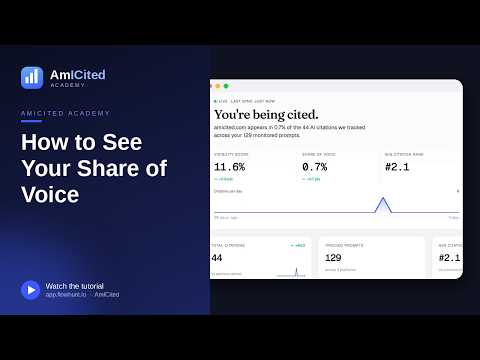
Share of Voice tells you how big a slice of the AI-citation pie belongs to your brand.
At a Glance
- Share of Voice is your citations as a percentage of all citations across your tracked prompts, competitors included.
- It sits in the middle of the Dashboard’s three headline stats, between Visibility Score and Avg Citation Rank.
- It differs from Visibility Score: Visibility Score measures whether you show up at all, Share of Voice measures how much of the total citation pool is yours.
- The Competitor share of voice widget breaks the same number down domain by domain.
- Every figure respects the page’s filters, so you can isolate it by AI engine, country, tag, or date range.
What is Share of Voice?
Share of Voice is a competitive metric borrowed from traditional marketing and re-applied to generative engine optimization , the practice of getting a brand cited, quoted, or recommended inside AI-generated answers rather than just ranked in a list of blue links. In its AI-search form, AI Share of Voice measures the percentage of all citations handed out across a set of tracked prompts that belong to your domain, versus every competing source the AI engine chose to cite instead.
The distinction that trips people up is the difference between being mentioned and being dominant. An AI citation happens any time a model like ChatGPT, Perplexity, Gemini, or Google AI Overviews names your brand, links to your site, or draws on your content while answering a prompt. You can rack up plenty of citations and still have a thin Share of Voice, because the metric isn’t about whether you showed up: it’s about how much of the total citation pool, across every domain the AI referenced, is actually yours. If an answer cites five sources and you’re one of them, your slice of that particular answer is 20%. Aggregate that across every tracked prompt and every period, and you get your overall Share of Voice.
This matters for AI search visibility because AI-generated answers behave differently from traditional search results pages. A classic Google results page has ten blue links and a fairly stable pecking order; an AI answer synthesizes a handful of sources into a single paragraph, and the model decides, largely invisibly, which sources earn a mention and which don’t. Two brands can both appear “often” in AI answers on paper, yet one might dominate the sourcing of those answers while the other is a bit-part player squeezed out by three or four more authoritative competitors every time. Share of Voice is the metric built to expose that gap.
It also matters commercially. Share of Voice is a reasonable proxy for how much of the AI-driven consideration set you’re capturing when a prospect asks an AI assistant something like “best tools for X.” If a competitor’s Share of Voice is climbing while yours is flat, they are quietly winning a growing share of AI-assisted research and recommendation moments, even if your own citation count looks unchanged. Because AI answers increasingly stand in for the first few search results a buyer would have clicked through in the past, a shrinking Share of Voice is an early warning sign long before it shows up in referral traffic or pipeline.
Where to find it
It’s the middle of the three headline stats at the top of the Dashboard, between Visibility Score and Avg Citation Rank. In the example below it reads 0.8%, with the change versus the previous period (▲ +0.8 pts) underneath.

Because it sits next to Visibility Score and Avg Citation Rank, the headline strip is designed to be read as a set: coverage (Visibility Score), share of the total pie (Share of Voice), and how prominently you’re placed within the answers where you do appear (Avg Citation Rank). Reading Share of Voice in isolation tells you your slice of the conversation; reading it alongside the other two tells you why that slice is the size it is.
What it measures
Share of Voice is your citations expressed as a percentage of all citations tracked across your monitored prompts, yours plus every competing domain the AI engines cited. If AmICited tracked 44 citations for your brand out of a much larger pool across all domains, your Share of Voice is your slice of that total pool.
That’s the key difference from the AI Visibility Score :
- Visibility Score = the share of your prompts where you appear at all. It’s a coverage metric: did the AI mention you, yes or no, on this prompt?
- Share of Voice = your share of the total citations handed out across those prompts, competitors included. It’s a dominance metric: when the AI did cite sources, how much of that citation “airtime” was yours?
You can have decent visibility (you show up on many prompts) but still a small Share of Voice, because each of those answers cites several other domains more prominently than you. Conversely, a brand with a narrower footprint (appearing on fewer prompts) can post a strong Share of Voice on the prompts it does win if it consistently out-cites everyone else there. Reading the two together is what turns a raw citation count into an actual competitive read: are you broadly present but diluted, or narrowly present but dominant?
Both metrics are built from the same underlying citation data as everything else on the Dashboard, which is also what powers the AI rank tracker view of where each individual citation lands within an answer. Share of Voice is the roll-up; rank tracking is the prompt-by-prompt detail behind it.
How to use it
- Read it next to Visibility Score. A gap between the two, visible but low share, means you’re getting mentioned but crowded out. That points to depth-of-content and authority work, not just coverage. If both numbers are low, you have a coverage problem first: you’re not even entering enough of these AI conversations to compete for a share of them.
- Watch the trend. The
+0.8 ptschange tells you whether you’re gaining or losing ground in the overall conversation. Because Share of Voice is relative, it moves whenever competitors’ citation counts move, even if your own haven’t changed, so a declining trend can mean a rival published something that started earning citations, not necessarily that you did anything wrong. Treat a falling trend as a prompt to check what changed on the competitive side, not just your own content. - Drill into competitors. The Competitor share of voice widget further down the dashboard breaks this same pie out domain by domain, so you can see exactly who’s taking the share you’re not. This is where Share of Voice stops being an abstract percentage and becomes an action list: if one competitor consistently takes the slice you’re missing, their cited pages are the ones worth studying first.
- Segment before you conclude anything. A blended Share of Voice number can hide very different stories underneath. You might be strong on ChatGPT and near-zero on Google AI Overviews, or dominant in one country and invisible in another. Filtering down before drawing conclusions avoids over- or under-reacting to a number that’s actually an average of very different situations.
Like every figure on the dashboard, Share of Voice respects the filters at the top of the page (AI model, country, tag, date range), so it always reflects the scope you’ve selected. Filtering to a single AI engine, for instance, isolates whether your share problem is platform-specific (a common pattern, since different models tend to favor different sources) or consistent everywhere, which points to a broader authority gap rather than a platform quirk. Filtering by tag lets you compare Share of Voice across separate prompt sets, such as branded versus category prompts, so you can see whether you dominate conversations about your own product but lose the share when the prompt is a generic “best tools for X” comparison.
Teams running this analysis for multiple brands or client accounts, common at agencies managing several domains at once, tend to lean on the Competitor share of voice breakdown as their standing weekly check, since it’s the fastest way to see whether a client’s position in the AI-citation conversation is improving or eroding without re-deriving the number by hand each time.
If you want the full mechanics of how the underlying percentage is calculated, or how it’s typically benchmarked across an industry, how AI search visibility is measured and which KPIs matter walks through the formula in more depth, and a closer look at competitor AI visibility analysis is a useful next stop once you’ve identified who’s outpacing you in the Competitor share of voice widget. From there, the practical move is usually to treat a low Share of Voice not as a verdict but as a to-do list: identify the two or three domains consistently cited ahead of you on the prompts that matter most, look at what their content does that yours doesn’t yet, and use the AI visibility view alongside Share of Voice to track whether the gap narrows as you close it.
Frequently asked questions
Share of Voice is your citations expressed as a percentage of all citations tracked across your monitored prompts, yours plus every competing domain the AI engines cited instead. It sits in the middle of the Dashboard's three headline stats, between Visibility Score and Avg Citation Rank, and shows how much of the total citation pie actually belongs to you.
Visibility Score is a coverage metric: did the AI mention you at all on a given prompt, yes or no. Share of Voice is a dominance metric: of the citations an answer actually handed out, how much of that "airtime" was yours. You can have decent visibility but still a thin Share of Voice if competitors keep out-citing you inside the same answers.
Because the metric is relative: it moves whenever competitors' citation counts move, not just your own. If a rival publishes something that starts earning citations, your slice of the total pool shrinks even though nothing about your content changed. A falling trend is a cue to check what changed on the competitive side, not only your own pages.
The Competitor share of voice widget further down the Dashboard breaks the same overall percentage down domain by domain, so you can see exactly which brands are capturing the share you're not. That's where an abstract percentage becomes an action list of specific competitor pages worth studying first.
More tutorials in this section
 How to Read Your Visibility Score
Learn what the AmICited Visibility Score measures and how its gauge and platform breakdown show your AI …
Read guide →
How to Read Your Visibility Score
Learn what the AmICited Visibility Score measures and how its gauge and platform breakdown show your AI …
Read guide →
 How to Use the Domain Semantic Map
Explore the AmICited Domain Semantic Map to find clusters and topic gaps across prompts, fan-out queries and …
Read guide →
How to Use the Domain Semantic Map
Explore the AmICited Domain Semantic Map to find clusters and topic gaps across prompts, fan-out queries and …
Read guide →
 How to See Visibility by AI Platform
Compare your AI citations across ChatGPT, Gemini, Perplexity and Google AI in the AmICited platform …
Read guide →
How to See Visibility by AI Platform
Compare your AI citations across ChatGPT, Gemini, Perplexity and Google AI in the AmICited platform …
Read guide →Ready to put it into practice?
Free check · 7-day trial · card required