


How to Add Prompts by Pasting a List
Already have a list of questions to track? Paste them straight into AmICited, one per line.

When you already know the questions you want to track, the fastest way in is to paste them, one prompt per line. AmICited counts them as you type and adds them all in one go.
Quick Steps
- Click + New prompt on the Prompts page and stay on the default Paste prompts tab.
- Paste your questions into the box, one per line; empty lines are ignored.
- Watch the detected count to confirm every line parsed as its own prompt.
- Choose AI providers, country, an optional tag, and a schedule.
- Click Add prompts to start tracking the whole batch at once.
What is prompt tracking?
In generative engine optimization (GEO), a prompt is simply the question a real person might type into ChatGPT, Perplexity, Gemini, or Google AI Overviews: “best project management software for remote teams,” “is [Brand] worth it in 2026,” “alternatives to [Competitor].” Prompt tracking is the practice of running a defined set of these questions against AI assistants on a regular cadence and recording whether, where, and how your brand shows up in the answer. It is the AI-era equivalent of rank-tracking a keyword list in Google, except the “result” you’re checking isn’t a ranked list of blue links; it’s a synthesized answer that may or may not name you at all.
This matters because AI assistants don’t expose anything like a search-results page you can just glance at. Each answer is generated fresh, phrased differently depending on the model, and can change from one day to the next as models update or re-crawl the web. Without a structured prompt set, you’re left guessing whether ChatGPT mentions your brand, or manually retyping questions into five different chat windows, a method that doesn’t scale and produces no historical record. A tracked prompt list turns that guesswork into a repeatable measurement: run the same questions on a schedule, and you get a comparable trend line of whether your AI search visibility is improving or slipping.
The prompt set you build is also the foundation every other AmICited metric is calculated from. Your AI Visibility Score, your share of voice against competitors, and your citation and source breakdowns are all aggregated across the prompts you’re tracking, so the prompts themselves aren’t a minor setup step, they are the measurement instrument. Get the prompt set right (relevant, realistic, and reasonably comprehensive) and every downstream number reflects reality. Get it wrong (too narrow, too promotional, or padded with irrelevant questions) and the metrics that come out will mislead you no matter how sophisticated the analysis underneath them is.
There are several ways to seed a prompt set: writing prompts one at a time, generating suggestions automatically, uploading a spreadsheet, or (the option this guide covers) pasting a plain list of questions. Pasting is the quickest route when the work of drafting your questions has already happened somewhere else, like a shared doc, a keyword-research spreadsheet, or notes from a discovery call with a client.
Where to find it
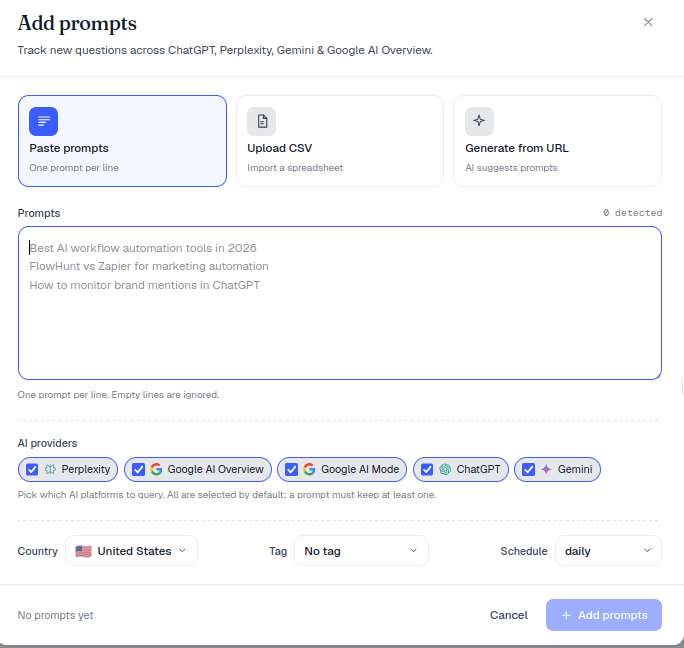
Click + New prompt on the Prompts page to open the Add prompts dialog. The Paste prompts tab (“One prompt per line”) is selected by default, so if you’re moving a list over from another document, you don’t need to change tabs, just paste and go.
Step by step
- Type or paste your questions into the Prompts box, one per line. As the note says, “One prompt per line. Empty lines are ignored.” This means you can paste directly from a numbered list, a bulleted doc, or a column of a spreadsheet without cleaning up blank rows first.
- Check the detected count in the top-right of the box to confirm everything parsed as you expected. If the number is lower than the count of lines you pasted, look for a line break that got swallowed: two questions that merged into one line will only register as a single prompt.
- Choose the AI providers to query (all are selected by default). Running the same prompt across every provider, rather than just one, is what lets you compare, for example, whether you’re consistently cited in ChatGPT but invisible in Gemini, which is often the first sign of a 7% overlap problem between the sources different engines actually pull from.
- Set the Country, an optional Tag, and the Schedule (e.g.
daily). The country setting matters because AI assistants localize answers: a prompt run from a US context can surface different sources and competitors than the same words run from a UK or German context. Tags let you group prompts by product line, campaign, or client from day one, which pays off later when you’re filtering dashboards or building reports. - Click Add prompts to start tracking the whole batch. AmICited begins querying each provider on the schedule you set, and results start populating your dashboard as each check completes.
What makes a good prompt
- Phrase them like a person would ask an AI: natural questions, not keyword strings (“best AI workflow automation tools in 2026” rather than “ai automation tools”). AI assistants respond to conversational intent, so a prompt written the way a real user talks produces a far more representative test of what that user would actually see.
- Mix intent levels: some high-intent comparison and pricing questions ("[Brand] vs [Competitor] pricing"), some broader category questions (“best tools for X”), and a few problem-aware questions that don’t name any brand at all. This mirrors how prompt engineering for measurement differs from prompt engineering for generation: you’re not trying to coax a specific answer out of the model, you’re sampling the range of real questions your buyers actually ask.
- Keep them on-topic: every prompt you add becomes part of the denominator for your Visibility Score and Share of Voice, so irrelevant questions dilute your metrics. A prompt set padded with tangential questions will produce a lower, noisier score than a tight, relevant one, even if your actual visibility hasn’t changed.
- Revisit the list periodically: new competitors enter the market, product categories get renamed, and the way people phrase questions to AI assistants shifts as the assistants themselves get better at handling follow-ups. Treat your prompt set as a living list, not a one-time input.
If you want AmICited to help generate the initial list rather than writing every line yourself, the Prompt Ideas and AI-generated options in the same dialog can suggest realistic questions based on your domain, useful for filling gaps once your pasted list is in.
Paste vs. other ways to add prompts
Pasting is ideal when you’re migrating a list from a spreadsheet or doc, consolidating questions gathered during onboarding, or moving a client’s existing question bank into AmICited in one motion. If your questions live in a .csv with extra columns (tags, countries, or provider selections already mapped per row), use Upload CSV
instead; it preserves that structure rather than flattening everything to plain text. And if you’re starting from nothing and want help figuring out which prompts trigger AI to mention your brand in the first place, it’s worth working backwards from the questions your customers already ask support and sales, rather than guessing.
Why this is worth doing properly
A sloppy prompt list is one of the most common reasons a new AmICited account produces confusing early numbers. Because the Visibility Score and share of voice are both averages across your tracked prompts, a list that’s too small, too narrow, or skewed toward branded searches will not reflect how a prospective customer actually experiences your brand across ChatGPT, Perplexity, Gemini, and AI Overviews. Investing a few extra minutes to write, or paste, a representative set of prompts before you hit Add prompts is the single highest-leverage step in setting up reliable AI visibility monitoring , and it’s far cheaper to get right at the start than to untangle after weeks of data have accumulated under the wrong questions.
Once your list is in and results start rolling in, the natural next step is watching how those numbers move relative to competitors, which is where AI rank tracking and citation-source breakdowns come in, showing not just whether you’re mentioned but where in the answer and alongside whom. If you’re running this for a client rather than your own brand, the same paste workflow scales cleanly across workspaces, which is part of why agencies use AmICited to run AI search visibility across a whole client portfolio instead of checking each account by hand. Whatever the use case, the prompt list you paste in today is the yardstick every future report will be measured against, so it’s worth treating it as seriously as the metrics it produces.
Frequently asked questions
Click + New prompt on the Prompts page, stay on the default Paste prompts tab, and paste your questions into the box, one per line — empty lines are ignored. Check the detected count to confirm every line parsed correctly, then set providers, country, tag, and schedule before clicking Add prompts.
Watch the "N detected" counter in the top-right of the box. It shows how many prompts AmICited actually parsed from your paste. If that number is lower than the number of lines you pasted, look for a line break that got swallowed, since two questions merged onto one line will only register as a single prompt.
Pasting is fastest when your questions already exist somewhere else, like a shared doc or notes from a discovery call, and you just need to move them in as plain text. Use Upload CSV instead if your list has extra columns like tags or providers mapped per row, since CSV preserves that structure rather than flattening it.
Phrase each one like a real question a person would type into ChatGPT or Perplexity, not a keyword string. Mix intent levels — comparison, pricing, and broader unbranded category questions — and keep every prompt on-topic, since each one becomes part of the denominator for your Visibility Score and Share of Voice.
More tutorials in this section
 How to Use the Tracked Prompts Table
Learn how to read, search and filter the AmICited Tracked Prompts table, including each prompt’s citations, …
Read guide →
How to Use the Tracked Prompts Table
Learn how to read, search and filter the AmICited Tracked Prompts table, including each prompt’s citations, …
Read guide →
 Generate AI Prompts from a URL
Let AmICited analyze a page and suggest buyer questions to track as prompts.
Read guide →
Generate AI Prompts from a URL
Let AmICited analyze a page and suggest buyer questions to track as prompts.
Read guide →
 How to Add Prompts by Uploading a CSV
Import prompts into AmICited from a CSV file with this guide to the upload option and required file format.
Read guide →
How to Add Prompts by Uploading a CSV
Import prompts into AmICited from a CSV file with this guide to the upload option and required file format.
Read guide →Ready to put it into practice?
Free check · 7-day trial · card required