


What Content Types Can You Generate?
Explore AmICited content types, from blog posts and FAQs to landing pages, comparisons, glossaries and custom flows.

The content type decides the shape of the article AmICited writes, and getting that shape right is one of the highest-leverage decisions in generative engine optimization (GEO).
At a Glance
- Content type is the structural shape of an article (Listicle, Comparison, FAQ, How-to, etc.), separate from its topic.
- Matching the shape to how a target prompt is phrased makes it far easier for an AI model to lift and cite your content.
- Choose it in step 3 of the Generate an Article flow, after you’ve set the topic and target prompts.
- AmICited offers ten types: Blog post, Listicle, Comparison, FAQ, Landing page, How-to guide, Glossary, Product detail, Product category, and Custom Flow.
- If your prompt wording doesn’t fit any single shape, generate separate articles for each intent rather than forcing one format to cover all of them.
What is a content type, and why does it matter for AI visibility?
A content type is the structural format a piece of writing takes (a listicle, a comparison, an FAQ, a how-to guide) as distinct from its topic. Two articles can cover the exact same subject and get radically different results in AI search depending on which shape they use, because ChatGPT, Perplexity, Gemini and Google AI Overviews don’t read a page the way a human skims it. They parse it for extractable, self-contained chunks of information: a numbered step, a defined term, a comparison table row, a direct answer to a question. The format of your content determines how easily an AI model can lift a chunk out and attribute it to you.
This is why content type is a first-class decision in AI search visibility work, not an afterthought. A prompt phrased as “best tools for X” is implicitly asking for a ranked list: if your content is a ranked list, the model has less interpretive work to do to reuse it, and reuse is what drives citation. A prompt phrased as “X vs Y” wants a structured comparison, ideally with a table or clearly delineated criteria. A prompt phrased as “how do I…” wants ordered, actionable steps, not a narrative essay. When you match content type to prompt phrasing, you’re aligning your content’s structure with the retrieval and synthesis pattern the AI model is already running, and that alignment shows up directly in your citation rate and share of voice for that prompt.
Content type also interacts with structured data. Formats like FAQ, How-to and Product detail map closely onto schema.org markup (FAQ schema , HowTo schema, Product schema), which gives AI crawlers an even more explicit signal about what each block of content is and how it should be extracted. Choosing the right content type up front makes it much easier to layer that structured data on afterward, because the content is already organized the way the schema expects.
None of this means one content type is universally “best.” Different AI engines and different prompt intents reward different shapes: research into which content types get cited most by AI shows list-style and comparison content performing especially well for evaluative queries, while definitional and how-to formats dominate for informational ones. The practical takeaway is that content type selection should be driven by what your target prompts actually look like, which is exactly what AmICited’s Generate an Article flow asks you to do in step 3.
Where to find it
It’s step 3 of the Generate an article flow: “Content type: what shape should the article take?” Each option is a card you click to select.
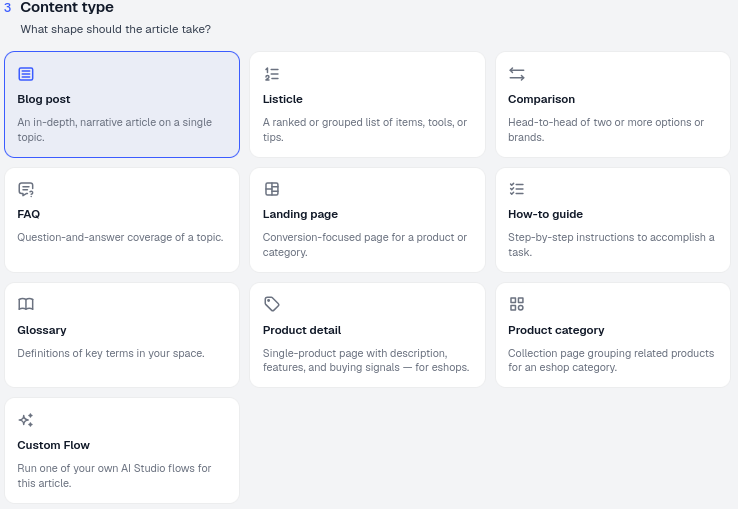
By the time you reach this step, you’ve already told AmICited the topic and the target prompt(s) the article should address (steps 1 and 2 of the flow). Content type is where you translate that intent into a concrete structure before the writer generates a draft.
The available types
- Blog post: an in-depth, narrative article on a single topic. Best when the prompt is open-ended (“what is…”, “why does…”) and benefits from context, examples and a point of view rather than a rigid list or table.
- Listicle: a ranked or grouped list of items, tools or tips. This is the natural shape for “best X for Y” and “top N” prompts, because each list item is already a self-contained, easily extractable unit an AI model can cite individually.
- Comparison: a head-to-head of two or more options or brands, typically built around shared criteria (price, features, use case). This is the format “X vs Y” and “which is better” prompts are effectively asking for.
- FAQ: question-and-answer coverage of a topic, structured as one clear question followed by one direct answer per block. This shape maps almost one-to-one onto how AI assistants answer discrete factual questions, which is why it pairs so well with FAQ schema markup.
- Landing page: a landing page for a product or category, combining a clear value proposition with feature and benefit statements. Use this when the target prompt has commercial intent rather than purely informational intent.
- How-to guide: step-by-step instructions to accomplish a task, written as an ordered sequence. This is the right shape whenever your target prompts start with “how do I” or “how to.”
- Glossary: definitions of key terms in your space, written as concise, standalone explanations. Glossary-style content performs well for definitional prompts (“what is X”) because each entry is a tight, quotable unit of meaning.
- Product detail: a single-product page with description, features and buying signals, built for eshops that want a product to be citable in its own right.
- Product category: a collection page grouping related products for an eshop category, useful when target prompts are exploratory (“options for X”) rather than about one specific item.
- Custom Flow: run one of your own AI Studio flows to write the article, letting you apply a bespoke structure or house style that isn’t covered by the built-in types.
How to choose
- Read your target prompts. Their wording usually points directly at the shape you need: lists, comparisons, definitions, or steps. If a prompt says “top 10,” don’t answer with a blog post; answer with a Listicle.
- Consider intent. Informational questions suit Blog posts, FAQs and How-to guides; commercial and evaluative questions suit Landing, Product and Comparison pages. Matching intent, not just keywords, is central to doing a good content gap analysis : a gap isn’t just a missing topic, it’s often a missing format for a topic you already cover.
- Use Custom Flow for special cases. If you have a bespoke AI Studio workflow (say, a specific outline your brand always follows, or a review process baked into the flow), run it here to keep a consistent house style across every generated article.
- Don’t force one shape onto every prompt. If you’re targeting a cluster of related prompts with different phrasing (a definition question, a comparison question, and a how-to question), it’s usually better to generate three articles in the shapes those prompts imply than to stretch a single Blog post to cover all three intents. Purpose-built content in the right shape consistently outperforms a generalist article trying to do everything.
What happens after you choose
The type you pick shows in the footer summary and again in the Article Setup panel once the draft opens, so you can confirm it before generation runs. It isn’t a purely cosmetic label: it shapes the outline the writer builds from, the heading structure it produces, and, for types like FAQ and How-to, the sections that align cleanly with schema markup you (or your CMS) can add later. If you generate an article and decide the shape isn’t landing the way you expected, you aren’t locked in: you can start a new generation with a different content type for the same topic and target prompts, and compare which version tracks better once it’s live and being monitored.
Choosing the right shape is only half the equation: the other half is confirming it actually moves the needle once it’s published. That’s where it’s worth connecting content type decisions back to your prompt tracking: watch how a newly generated Listicle or Comparison performs against the specific prompts it was built for, using an AI rank tracker to see whether your citation position improves after the new format goes live. It’s also worth remembering that shape can’t fully compensate for volume or depth: if you’re publishing thin, one-off pieces regardless of type, it’s worth weighing content quantity against quality before generating more. And if you’re producing content across a whole client portfolio rather than a single brand, the same content-type logic scales through AmICited’s SEO agents , which can turn a detected visibility gap directly into a properly shaped, published draft. If a topic still isn’t getting picked up after the format is right, that’s a signal to revisit the prompt targeting itself, not just the words on the page.
Frequently asked questions
Topic is what the article is about; content type is the structural shape it takes, such as Listicle, Comparison, FAQ or How-to guide. Two articles on the same topic can perform very differently in AI search depending purely on which shape you choose in step 3 of the Generate an Article flow.
Read the prompt's wording. "Best X for Y" or "top 10" points to a Listicle; "X vs Y" points to a Comparison; "how do I" points to a How-to guide; "what is X" suits a Blog post, FAQ or Glossary entry. Matching the shape to the phrasing makes it easier for an AI model to lift and cite the content.
Don't stretch one content type to cover all of them. If you're targeting a definition question, a comparison question and a how-to question, generate three separate articles in the shapes those prompts imply, purpose-built content in the right shape consistently outperforms one generalist piece.
Custom Flow lets you run one of your own AI Studio flows to write the article instead of one of the ten built-in types. Use it when you have a bespoke outline or house style, such as a specific review process, that the standard content types don't cover.
More tutorials in this section
 How to Choose Prompts to Target
Choose tracked prompts for an AI-generated article in AmICited to focus its topic and citation goals.
Read guide →
How to Choose Prompts to Target
Choose tracked prompts for an AI-generated article in AmICited to focus its topic and citation goals.
Read guide →
 How to Use the Article Editor
Tour the AmICited Article Editor, including its writing canvas, formatting tools, GEO score, outline and …
Read guide →
How to Use the Article Editor
Tour the AmICited Article Editor, including its writing canvas, formatting tools, GEO score, outline and …
Read guide →
 What Is the GEO Score?
The GEO Score in AmICited rates how well a generated article is optimized for AI answer engines.
Read guide →
What Is the GEO Score?
The GEO Score in AmICited rates how well a generated article is optimized for AI answer engines.
Read guide →Ready to put it into practice?
Free check · 7-day trial · card required