


Add Custom Instructions to AI Articles
Use the optional Custom instructions field in AmICited's Generate an article flow to guide the AI agent.

Want the draft written a particular way? Custom instructions let you brief the AI agent before it writes: tone of voice, style rules, things it must include or avoid, so the first draft already sounds like you.
Quick Steps
- Open the Generate an article flow and reach the optional Custom instructions field at step 4.
- Type up to 1000 characters covering tone and voice, style rules, must-includes, and don’ts.
- Keep it short and specific; a few clear rules steer a draft further than a long essay.
- Leave it blank for a solid default draft, or fill it in whenever voice, compliance, or formatting consistency matters.
- Reuse instructions that work well across future articles for a consistent house style.
What is AI content generation, and why does it need a brief?
AI content generation is the use of a large language model to draft written content (articles, landing pages, product descriptions) from a topic, a set of prompts, and (ideally) some direction about how the piece should sound. It’s the same underlying technology that powers ChatGPT, Perplexity, and Google’s AI Overviews, applied in reverse: instead of answering a question, the model is writing a page designed to be worth citing when that question comes up. This is why content generation and AI visibility sit next to each other in a GEO workflow: the article you generate today is the page you hope an AI assistant quotes tomorrow.
A content brief is the set of instructions that shapes what a writer (human or AI) produces before a single sentence is written: topic, audience, structure, tone, sources, things to avoid. Skip the brief and you get generic output; a model without direction defaults to a safe, average tone and a structure it has seen a thousand times before. That’s usually functional but rarely distinctive, and distinctive, well-structured writing is exactly what tends to earn citations. Research and practitioner guidance on generative engine optimization (the practice of optimizing content so AI systems select and cite it) consistently points to specificity and clarity as the traits that separate content models quote from content they skim past.
This matters more for AI-written drafts than for human ones because a language model has no memory of your brand’s house style between sessions. Every generation starts from a blank slate unless you supply the constraints yourself. The instructions you give it aren’t a nice-to-have layer of polish: they’re the mechanism that turns a generic model output into something that reads like your brand wrote it, with the tone, factual guardrails, and structural choices your editorial standards actually require.
In AmICited’s Generate an article flow, that brief has a dedicated home: the Custom instructions field. It sits alongside the content type and prompt selection that already tell the AI agent what to write about; custom instructions tell it how.
Where to find it
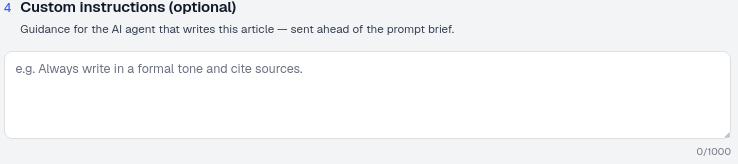
It’s step 4 (optional) of the Generate an article flow: “Custom instructions — Guidance for the AI agent that writes this article, sent ahead of the prompt brief.” It’s a text box with a 1000-character limit. Because it’s sent ahead of the prompt brief, the AI agent reads your rules first and applies them as it works through the topic, structure, and prompts you’ve already selected earlier in the flow, rather than trying to retrofit tone onto a draft that’s already been written.
The field is optional by design. If you leave it blank, AmICited still produces a complete, publishable draft using sensible defaults; you’re not required to fill it in for every article. But for any content where voice, compliance, or formatting consistency matters, it’s the single highest-leverage input in the whole generation flow, because it’s the only step where you’re not choosing what the article covers but how it reads.
What to put in it
Good instructions cover things the content type and prompts don’t already imply. Four categories consistently do the most work:
- Tone and voice: formal, conversational, expert, plain-language. This is the fastest way to make a generated draft sound like it came from your team rather than a generic template. If your brand has a documented style guide, distilling its tone rules into a sentence or two here is more effective than pasting the whole document; the model responds better to a handful of clear, prioritized rules than to a long, unranked list.
- Style rules: spelling variant (British vs. American), sentence length, whether to use “we”/“you”, how to handle numbers and headings. These are exactly the kind of mechanical, easy-to-verify choices that are tedious to fix in editing but trivial to specify up front.
- Must-includes: a specific stat, a disclaimer, a call-to-action, a comparison table, a named source to cite. If a page must reference a specific data point or legal disclaimer every time, put it here rather than relying on the prompt topic to surface it naturally.
- Don’ts: claims to avoid, competitors not to name, jargon to skip, formats you don’t want (no bullet lists, no rhetorical questions). Negative instructions are just as valuable as positive ones; models are good at avoiding a specific pattern once it’s named, but won’t guess that you dislike it.
Instructions that touch on E-E-A-T signals (asking the agent to attribute claims, name a credentialed source, or avoid unverifiable superlatives) are worth the character budget. Google’s quality framework and most AI answer engines weigh experience, expertise, authority, and trust cues when deciding what to surface, so a brief that nudges the draft toward sourced, specific claims rather than vague assertions is doing double duty: it improves the immediate draft and it improves the odds that the published page reads as citation-worthy content later.
How to use it
- Keep it short and directive. A few clear rules beat a long essay. The 1000-character limit isn’t a constraint to fight; it forces you to prioritize the two or three rules that actually change the output, which is usually all a model needs.
- Focus on what’s non-obvious. You don’t need to restate the topic; the prompts and content type already set that. Spend the character budget on things the AI agent genuinely cannot infer: your house tone, a mandatory disclaimer, a spelling convention, a structural preference.
- Reuse what works. Once you find instructions that produce good drafts, keep them handy and paste them into each new article for a consistent house style. Treat your best-performing instruction set the way you’d treat a template: refine it over a few generations, then reuse it as the default for that content type until you have a reason to change it.
- Write instructions a new hire could follow. If a junior writer couldn’t turn your custom instructions into a consistent draft without asking a follow-up question, the model probably can’t either. Ambiguity that a human would resolve by asking you gets resolved by the model guessing, and guesses are where inconsistent output comes from.
- Separate voice from facts. Custom instructions are for how the piece is written, not a substitute for research. If a claim needs to be accurate and specific, make sure it’s implied by your prompt selection or source material, not just requested in the instructions field: the field steers style and structure more reliably than it guarantees factual precision.
Leave it blank and AmICited writes a solid default draft; fill it in when you need the output to follow specific rules.
Getting the most out of generated drafts
Custom instructions solve the tone-and-style half of the problem, but they work best as part of a broader AI-ready content strategy : choosing the right prompts to write against, structuring the draft so AI engines can actually parse and quote it, and keeping the language specific enough to read as genuine rather than templated. If you’re optimizing for citations rather than just publishing volume, it’s worth reading up on how to structure content so AI models can actually cite it and on writing authentic content that gets cited rather than content that reads as generic AI output; both are natural next steps once your custom instructions are dialed in. From there, AmICited’s broader SEO AI agent workflow ties article generation back to the visibility gaps it was built to close: the prompts you’re losing, the competitors currently cited instead of you, and the share of voice you’re trying to shift, so the drafts you generate here aren’t just well-written, they’re aimed at the exact queries where your brand needs to show up.
Frequently asked questions
It's an optional text box, step 4 of the flow, where you brief the AI agent on how the article should be written — tone, style rules, must-include points, and things to avoid. It's sent ahead of the prompt brief, so the agent applies your rules while it writes rather than trying to retrofit them afterward.
Focus on four areas: tone and voice, style rules (like spelling variant or sentence length), must-includes (a stat, disclaimer, or CTA), and don'ts (claims or formats to avoid). Keep it to a few clear, prioritized rules rather than a long essay — the 1000-character limit forces you to focus on what actually changes the output.
AmICited still generates a complete, publishable draft using sensible defaults. The field is optional, so you only need to fill it in when voice, compliance, or formatting consistency actually matters for that piece of content.
No. Custom instructions steer how the piece is written — tone and structure — not what facts it contains. If a claim needs to be accurate and specific, it should be implied by your prompt selection or source material, since the field influences style far more reliably than it guarantees factual precision.
More tutorials in this section
 How to Choose Prompts to Target
Choose tracked prompts for an AI-generated article in AmICited to focus its topic and citation goals.
Read guide →
How to Choose Prompts to Target
Choose tracked prompts for an AI-generated article in AmICited to focus its topic and citation goals.
Read guide →
 What Content Types Can You Generate?
Explore AmICited content types, from blog posts and FAQs to landing pages, comparisons, glossaries and …
Read guide →
What Content Types Can You Generate?
Explore AmICited content types, from blog posts and FAQs to landing pages, comparisons, glossaries and …
Read guide →
 How to Use the Article Editor
Tour the AmICited Article Editor, including its writing canvas, formatting tools, GEO score, outline and …
Read guide →
How to Use the Article Editor
Tour the AmICited Article Editor, including its writing canvas, formatting tools, GEO score, outline and …
Read guide →Ready to put it into practice?
Free check · 7-day trial · card required