



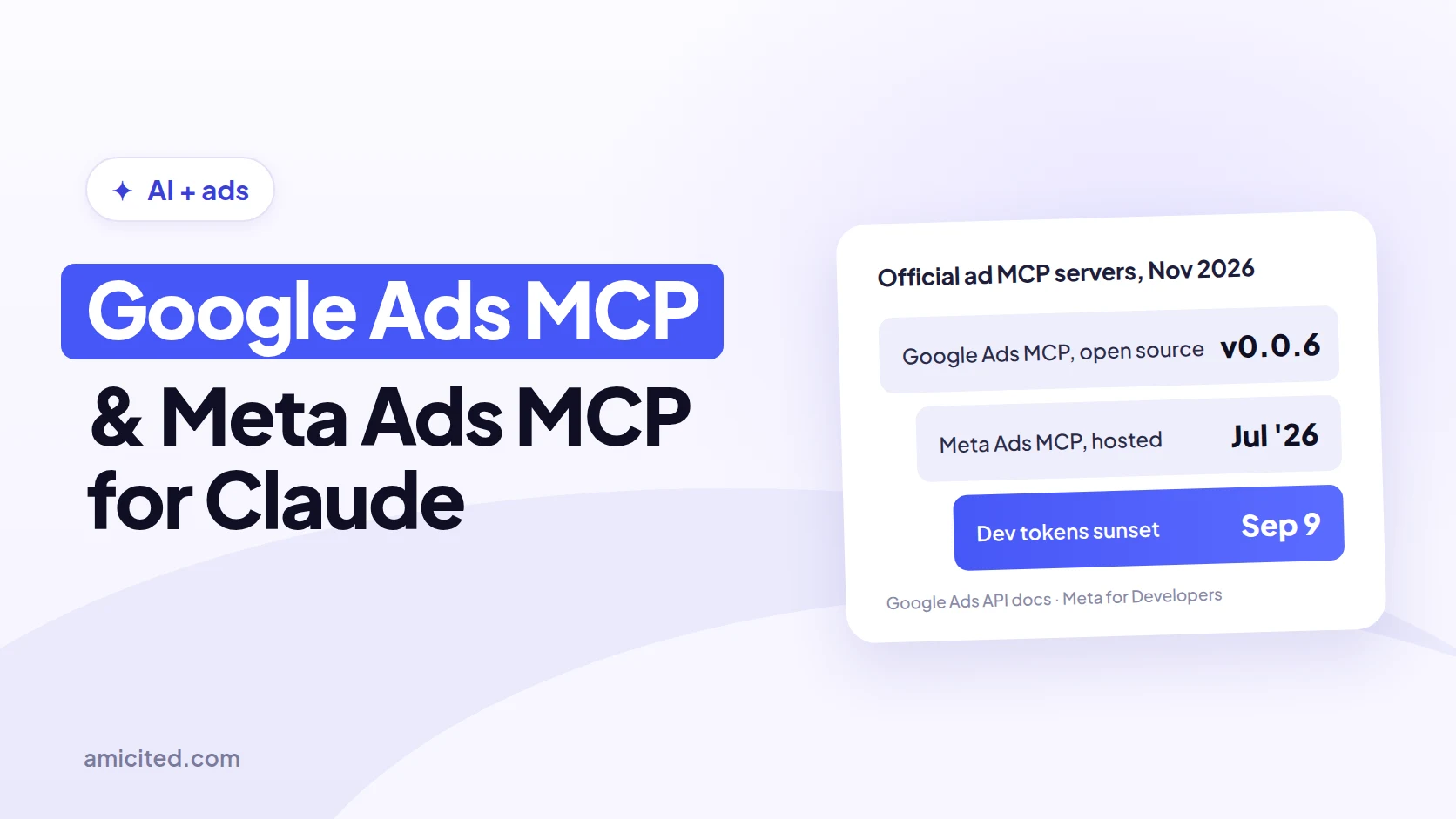
A Google Ads MCP server is a connector that lets an AI assistant such as Claude, ChatGPT or Cursor query your Google Ads account, and sometimes change it, through the Model Context Protocol. As of November 2026 both big ad platforms have an official one: Google’s open-source
google-ads-mcp, which reads data and makes only limited, confirmed changes, and Meta’s hosted Ads MCP server at https://mcp.facebook.com/ads, which reads and writes.
Third-party servers fill the gaps: hosted setup, more ad platforms on one connection, and campaign management with approval steps. What none of the official servers can do is check an ad platform’s numbers against data it doesn’t have, such as your store’s orders, your margins or your organic search.
This guide compares the options with facts checked on each vendor’s own page, then shows how to connect Claude, ChatGPT and Cursor to Google Ads, Meta Ads, Microsoft Ads, LinkedIn Ads and ChatGPT Ads through AmICited’s MCP server, and which prompts are worth asking once you have.
Key Takeaways
- Google’s official Google Ads MCP server is open source (Apache-2.0) and self-hosted. Since v0.0.6 (November 2, 2026) it can create assets and manage labels, but it “cannot create, modify, pause, or enable campaigns, ad groups, ads, budgets, or bids”.
- Google’s documentation says developer tokens were sunset on September 9, 2026. Access now comes from the Google Cloud project’s API access level, so older setup guides that start with a developer token are out of date.
- Meta’s official Ads MCP server is hosted at
https://mcp.facebook.com/adsand supports reads and writes. Admins set rules for what an agent can do, starting from read-only or approval-required. - Hosted third-party servers such as Pipeboard, Markifact, AdKit and Ryze AI add multi-platform access and write workflows; Pipeboard’s free plan allows 30 tool executions a week on 2 ad accounts.
- Platform-only servers can’t compare Meta’s claimed purchases with orders that landed, or paid search terms with organic rankings. That needs one server holding both data sets.
What an MCP server is
The Model Context Protocol (MCP) is “an open-source standard for connecting AI applications to external systems.” An MCP server publishes a list of tools, such as “get campaign performance” or “update budget”; an MCP client, such as Claude, ChatGPT, Cursor or Claude Code, discovers those tools and calls them during a conversation.
For advertising, that means you ask a question in plain language and the assistant runs the queries, for example a GAQL report in Google Ads or an insights call in Meta, then explains the result. Whether it can also change anything depends entirely on which tools the server exposes and which permissions you grant.

Ready to Monitor Your AI Visibility?
Track how AI chatbots mention your brand across ChatGPT, Perplexity, and other platforms.
Google’s official Google Ads MCP
Google’s Google Ads MCP server is an open-source project at github.com/googleads/google-ads-mcp, licensed Apache-2.0. Google describes its mode as “read and partial mutate.” It reads account data through GAQL queries and can create assets, upload videos and manage labels, each behind a two-step propose-and-confirm check. It can’t touch campaigns, budgets or bids.
What we verified on Google’s developer page and the repository on November 17, 2026:
- Read tools.
search_searchruns GAQL,metadata_get_resource_metadatalists queryable fields, andcustomers_list_accessible_customerslists accounts (default tool names). Manager accounts (MCC) work through alogin_customer_id. - Write tools, v0.0.6 (released November 2, 2026). Asset creation, video upload and label management. Each write first returns a proposed change and a checksum; the change is applied only when the same call is repeated with that checksum after you approve. A read-only mode is available through
tools_config.yaml. - Not possible. Linking assets to campaigns or ad groups, and creating, modifying, pausing or enabling campaigns, ad groups, ads, budgets or bids.
- Setup. A Google Cloud project with the Google Ads API enabled, Python and
pipx, and Application Default Credentials for local use, or an OAuth client for a remote deployment on Cloud Run. Production accounts need Explorer, Basic or Standard API access. - Clients. Gemini CLI, Antigravity and Claude Code locally; Claude and ChatGPT as custom connectors to a remote deployment.
Several AI answers we checked still describe it as “strictly read-only,” which was true for v0.0.5. It’s free software, but you host it, keep it updated and handle the credentials yourself.
Meta’s official Ads MCP server
Meta’s Ads MCP server is “a Meta-hosted Model Context Protocol server” at https://mcp.facebook.com/ads, part of Meta’s ads AI connectors. Unlike Google’s server, it covers both reporting and management: creating and editing campaigns, ad sets and ads, catalogs, signals, A/B tests and conversion lift studies. It works with any MCP-compatible client.
From Meta’s server overview and its July 2026 announcement, updated September 22, 2026:
- Access. “Any app can now connect to the ads MCP server,” with tool access rolling out gradually. Agencies managing other businesses’ accounts need Advanced Access on the
ads_mcp_managementpermission. - Agent rules. “Rules define the actions an AI agent can and cannot take on a given ad account or catalog.” An account can start read-only or approval-required and widen over time.
- Sign-in. OAuth with a Meta account that has access to the ad accounts; you select assets on the consent screen. Meta’s client guide gives steps for Claude Code, Claude, ChatGPT, Codex and Cursor.
- Price. Meta’s pages don’t state one.
Meta’s guide carries a warning worth repeating: in ChatGPT, “Developer mode enables both read and write tools. Review each tool call before you approve it.”
Stay Updated on AI Visibility Trends
Get the latest insights on AI mentions, brand monitoring, and optimization strategies.
Third-party ad MCP servers
Third-party servers exist because the official ones are single-platform, and Google’s is self-hosted and can’t manage campaigns. The ones below were checked on their own pages or repositories on November 17, 2026. Many “best MCP server” lists are written by a vendor ranking its own product first, so weigh them accordingly.
Pipeboard
Pipeboard runs hosted MCP servers for Meta, Google, TikTok, Snap and Reddit Ads behind one sign-in, with 230+ tools across the five, including campaign launches and budget updates. Its README says writes are explicit and new campaigns start paused where the platform allows. The Meta server’s code is source-available under the Business Source License 1.1. Pricing as of November 2026: Free (30 tool executions a week, 2 ad accounts), Pro $29.90/month, Premium $99/month (bulk operations), Agency $199/month.
GoMarble
GoMarble publishes two MIT-licensed servers you run locally: a Meta Ads server whose tools read accounts, campaigns, ad sets, ads, insights and change history, and a Google Ads server that runs GAQL and Keyword Planner queries. Neither repository lists write tools. You need Python and your own credentials.
Markifact
Markifact is a hosted server connected with one-click OAuth. In its own comparison (September 2026) it claims “more than 60 dedicated Google Ads operations” for read and write, 36+ platforms on one connection, and that “every write is approval-gated.” Listed pricing: Pro $79/month, Team $249/month.
AdKit
AdKit is hosted and, per its comparison page, covers Google, Meta, TikTok, Reddit, X, LinkedIn and Microsoft with full write access, where “every change your agent makes is saved as a draft you approve before it goes live.” Pricing: $29/month for one brand, $49 for unlimited brands, after a 7-day trial.
Windsor.ai and Supermetrics
Both are data connectors first. Windsor MCP connects 350+ sources including Google Ads and Facebook Ads, can pause and enable campaigns in both, and is available on a free plan. Supermetrics MCP covers Google Ads, Meta Ads, LinkedIn Ads, TikTok Ads, Microsoft Ads and more for querying and analysis, and is included in Supermetrics plans with Data API access.
Ryze AI
Ryze AI, which also sells ads analytics and competes with AmICited, runs a hosted connector. Its page says writes cover Google Ads and Meta, each “held by approval controls until a human confirms,” and lists read tools for TikTok, GA4, Search Console and Shopify on the same endpoint. Connecting is free; its optional Autopilot is $89/month.
Ads MCP servers compared
The table uses the same criteria for every server, including ours. “Write access” means the server can change campaigns, budgets or ads, not just read them. Prices are what each vendor’s own page showed on November 17, 2026; “not stated” means we couldn’t find a price there, not that it’s free.
| Server | Hosting | Ad platforms | Write access | Write safeguard | Price (Nov 2026) |
|---|---|---|---|---|---|
| Google official | Self-hosted (local or Cloud Run) | Google Ads | Assets, videos, labels only | Propose and confirm with checksum | Free software; you host it |
| Meta official | Hosted by Meta | Meta (Facebook, Instagram) | Campaigns, ad sets, ads, audiences, catalogs | Admin rules per ad account | Not stated |
| Pipeboard | Hosted (source-available) | Meta, Google, TikTok, Snap, Reddit | Yes, full lifecycle | Explicit writes, paused launches | Free tier; $29.90–$199/mo |
| GoMarble | Self-hosted (MIT) | Meta, Google Ads | No write tools listed | Not applicable | Free software |
| Markifact | Hosted | Google Ads + 36 platforms (vendor claim) | Yes | Approval per write | From $79/mo |
| AdKit | Hosted | Google, Meta, TikTok, Reddit, X, LinkedIn, Microsoft | Yes | Drafts you approve | $29–$49/mo |
| Windsor.ai | Hosted connector | 350+ sources incl. Google, Facebook Ads | Pause and enable campaigns | Not stated | Free plan available |
| Supermetrics | Hosted connector | Google, Meta, LinkedIn, TikTok, Microsoft + more | Analysis (per product page) | Not applicable | With Data API plans |
| Ryze AI | Hosted | Google Ads, Meta (writes); TikTok, GA4, GSC, Shopify (reads) | Google Ads, Meta | Approval per write | Free to connect |
| AmICited (ours) | Hosted | Google Ads, Microsoft Ads, Meta, LinkedIn (reporting), ChatGPT Ads | Google, Microsoft, Meta, ChatGPT Ads | Separate write scope; client approval | MCP from the trial and Pro plan |
AmICited is our product. It isn’t a creative-production or bulk-upload tool, and LinkedIn Ads is reporting only. Its difference is the other data on the same server: store orders and margins, GA4, Search Console and Bing, marketing mix models and AI-answer visibility.
Which should you choose
Pick by the question you need answered and whether you want an agent to change anything. For reporting on one platform, the official servers are the safest start. For managing campaigns across platforms, a hosted server with approvals fits. For checking ad claims against revenue, you need a server that also has your store and organic data.
| If you need… | Start with |
|---|---|
| Free Google Ads reporting, and you can run a server | Google’s official google-ads-mcp |
| Meta reporting and edits on your own ad accounts | Meta’s official Ads MCP server |
| Campaign management across several ad networks | A hosted write server with approvals (Pipeboard, Markifact, AdKit, Ryze AI) |
| Cross-platform reporting into an existing data stack | Windsor.ai or Supermetrics |
| Ad results checked against real orders, margin and organic search | A server with store and search data, such as AmICited |
| No live connection at all | Export CSVs from each platform and upload them to the chat |
Agencies should check manager-account support (Google’s server takes a login_customer_id; Meta requires Advanced Access for managing other businesses) and per-account token scoping before choosing.
Connect Claude to your ads
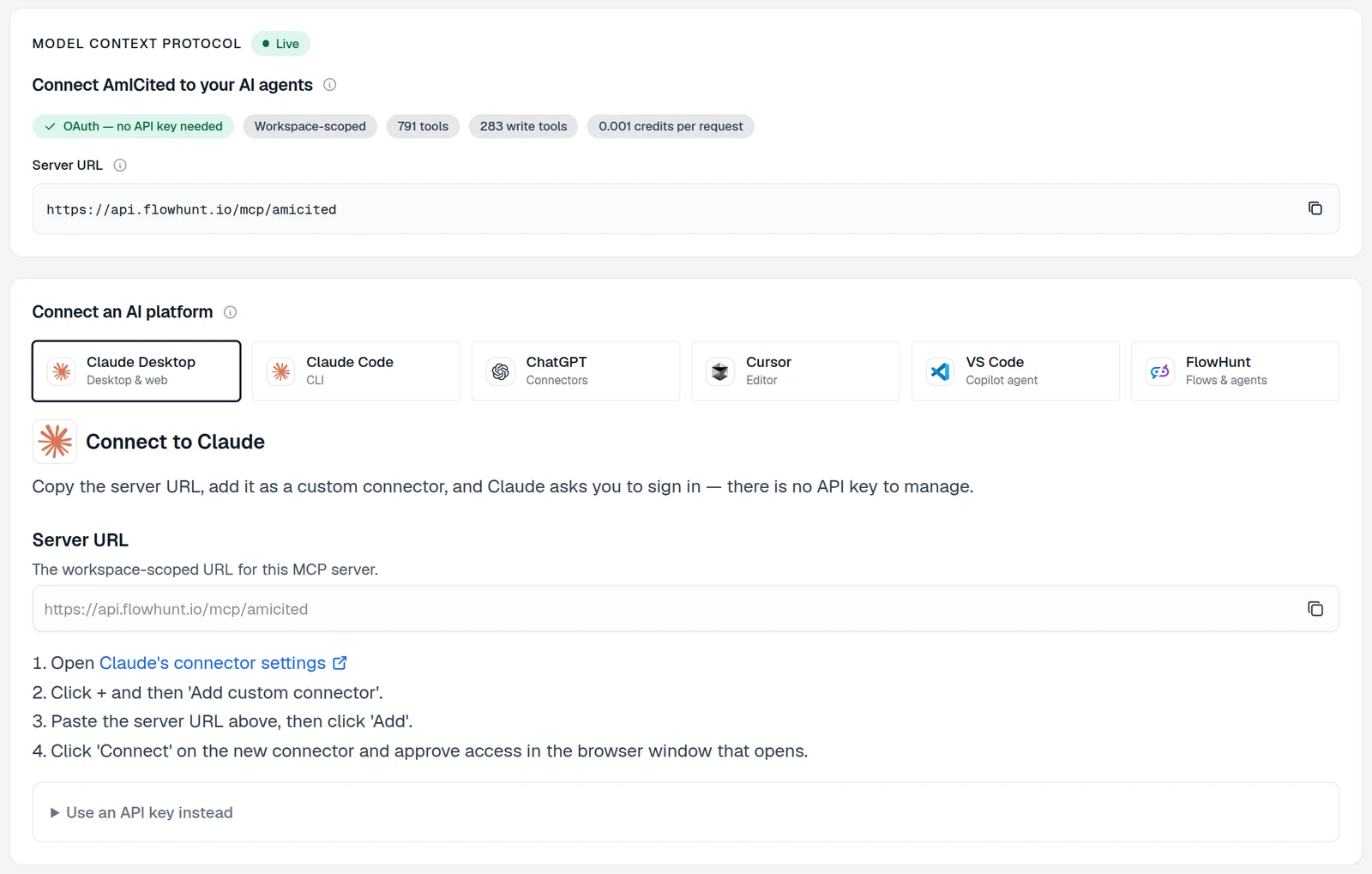
To connect Claude to Google Ads, Meta Ads, Microsoft Ads, LinkedIn Ads and ChatGPT Ads through AmICited, connect the ad accounts once in the app, then add one MCP server URL to your AI client: https://api.flowhunt.io/mcp/amicited. Sign-in is OAuth, and you pick the workspace on the consent screen.
Before you start (from the connect guide):
- A plan that includes MCP: the 7-day trial, Pro, Premium or Enterprise. Ad and store integrations start on Pro.
- Editor permissions or higher in the workspace, and a positive credit balance. Reads over MCP are free.
- The ad accounts connected under Data Sources by a workspace admin, as described in ad platforms. Google Ads imports keep about 13 months of history. For order-based answers, connect your store too.
Claude Code
Register the server once from your terminal:
claude mcp add --transport http amicited https://api.flowhunt.io/mcp/amicited
Then run /mcp inside Claude Code, choose Authenticate, and approve access in the browser window that opens.
Claude on the web and Claude Desktop
- Open Claude’s connector settings.
- Click +, then Add custom connector.
- Paste
https://api.flowhunt.io/mcp/amicitedand click Add. - Click Connect on the new connector, approve access and choose your workspace.
Connectors added on claude.ai are also available in Claude Desktop. In a chat, open the tools menu and make sure the AmICited connector is enabled.
ChatGPT and Cursor
- ChatGPT. Custom MCP connectors need Developer mode, available on paid plans. Turn it on, open Settings, then Apps & Connectors, add a custom connector with the same URL, and approve access.
- Cursor. On the app’s MCP page, select Cursor and click Add to Cursor, or add the server to
~/.cursor/mcp.json. Set the chat to Agent mode to use the tools.
Check it works
Ask: “List my AmICited domains.” The agent should call list_domains and return them by name. The server holds over 300 tools, so it shows your client a short list and the agent finds the rest with search_tools. To expose the ads areas directly, add a toolset filter to the URL, as the
toolsets guide explains:
https://api.flowhunt.io/mcp/amicited?toolsets=paid_ads,chatgpt_ads,eshop,seo_reports
paid_ads holds Google Ads, Microsoft Ads, Meta and LinkedIn reporting plus campaign management for the first three; chatgpt_ads holds ChatGPT Ads; eshop holds store analytics and the marketing mix model tools; seo_reports holds paid gaps and other organic analysis.
Prompts worth asking
A platform-only server can answer “what did Meta report?” The useful questions combine sources: what Meta claimed against what the store received, or what you pay for in search against what you already rank for. These prompts work only because ad spend, orders, Search Console and models sit on the same server.
Meta’s numbers against real orders (uses Attribution Reality and Profit-true ROAS):
For the last 30 days, compare Meta's reported purchases and purchase value
with the orders and net revenue that actually landed in our store, by day.
Then show revenue ROAS next to CM2 and CM3 ROAS, and tell me which days
look profitable on Meta's numbers but not on ours.
Paid search terms you could win organically (uses Paid Proven Gaps):
List the Google Ads and Microsoft Ads search terms we paid for that have
never had an organic impression on any connected engine. Rank them by
total spend and group them by intent, so I can see which need a page.
Paid against organic for the same query:
Take our 20 most expensive Google Ads search terms this quarter and show
our Search Console position and clicks for each. Flag terms where we
already rank in the top 3 organically.
Budget from the marketing mix model (Premium and Enterprise):
Using our current marketing mix model, where would the next 1,000 of spend
do the most, which channels does the model say to reduce, and which
verdicts are "unclear"? Include the credible intervals.
Cross-platform cost with caveats:
Compare cost per conversion for Google Ads, Microsoft Ads, Meta and
LinkedIn Ads last month using each platform's own numbers. Before ranking
them, list how each platform defines and attributes a conversion.
ChatGPT Ads against organic answers (uses the ChatGPT Ads Manager):
For the prompts we track, where do competitors run sponsored placements in
ChatGPT while we're cited organically? Show our own ChatGPT Ads spend on
the same topics.
Model and attribution outputs are estimates. A marketing mix model gives ranges, not exact contributions; the marketing mix model page explains how ours reports uncertainty. For Meta specifically, our post on Meta over-reporting conversions explains why the two numbers differ.
Read-only first
Connect read-only, and grant write access only for a specific task. On AmICited, an OAuth token with amicited:read can list and read everything; any tool that creates, edits or deletes refuses with a message naming the amicited:write scope. Reconnect with write access when you need it, and revoke it after.
Why it matters for ads:
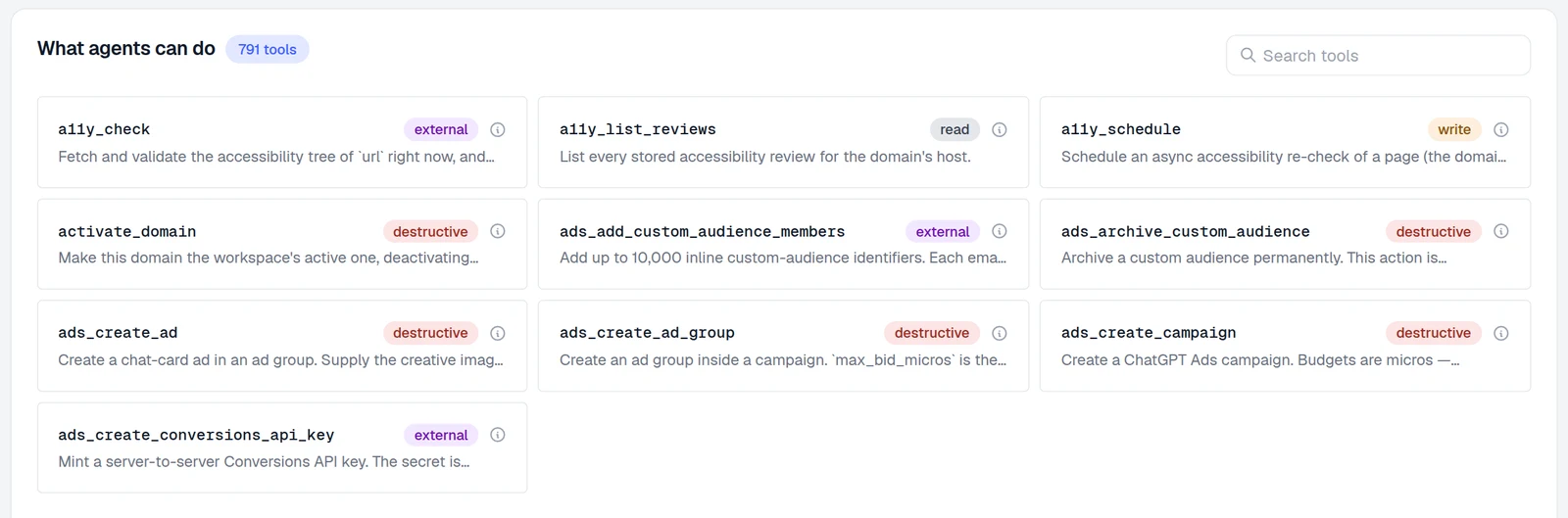
- Some tools spend money. The server labels tools by kind, and
destructivecovers tools that “delete data, or start and stop real ad spend,” such as changing a Google Ads or Meta campaign’s status or budget. - Defaults help, but don’t rely on them. Google Ads campaigns created through AmICited’s tool default to paused, and ChatGPT Ads campaigns are created paused until you activate them. Updates to live campaigns take effect immediately.
- AmICited has no draft queue. Writes aren’t held for approval inside AmICited. The protection is the separate write scope plus your client’s tool-approval prompt, so keep per-call approval on.
- API keys are full access. A workspace API key can run every tool, including writes. Prefer OAuth and keep keys out of shared repositories.
- Check before and after. Ask the agent to state the exact change, the campaign ID and the current value before applying it, then read Google Ads change history afterwards.
The same applies to every server in the comparison: read-only by default, small scoped changes, and a human approving every budget, bid, audience or status change.
Common connection issues
Most failed connections come down to plan, credits, permissions or a read-only token. The error message usually says which one. On AmICited, a refused connection names the reason, and a write refused for scope can’t be fixed by retrying.
- “Requires a Pro plan or above.” The workspace plan doesn’t include MCP.
- Credits. The balance is zero or negative; top up and retry.
- Rate limit. Calls are capped per workspace per hour: 120 on the trial, 600 on Pro, 2,000 on Premium, unlimited on Enterprise.
- Empty ad data. An empty report isn’t the same as an unconnected platform. Check that the ad account is connected and its import has finished.
- Write refused. The token has only
amicited:read. Reconnect and grantamicited:write.
For other servers, the usual culprits are a Google Cloud project without production API access, a Meta account without access to the ad account you selected, or a ChatGPT workspace where Developer mode hasn’t been enabled.
What to do now
- Decide read or write. For analysis, any read-only server will do; don’t grant write access you don’t need.
- Pick by platforms. One platform: start with the official server. Several: a hosted multi-platform server. Ads plus store and search: a server holding all three.
- Connect read-only and run one small query to confirm it works.
- Ask cross-source questions that the ad platforms can’t answer alone: claimed vs real orders, paid vs organic, model-based budget splits.
- Use writes for small, reviewed changes with per-call approval on, and check change history afterwards.
- Re-check vendors before relying on a feature. These servers change monthly; Google’s server gained write tools in November 2026.
For more agent workflows, see AmICited’s MCP recipes and our post on AI agent tools on websites. If Meta frequency is your next question, our guide to ad fatigue and audience saturation shows what to ask for.
The takeaway
Both Google and Meta now run official MCP servers, and they’re the safest way to give an AI assistant access to one platform. Google’s is self-hosted and can’t change campaigns; Meta’s is hosted and can, under admin rules. Third-party servers add more platforms and approval workflows. The questions that move budgets, such as whether Meta’s sales really happened or whether you’re paying for searches you already win, need a server that sees your orders and organic data too.
 LinkedIn