


How Does AmICited Auto-Detect Competitors?
Learn how AmICited detects brands cited alongside you in AI answers, then review or add competitors to your charts.

You don’t have to guess who your AI-search competitors are. AmICited finds them for you.
At a Glance
- AmICited watches which brands get named alongside yours in AI answers, instead of relying on a list picked from memory.
- The Detected competitors list on the Competitors page shows each brand’s share, mentions, and 30-day trend.
- A
newbadge flags fresh entrants so you can spot them at a glance. - Click + Add to move a brand into Tracked competitors, where it appears in your Share-of-voice chart.
- Review the list periodically; it regenerates from live prompt results, so it reflects the current competitive landscape automatically.
What is competitor auto-detection?
Competitor auto-detection is the practice of identifying your real rivals by watching who actually gets named alongside you in AI-generated answers, rather than by asking a marketing team to list “the competitors” from memory. In traditional competitor analysis , companies pick their rival set once, usually based on category peers, pricing tier, or who shows up in the same Google search results. That approach breaks down for AI search, because large language models don’t return ten blue links from a fixed index: they generate an answer and choose which brands to name inside it, and that choice can differ from what ranks on Google.
This is why AI competitive intelligence has become its own discipline. A brand can rank well organically yet be almost invisible in ChatGPT, Perplexity, Gemini, or Google AI Overviews, while a smaller competitor with better structured content, stronger third-party validation, or more citation-worthy pages gets named constantly. The only reliable way to know who you’re actually up against in AI answers is to look at co-occurrence: which brands appear in the same responses as yours, for the same prompts, over time. That’s the basis of an AI competitor audit : systematically capturing who gets cited next to you across a representative set of queries, then separating genuine rivals from noise (aggregator sites, review platforms, or unrelated brands that happen to co-occur for unrelated reasons).
Once you know who your real AI-search rivals are, the natural next step is measuring how you stack up against them. That’s where metrics like share of voice come in: the proportion of citations in a given category or prompt set that go to your brand versus each competitor. Share of voice turns a raw list of names into a comparative, trackable number: instead of “we’re mentioned sometimes,” you get “we hold 22% of citations in this category, versus 31% for our closest rival.” Tracking that number over time, for a stable set of competitors, is what turns competitor detection from a one-off curiosity into an ongoing competitive AI benchmarking practice.
Manual versions of this exercise exist (you can run prompts by hand in ChatGPT or Perplexity and note which brands come up), but it doesn’t scale. AI answers vary by phrasing, by day, and by platform, so a one-time manual check only ever captures a snapshot. Automated detection solves that by running the same discipline continuously, across every tracked prompt, and surfacing the pattern for you instead of asking you to spot it yourself.
Where to find it in AmICited
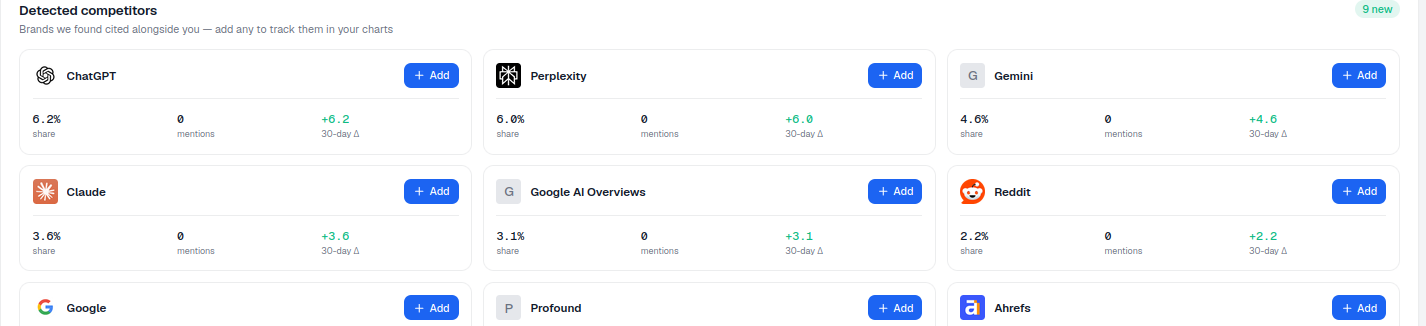
AmICited applies this idea directly inside your account. The Detected competitors list surfaces the brands that keep showing up alongside you in AI answers, ready for you to add to your charts. Scroll down the Competitors page to Detected competitors, subtitled “Brands we found cited alongside you — add any to track them in your charts.” A badge shows how many are new (e.g. 9 new), so you can spot fresh entrants to your competitive set at a glance without re-scanning the whole list every time.
How auto-detection works
As AmICited runs your tracked prompts, it records every brand named in the answers: this is the same underlying AI citation data that powers your own visibility metrics, just aggregated across every brand that appears, not only yours. Brands that appear frequently alongside you (competing for the same citations, in the same prompts, across the same AI platforms) are surfaced here automatically, without you having to define a competitor list up front.
Each card in the Detected competitors list shows:
- The brand and its icon, so you can identify it instantly.
- Its share of category answers: a lightweight, at-a-glance read on how often that brand is cited relative to the rest of the field for your tracked prompts.
- Its mentions count: the raw volume behind that share, useful for judging whether a brand is a marginal co-occurrence or a consistent presence.
- A 30-day Δ trend, showing whether that brand’s presence is rising, falling, or holding steady over the past month.
- An + Add button to start tracking it as a full competitor.
Because this list regenerates from live prompt results rather than a static configuration, it reflects the current state of the AI-search landscape for your category. If a new entrant starts getting cited for your prompts, or an established player’s presence fades, the list updates to match. You don’t need to remember to go back and manually re-audit your competitor set.
What it measures
The Detected competitors list is not a popularity contest or a generic “top brands in your industry” ranking. It is scoped specifically to co-citation with you. A brand only appears here because it was named in the same AI answers as your brand, for the prompts you’re already tracking. That scoping matters: it means the list reflects your actual prompt coverage and your actual category, not a broad industry list pulled from somewhere else. If you track prompts across several distinct use cases, you may see a wider or narrower competitor set depending on how much overlap there is between the brands cited in each.
The share and mentions figures give you two different lenses on the same underlying data. Share tells you how a competitor’s citations compare proportionally to everyone else showing up in the same answers: useful for quickly ranking detected brands by relative prominence. Mentions gives you the raw count, which helps you judge statistical confidence: a brand with a high share but very few total mentions may just be an outlier in a small sample, while a brand with consistent mentions across many prompts is a more dependable signal of a genuine rival. The 30-day Δ adds a time dimension, letting you catch a competitor that’s gaining ground in AI answers before it shows up as a problem in your overall AI visibility numbers.
How to use it
- Review the list. Not every detected brand is a true competitor: some may be platforms, marketplaces, review sites, or unrelated names that happen to co-occur in the same answers for reasons that have nothing to do with direct competition.
- Add the real ones. Click + Add on the brands you genuinely compete with; they move into Tracked competitors and appear in your Share-of-voice chart, where their citation performance is measured alongside yours on an ongoing basis rather than as a one-off snapshot.
- Re-check periodically. New detections appear as your prompt set and the AI landscape evolve. The
newbadge flags them, so a quick glance is enough to catch a rival before it becomes an established fixture in your answers.
Treat this list as a discovery tool, not a final verdict. Its job is to widen your view of who’s actually contesting your citations; deciding which of those brands matter enough to benchmark against is still a judgment call informed by your market knowledge. Once you’ve added the ones that count, the value compounds: your Share-of-voice chart becomes a live comparison against the rivals who are actually in the room, not a guess based on last year’s competitor deck.
Detection finds the candidates; adding them is how you choose which rivals to measure yourself against. From there, the natural next step is turning that competitive picture into action: using the gaps you can see in your Share-of-voice chart to prioritize what to fix. If a detected competitor is consistently out-citing you on a cluster of prompts, that’s a signal worth investigating with a structured content gap analysis for AI search visibility , which helps translate “they’re cited more than us here” into a concrete list of pages or topics to build. And if you’re still deciding how much of your GEO program should revolve around competitor tracking versus other visibility work, it’s worth reading how AmICited’s AI rank tracker and Share-of-voice tooling fit together as part of a broader monitoring setup, a question covered in more depth in the guide to choosing an AI visibility monitoring platform .
Frequently asked questions
It's a list on the Competitors page showing brands that keep getting cited alongside you in AI answers for your tracked prompts. Each card shows the brand's share, mentions count, and 30-day trend, with a "new" badge flagging fresh entrants so you can spot rivals you may not have listed yourself.
As your tracked prompts run, AmICited records every brand named in the AI answers, not just yours, and surfaces brands that appear frequently alongside you in the same prompts and platforms. It's based purely on real co-citation, not a category list or industry guess, so it reflects who you're actually up against in AI search.
Detected competitors is an automatically generated candidate list based on who gets cited next to you. Tracked competitors is the curated set you've explicitly added by clicking + Add; only those brands appear in your Share-of-voice chart and get measured against you on an ongoing basis.
Share shows a brand's proportion of citations relative to everyone else in the same answers, while mentions is the raw count behind that share. A high share with very few mentions can just be an outlier in a small sample, whereas consistent mentions across many prompts signal a genuine, dependable rival.
More tutorials in this section
 How to Read Your Competitors Overview Stats
Review tracked competitors, detected brands, rank, share and category leader stats on the AmICited …
Read guide →
How to Read Your Competitors Overview Stats
Review tracked competitors, detected brands, rank, share and category leader stats on the AmICited …
Read guide →
 Compare AI Share of Voice with Competitors
Compare your share of AI answers with competitors over time using the AmICited Competitors chart.
Read guide →
Compare AI Share of Voice with Competitors
Compare your share of AI answers with competitors over time using the AmICited Competitors chart.
Read guide →
 How to Manually Add a Competitor
Add a competitor by URL in AmICited to track its domain and find keywords to monitor as prompts.
Read guide →
How to Manually Add a Competitor
Add a competitor by URL in AmICited to track its domain and find keywords to monitor as prompts.
Read guide →Ready to put it into practice?
Free check · 7-day trial · card required