


How to Manually Add a Competitor
Add a competitor by URL in AmICited to track its domain and find keywords to monitor as prompts.

Auto-detection catches the brands cited alongside you, but sometimes you already know a rival you want to watch, before an AI model ever mentions them in the same breath as you.
Quick Steps
- Click + Add Competitor on the Competitors page to open the tracking dialog.
- Enter the competitor’s URL, the primary marketing domain you want AmICited to track.
- (Optional) Click Get top keywords to pull the search terms driving traffic to that domain.
- Confirm the detected domain, brand name, country, tag, and schedule.
- Click Add competitor: the domain gets tracked, and any selected keywords become new monitored prompts.
What is competitor tracking in AI search?
Competitor tracking, in the context of AI search visibility , means monitoring how often a rival brand gets cited by AI assistants (ChatGPT, Perplexity, Gemini, and Google AI Overviews) across a defined set of prompts, and comparing that citation frequency against your own. It’s the AI-era equivalent of tracking a competitor’s keyword rankings in traditional SEO, except the unit being measured isn’t a ranking position on a results page: it’s whether and how often a brand is named as a source when an AI model answers a question.
This matters because generative engine optimization (GEO) works differently from classic SEO. A model doesn’t return ten blue links you can eyeball against a competitor’s; it synthesizes an answer and may cite one brand, several, or none. Two brands can rank identically in Google and still get cited at wildly different rates by an AI model, because the model is weighing signals like content structure, source authority, and how directly a page answers the underlying question, not just backlinks and on-page keywords. Without a rank-tracking system built for this, you have no way to see that divergence.
Share of voice is the metric that makes competitor tracking actionable: it’s the percentage of citations across your monitored prompts that go to your brand versus each tracked competitor. If a rival’s share of voice is climbing on a set of prompts you also track, that’s an early signal they’re winning ground in AI answers before it shows up in referral traffic or leads. AmICited surfaces this by watching a fixed prompt set over time and recording every citation, giving you a competitive AI benchmarking view rather than a one-off snapshot.
Most competitors get onto your radar automatically: AmICited detects brands that get cited alongside you across your monitored prompts and surfaces them as candidates to track. But auto-detection only surfaces rivals that already co-occur with you often enough in AI answers to be noticed. Add competitor closes that gap: it lets you track any competitor by URL, on your own initiative, and even pull the keywords they rank for into your monitored prompts.
Where to find it
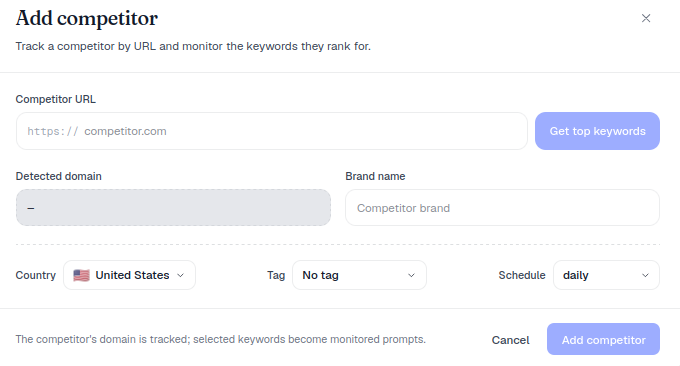
Click + Add Competitor in the top-right of the Competitors page. A dialog opens: “Track a competitor by URL and monitor the keywords they rank for.”
Step by step
- Enter the competitor’s URL in the Competitor URL field. This is the domain AmICited will track going forward: it’s what gets checked against every citation AI models return for your monitored prompts, so use the competitor’s primary marketing domain rather than a regional subdomain or a product-specific URL, unless that narrower scope is exactly what you want tracked.
- (Optional) Click Get top keywords to pull the keywords that competitor ranks for. AmICited looks up the search terms driving traffic to that domain and surfaces them as candidates: these are the terms real searchers already associate with the rival, which makes them a strong starting point for prompt tracking rather than prompts you’d have to guess at from scratch.
- Confirm the details: the Detected domain and an editable Brand name. The brand name is what will label this competitor everywhere else in the product: in charts, in citation lists, and in any comparison views, so it’s worth setting it to whatever name you’d want on a slide.
- Set the Country, Tag and Schedule for any prompts created from this competitor. Country determines which AI market the new prompts get checked in; tag lets you group these prompts alongside others in the same campaign or initiative; schedule controls how often AmICited re-checks them for citations.
- Click Add competitor. As the dialog notes, “the competitor’s domain is tracked; selected keywords become monitored prompts.”
What it measures
Once a competitor is added, AmICited tracks two related but distinct things. First, it watches for that competitor’s domain across every response your existing monitored prompts generate, so if you already track “best project management software,” and the new competitor gets cited in that answer, it now shows up in your competitor comparison for that prompt. Second, if you pulled in keywords during setup, those become their own monitored prompts, checked on the schedule you set, expanding your prompt library specifically around the territory that competitor already owns.
Together, this gives you a fuller picture for AI competitive intelligence: not just whether a rival occasionally gets mentioned, but how consistently, on which prompts, and whether that’s growing or shrinking over time. It’s the difference between anecdotally noticing a competitor in an AI answer once and having a system that flags the pattern.
When to use it
- For known rivals AmICited hasn’t auto-detected yet: a competitor you’re aware of strategically but who hasn’t co-occurred with you often enough in AI answers to trigger automatic detection.
- To seed prompts from a competitor’s keyword footprint, expanding your tracked set around their strengths. This is a fast way to build out a prompt library around a specific rival’s territory instead of drafting prompts one by one.
- For niche competitors that don’t co-occur with you often enough to be detected but still matter to your strategy: smaller or regional players, emerging entrants, or a competitor you’re specifically being asked about internally.
- When entering a new market or vertical, where you already know the incumbent brand and want visibility data on them from day one rather than waiting for detection to catch up.
- Before a sales or renewal conversation, when you want a documented, dated view of how a specific named competitor is performing in AI answers, not just a general sense of the landscape.
Once added, the competitor appears in Tracked competitors and in your Share-of-voice chart, right alongside the ones you added from the detected list. From there, they’re treated identically to auto-detected rivals: the same charts, the same citation breakdowns, the same historical tracking. There’s no second-class tier for manually added competitors.
Keeping manually added competitors useful over time
A competitor you add manually today is only as useful as the maintenance you give it. Because the keywords pulled in at setup reflect that rival’s ranking footprint at one point in time, it’s worth revisiting the competitor periodically (especially after they launch a new product line, rebrand, or expand into a market you also serve) and pulling fresh keywords or adjusting the country and tag settings so the tracked prompts stay aligned with where the rivalry is actually happening. This is particularly relevant if you’re running AI rank tracking across a large prompt set: a stale competitor entry with outdated keywords will quietly under-represent a rival that has since moved into new territory, while a well-maintained one keeps surfacing exactly where you’re losing or winning citations.
It’s also worth being deliberate about which competitors you add manually versus which you let auto-detection surface. Auto-detection is a good signal of who AI models already associate with you; manual addition is for the rivals you know matter even if the models haven’t caught up yet. Using both together (rather than relying on one exclusively) gives a more complete view for teams running competitor analysis as an ongoing discipline instead of a one-time audit.
If you’re setting this up for the first time, it helps to think about which prompts actually trigger a mention of that competitor in the first place. Understanding which prompts trigger AI brand mentions for a rival will make your keyword selection in step two far more targeted, rather than importing every keyword the tool surfaces regardless of relevance.
Where to go next
Manually added competitors are most valuable once they feed into the metrics you’re already watching: particularly AI share of voice , which turns a pile of individual citations into a single trend line you can report on. If you manage visibility across multiple client accounts, this same workflow scales cleanly through AmICited for agencies , where tracking a client’s named competitors by URL is often the fastest way to stand up a new account’s competitor set before auto-detection has had time to run. And if you’re still deciding how to prioritize which rivals to track first, reading up on how to measure AI search visibility with the right metrics and KPIs will help you choose competitors whose keyword footprint actually overlaps with the prompts that matter to your business, rather than tracking a rival for its own sake.
Frequently asked questions
Auto-detection surfaces brands AI models already cite alongside you across your monitored prompts, so it only catches rivals that co-occur with you often enough to be noticed. Manually adding a competitor lets you track any rival by URL on your own initiative, even one that hasn't shown up in an AI answer yet, such as a new entrant or a niche player you know matters.
It can, but only if you choose to. When you add a competitor's URL, you can optionally click "Get top keywords" to pull the search terms driving traffic to their domain. Any keywords you select become new monitored prompts on the country, tag and schedule you set, alongside the domain tracking itself.
Use the competitor's primary marketing domain rather than a regional subdomain or a product-specific URL, unless that narrower scope is exactly what you want tracked. This is the domain AmICited checks against every citation AI models return for your monitored prompts, so a too-narrow URL can undercount how often that rival actually gets cited.
No. Once added, a manually tracked competitor appears in Tracked competitors and your Share-of-voice chart exactly like an auto-detected rival, with the same charts, citation breakdowns and historical tracking. There's no second-class tier: the only difference is how the competitor got onto your radar in the first place.
More tutorials in this section
 How to Read Your Competitors Overview Stats
Review tracked competitors, detected brands, rank, share and category leader stats on the AmICited …
Read guide →
How to Read Your Competitors Overview Stats
Review tracked competitors, detected brands, rank, share and category leader stats on the AmICited …
Read guide →
 How Does AmICited Auto-Detect Competitors?
Learn how AmICited detects brands cited alongside you in AI answers, then review or add competitors to your …
Read guide →
How Does AmICited Auto-Detect Competitors?
Learn how AmICited detects brands cited alongside you in AI answers, then review or add competitors to your …
Read guide →
 Compare AI Share of Voice with Competitors
Compare your share of AI answers with competitors over time using the AmICited Competitors chart.
Read guide →
Compare AI Share of Voice with Competitors
Compare your share of AI answers with competitors over time using the AmICited Competitors chart.
Read guide →Ready to put it into practice?
Free check · 7-day trial · card required