


How to See Competitor Share of Voice
Compare your AI citation share with competing domains using the Competitor Share of Voice dashboard widget.
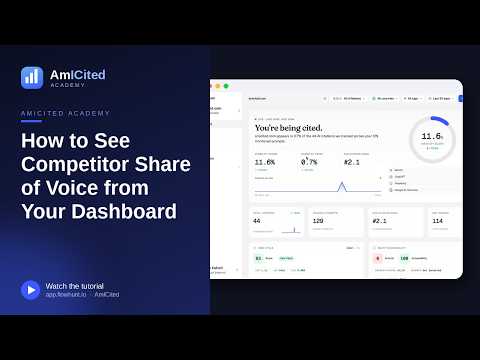
The Competitor share of voice widget takes your single Share of Voice number and shows it in context: as one bar among all the other domains competing for citations on your prompts. It’s the fastest way to see who’s ahead of you.
Quick Steps
- The widget lists every cited domain for your tracked prompts, with your you badge at the top.
- Find it by scrolling down the Dashboard to the Competitor share of voice card.
- Read the gap between your bar and the top bars as your opportunity size, and watch the trend arrows to see who’s gaining.
- Pick the nearest domain above you as your next target, then click Compare → for the full breakdown.
- Revisit it on a cadence: share of voice shifts as engines update retrieval and competitors publish new content.
What is AI share of voice?
AI share of voice is the percentage of all citations, across a defined set of prompts, that go to a specific domain. When you ask ChatGPT, Perplexity, Gemini, or Google AI Overviews a question in your category, the answer typically cites several sources: your site, maybe two or three competitors, a review site, a forum thread, sometimes the AI vendor’s own documentation. Add up every citation across every tracked prompt, group them by domain, and each domain’s slice of that total is its share of voice.
This is different from a citation count in isolation. Knowing you were cited 40 times last month tells you very little on its own: 40 citations out of 45 total mentions in your space is dominant; 40 out of 4,000 is a rounding error. Share of voice fixes that by putting your number on the same scale as everyone else’s, so “0.8%” or “12%” actually means something. It’s the AI-search equivalent of market share: not how many customers you have, but what fraction of the whole market is yours.
Share of voice matters for generative engine optimization because AI answer engines behave differently from traditional search results pages. A Google SERP shows ten blue links, and you can rank #1 while a competitor ranks #2, both visible, both clickable. An AI-generated answer is a single synthesized response, and it might cite only three or four sources out of dozens that were candidates. If a competitor’s domain shows up in that citation set and yours doesn’t, you don’t just rank lower, you’re effectively invisible for that query. Tracking share of voice is how you quantify that risk before it shows up in lost pipeline.
It’s also a competitive, not absolute, metric. Your share of voice will always sum to 100% across the whole cited landscape, including domains you’d never think to compete with directly, like Reddit threads, review aggregators, or even the AI platforms’ own properties. That’s a deliberate feature of the metric, not noise: it tells you exactly who and what is winning the attention that would otherwise go to you, whether that’s a direct competitor or an entirely different kind of source.
Where to find it
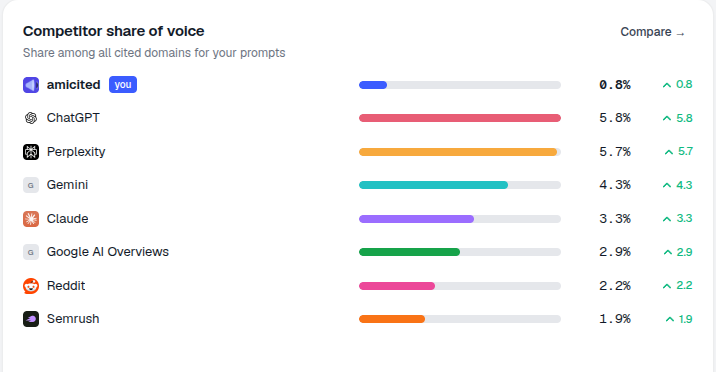
Scroll down the Dashboard to the Competitor share of voice card, subtitled “Share among all cited domains for your prompts.” A Compare → link opens the full Competitors view, where the same underlying data can be filtered, broken down, and tracked over time in more depth.
What it shows
Each row is a cited domain with a colored bar, its share percentage, and a trend arrow. Your brand appears at the top with the you badge (in the example, amicited 0.8%), followed by the other domains taking share, such as ChatGPT 5.8%, Perplexity 5.7%, Gemini 4.3%, Claude 3.3%, Google AI Overviews 2.9%, Reddit 2.2%, Semrush 1.9%.
The percentages are each domain’s slice of all citations across your tracked prompts, so they show the competitive landscape at a glance, including where your own share sits relative to everyone else. Notice that the list isn’t limited to obvious head-to-head competitors: AI platforms citing their own documentation, community sites like Reddit, and industry tools like Semrush all compete for the same citation real estate. That’s normal, and it’s useful: it tells you whether your biggest obstacle is a direct rival or a structural one, like AI engines defaulting to their own sources for certain question types.
How to read it
- The gap between your bar and the top bars is your opportunity size. A small
youbar under several larger ones means the conversation is being won by other sources, and the wider the gap, the more prompts you’re likely losing outright rather than just ranking lower on. - The trend arrows show who’s gaining and who’s fading, so you can see whether you’re closing or losing ground. A domain with a rising arrow and a share above yours is worth watching closely, it suggests something about its content or structure is increasingly favored by the AI engines’ retrieval process, and that pattern is likely to keep compounding if left unaddressed.
- Consistency across the field also tells a story. If most of the top domains are non-competitor sources (forums, aggregators, the AI platforms themselves), that’s a sign the category still lacks a single authoritative brand answer, which is an opening, not a dead end.
What it measures
The widget is a snapshot of AI competitive intelligence distilled into one chart: instead of manually testing prompts across four different AI assistants and tallying who gets mentioned, AmICited aggregates that work into a single, always-current comparison. Because it’s scoped to your tracked prompts (the actual questions your buyers ask), it avoids the trap of generic industry benchmarks that don’t reflect your specific competitive set or use case.
How to use it
- Identify who to study. The domains above you are the ones to analyze. Open their cited pages to understand why they’re being pulled into answers. Look for patterns: are they answering the question more directly, structuring content in a way that’s easier to extract, or simply publishing more comprehensively on the topic?
- Set a target. Pick the nearest domain above you and aim to overtake its share. Treat it as a rolling target: once you close that gap, the next domain up becomes the new benchmark.
- Click Compare → to open the full Competitors section, where you can add competitors manually, compare share-of-voice trends over time, and break the comparison down by AI engine. This is especially useful when a competitor’s overall share is being driven by dominance on a single platform, like Perplexity or Google AI Overviews, rather than an even spread.
- Revisit it on a cadence, not just once. Share of voice shifts as AI engines update their retrieval behavior and as competitors publish new content, so a one-time snapshot only tells you where things stood on a given day; the trend arrows are what turn it into an early-warning system.
For teams managing this across multiple client accounts, the same logic scales: each client gets its own share-of-voice view against its own competitive set, which is part of why agencies running AI visibility programs for several brands at once tend to lean on the Competitors view rather than manual prompt testing per client.
Where to go next
The Competitor share of voice widget is a starting point, not the whole picture. Once you know who’s ahead of you and by how much, the next step is understanding why, which means digging into the citation sources and content patterns behind each competitor’s number. If you want a deeper framework for that analysis, analyzing competitor AI visibility walks through the methodology in more detail, and how to track competitor AI mentions covers the mechanics of monitoring specific rivals across ChatGPT, Perplexity, and Gemini individually. If you’re still building out your broader measurement approach, it’s worth pairing this widget with the rest of the AI search visibility metrics that matter: citation rate, sentiment, and position all add context that share of voice alone doesn’t capture. And if closing the gap with a competitor above you becomes a recurring priority rather than a one-off project, the AI visibility and AI rank tracker features in AmICited are built to turn this widget’s snapshot into an ongoing, trackable program rather than a metric you check once and forget.
Frequently asked questions
It's a widget lower on the Dashboard that lists every domain cited across your tracked prompts as a ranked bar chart, with your own you-badged bar included, so you can see your share of citations in context against every other domain competing for the same attention, not as an isolated number.
Share of voice always sums to 100% across the whole cited landscape, and AI engines routinely cite platforms, review sites, forums, and even their own documentation alongside real rivals. Seeing all of them is deliberate: it shows you whether your biggest obstacle is a direct competitor or a structural one, like an engine defaulting to its own sources.
Read the gap as your opportunity size: a small you bar under several larger ones means other sources are winning the conversation, and the wider the gap, the more prompts you're likely losing outright. Pick the nearest domain above you as a concrete first target, then click Compare to open the full Competitors breakdown.
Revisit it on a regular cadence rather than once. Share of voice shifts as AI engines update their retrieval behavior and as competitors publish new content, so a one-time snapshot only tells you where things stood on a given day. The trend arrows next to each domain are what turn it into an early-warning system for who's gaining ground.
More tutorials in this section
 How to Read Your Visibility Score
Learn what the AmICited Visibility Score measures and how its gauge and platform breakdown show your AI …
Read guide →
How to Read Your Visibility Score
Learn what the AmICited Visibility Score measures and how its gauge and platform breakdown show your AI …
Read guide →
 How to See Your Share of Voice
Find your AmICited Share of Voice and learn how it compares with your Visibility Score.
Read guide →
How to See Your Share of Voice
Find your AmICited Share of Voice and learn how it compares with your Visibility Score.
Read guide →
 How to Use the Domain Semantic Map
Explore the AmICited Domain Semantic Map to find clusters and topic gaps across prompts, fan-out queries and …
Read guide →
How to Use the Domain Semantic Map
Explore the AmICited Domain Semantic Map to find clusters and topic gaps across prompts, fan-out queries and …
Read guide →Ready to put it into practice?
Free check · 7-day trial · card required