


How to See Every Brand in One AI Response
See every brand named in an AI response, listed in the order the engine mentioned them.

Every time ChatGPT, Perplexity, Gemini, or Google AI Overviews answers a question relevant to your category, it doesn’t just cite one brand, it typically names several, in a specific order, with some brands framed as the obvious answer and others mentioned almost in passing. Seeing that full lineup, for a single response, is one of the most direct ways to understand where you actually stand.
Quick Steps
- The Brands mentioned list shows every brand named in one specific AI response, in the order the engine mentioned them.
- Find it beside each response in the Latest responses by provider panel on a prompt detail page.
- Order matters: brands named earlier are usually treated as more central to the question.
- Check whether you’re on the list at all, see who you’re grouped with, and switch engines to compare brand lists.
- Track the same prompt over time to catch a competitor climbing the order or a new brand entering the answer.
What is a brand mention in an AI response?
A brand mention is any place an AI-generated answer names a company, product, or organization in its response text, with or without a hyperlink back to that brand’s website. This is different from a citation in the strict sense, which usually refers to a linked source the model drew on while composing the answer. A brand can be mentioned by name without being linked, and it can be linked (cited) without being the brand the user actually asked about. Both matter, but a mention is the more fundamental unit: it’s proof the model associated your name with the topic at all. You can read a fuller breakdown of how AI citation differs from a plain mention if you want the underlying mechanics.
When a generative engine composes an answer, it draws on a mix of its training data, retrieved web content, and (for retrieval-augmented systems like Perplexity or AI Overviews) live search results. It then synthesizes that material into prose, and in doing so it has to decide, implicitly, which entities are relevant enough to name. That decision isn’t random: models tend to lead with brands they treat as canonical or dominant for the query, then add secondary names for comparison, nuance, or completeness. This is why order matters almost as much as presence: the brand named first is doing different work in the answer than the brand named fifth, even though both technically got a brand mention .
This matters for AI search visibility because a single response is the atomic unit of what a real user actually sees. Aggregate metrics like share of voice are essential for spotting trends across hundreds of prompts and responses, but they can hide the texture of any one answer: who you’re grouped with, whether you’re the headline name or an afterthought, and how that framing shifts from engine to engine. Understanding both levels, the single response and the aggregate, is core to doing generative engine optimization well, because you’re optimizing for how models talk about you in specific contexts, not just how often your name appears somewhere in a wall of text.
It also matters competitively. The other names in that list are, in effect, the AI’s own shortlist for the question your prompt represents. If you’re absent from a response where three competitors appear together, that’s a co-citation pattern worth studying: it tells you which brands the model has learned to associate with each other for this topic, and whether you’ve been left out of that cluster entirely. You can read more about how co-citation patterns form and why they’re sticky once established.
Where to find it
Alongside each AI answer, the Brands mentioned list shows every brand named in that specific response, in the order the engine mentioned them. It’s the per-answer companion to the prompt’s overall Brand mentions leaderboard. In the Latest responses by provider panel on a prompt detail page, the Brands mentioned (N) list sits beneath the Sources cited list, to the right of each response.
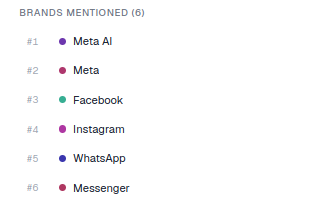
#1, #2) were named earliest in the answer, which usually signals the ones the engine treats as most central to the question.Because this list sits at the response level, it refreshes with every new run of a prompt. If AmICited tracks a prompt daily or weekly, you can watch this exact list change over time for the same question: a competitor climbing from #4 to #1, or a new brand entering the answer for the first time, is a concrete, dated signal rather than a vague impression that “things feel different lately.”
What it shows
- A ranked list of every brand named in this one answer (e.g.
#1 Meta AI,#2 Meta,#3 Facebook…). - A colored dot per brand matching the highlights in the response text, so you can find each mention in the answer.
- The heading count (e.g. Brands mentioned (6)) tells you how crowded that answer is.
The ranking order isn’t a score AmICited calculates after the fact. It reflects the literal sequence in which the AI engine’s own generated text named each brand, first to last. That’s deliberate: it preserves the AI’s actual framing rather than re-sorting brands by some external popularity measure, so what you see is exactly what a real user reading that answer would encounter, in the same order.
The count in the heading is worth paying attention to on its own. A response with two brands mentioned is a very different competitive situation than one with eight. In a two-brand answer, being absent or being #2 both carry a lot of weight; there’s nowhere to hide in a crowded field, and no room to be dismissed as one of many. In an eight-brand answer, being named at all may be a reasonable outcome even if you’re not first, since the model is clearly treating the category as broad and comparison-heavy.
How it differs from the Brand mentions leaderboard
- This list is scoped to a single response: who got named in that one answer, in mention order.
- The Brand mentions leaderboard aggregates across all answers to the prompt, with shares and average positions.
Read them together: the leaderboard for the big picture, this list to see exactly how one engine framed its answer. A brand can have a strong leaderboard position built on consistent #2 or #3 finishes across many responses, while another brand’s leaderboard position comes from occasionally being #1 and otherwise missing entirely. Only the per-response list distinguishes those two very different patterns, which is why it’s worth checking both rather than treating the leaderboard as the complete picture on its own. If you’re specifically trying to understand which prompts are producing these mentions in the first place, it helps to find which prompts trigger AI to mention your brand
so you can prioritize where to focus.
How to use it
- Check whether you’re on the list. Absent means this answer didn’t name you at all: no ranking position, no partial credit, simply not part of the AI’s answer to that question at that moment.
- See who you’re grouped with. The other brands named are your direct context for this question. If the same two or three competitors keep appearing together across multiple responses, that’s the peer set the AI has effectively assigned to your category, whether or not you agree with it.
- Switch engines to compare which brands each one chooses to mention. ChatGPT, Perplexity, Gemini, and Google AI Overviews are trained differently and retrieve from different sources, so the same prompt can produce meaningfully different brand lists. A name that leads in one engine’s answer can be missing entirely from another’s.
- Track the same prompt over time. Because the list regenerates with each tracked run, a brand moving up or down the order, or a new name appearing for the first time, is a dated event you can tie back to something you changed: new content published, a PR mention picked up, or a competitor’s launch.
- Use the colored dots to read the answer itself, not just the list. Seeing exactly where in the response text a brand was named, early framing versus a closing aside, tells you more about how the AI actually thinks of that brand than the ranking number alone.
This is also a useful check when you’re deciding whether to invest more in a given topic. If your brand consistently shows up at #1 for a prompt, that’s confirmation the current strategy is working there. If you’re consistently absent or buried at #5 or lower on a prompt that clearly matters to your business, that’s a strong candidate for the kind of gap analysis covered in analyzing competitor AI visibility
, where the goal is figuring out what the leading brands are doing (in their content, their site structure, or their public mentions elsewhere) that’s earning them the top slot.
It’s worth remembering that this single-response view is one layer of a larger measurement problem. An individual AI answer can vary slightly even for the identical prompt run twice, because generative models aren’t fully deterministic, which is exactly why AmICited tracks prompts repeatedly rather than relying on a single snapshot, and why the response-level list is meant to be read alongside the aggregated leaderboard rather than instead of it. If you want the mechanics of how a position in an answer gets tracked and scored over repeated runs, the overview of the AI rank tracker covers how citation rank and mention order are recorded across engines and history.
Where this goes next depends on what the list tells you. If you’re consistently present but rarely first, the fix usually lives in your content and entity signals: making your brand the unambiguous, best-supported answer for that specific prompt rather than a plausible mention among several. If you’re consistently absent, the more useful move is treating this as an AI visibility gap to close deliberately: identify the prompts where you’re missing, study who does get mentioned there, and work backwards to what’s earning them that place in the answer. Agencies managing this across many client brands at once will find the same per-response detail scales into portfolio reporting through the tools built for agency AI visibility workflows , where the question isn’t just “are we mentioned” for one brand but for dozens, across every tracked prompt and engine at once.
Frequently asked questions
It's a ranked list beside each individual AI response on a prompt detail page, showing every brand named in that one specific answer, in the exact order the engine mentioned them. It sits beneath the Sources cited list in the Latest responses by provider panel and refreshes with every new run of the prompt.
The ranking reflects the literal sequence in which the AI's generated text named each brand, first to last, not a score AmICited calculates. Models tend to lead with the brand they treat as canonical for the question, so a brand at #1 is doing more central work in the answer than one named fifth, even though both technically got a mention.
The Brands mentioned list is scoped to a single response: who got named in that one answer, in mention order. The Brand mentions leaderboard aggregates across all answers to the prompt, with overall shares and average positions. Read them together: the leaderboard for the big picture, this list for how one specific engine framed its answer.
It means that particular answer didn't name you at all, no ranking position and no partial credit. Because the list regenerates on every tracked run, being absent from one response isn't necessarily permanent, but if you're consistently missing across repeated runs of the same prompt, that's a real AI-visibility gap worth investigating.
More tutorials in this section
 How to Use the Fan-Out Queries Heatmap
Explore related fan-out queries for a prompt and see how well cited pages match them in AmICited’s heatmap.
Read guide →
How to Use the Fan-Out Queries Heatmap
Explore related fan-out queries for a prompt and see how well cited pages match them in AmICited’s heatmap.
Read guide →
 How to Use the Semantic Scatter Map
Explore the AI semantic scatter map to compare prompts, fan-out queries, cited URLs and your page content.
Read guide →
How to Use the Semantic Scatter Map
Explore the AI semantic scatter map to compare prompts, fan-out queries, cited URLs and your page content.
Read guide →
 Read AI Responses to a Tracked Prompt
Read the latest AI response for a tracked prompt, including the brands and sources detected by AmICited.
Read guide →
Read AI Responses to a Tracked Prompt
Read the latest AI response for a tracked prompt, including the brands and sources detected by AmICited.
Read guide →Ready to put it into practice?
Free check · 7-day trial · card required