


Read AI Responses to a Tracked Prompt
Read the latest AI response for a tracked prompt, including the brands and sources detected by AmICited.

Metrics tell you whether you’re cited; the Latest responses by provider panel shows you the actual AI answers, so you can see why.
Quick Steps
- Open a prompt’s detail page, then scroll to Latest responses by provider.
- Switch between provider tabs (ChatGPT, Perplexity, etc.) to see each engine’s current answer.
- Check the mentioned / not mentioned badge to confirm whether your brand appears in that answer.
- Read the full response text: brands are highlighted inline, and sources are listed alongside it.
- Use what you learn to spot content gaps, then act on them with Generate article.
What is an AI response, and why does reading it matter?
An AI response is the full, generated text that a chat assistant or AI search engine returns to a specific prompt: the actual paragraphs of ChatGPT, Perplexity, Gemini, or Google AI Overviews, not a summarized score. Every time one of these engines answers a question, it does two things behind the scenes: it decides which entities (brands, products, people) to name, and it decides which web sources to draw facts from and, in some cases, cite directly. The visible text is the output of that process, and it is the richest evidence you have of how an engine “thinks” about a topic.
This matters because AI citation is not a stable, rules-based ranking the way a traditional search result is. Large language models regenerate their answers on each run, drawing on a blend of training data, retrieved web content, and, for retrieval-augmented engines like Perplexity and Google’s AI Overviews, a live set of sources fetched at query time. A dashboard metric can tell you that your brand mention rate on a prompt dropped from 40% to 10%, but only the underlying text tells you whether you disappeared because a competitor’s page now answers the question better, because the engine restructured its answer around a different source, or because your product was mentioned but not linked. Reading the response closes that gap between “what happened” and “what to do about it.”
The practice of examining raw AI outputs, rather than only the aggregated numbers, is sometimes called response auditing or answer analysis. It is the qualitative counterpart to prompt tracking : tracking tells you which prompts to watch and how often you’re cited across them; reading the response tells you what “being cited well” actually looks like for a given question, in the engine’s own words. Because engines like Google’s AI Overview and Perplexity actively surface source links alongside generated text, the response also functions as a small, self-contained case study in content grounding , showing you exactly which passages the model considered authoritative enough to draw from or cite.
Because generation is non-deterministic and engines update their retrieval and ranking behavior continuously, a single historical answer is a snapshot, not a guarantee of what the engine will say next time. That’s why AmICited always shows you the latest response per provider rather than a single answer captured once, so what you’re reading reflects current model behavior, not last month’s.
Where to find it
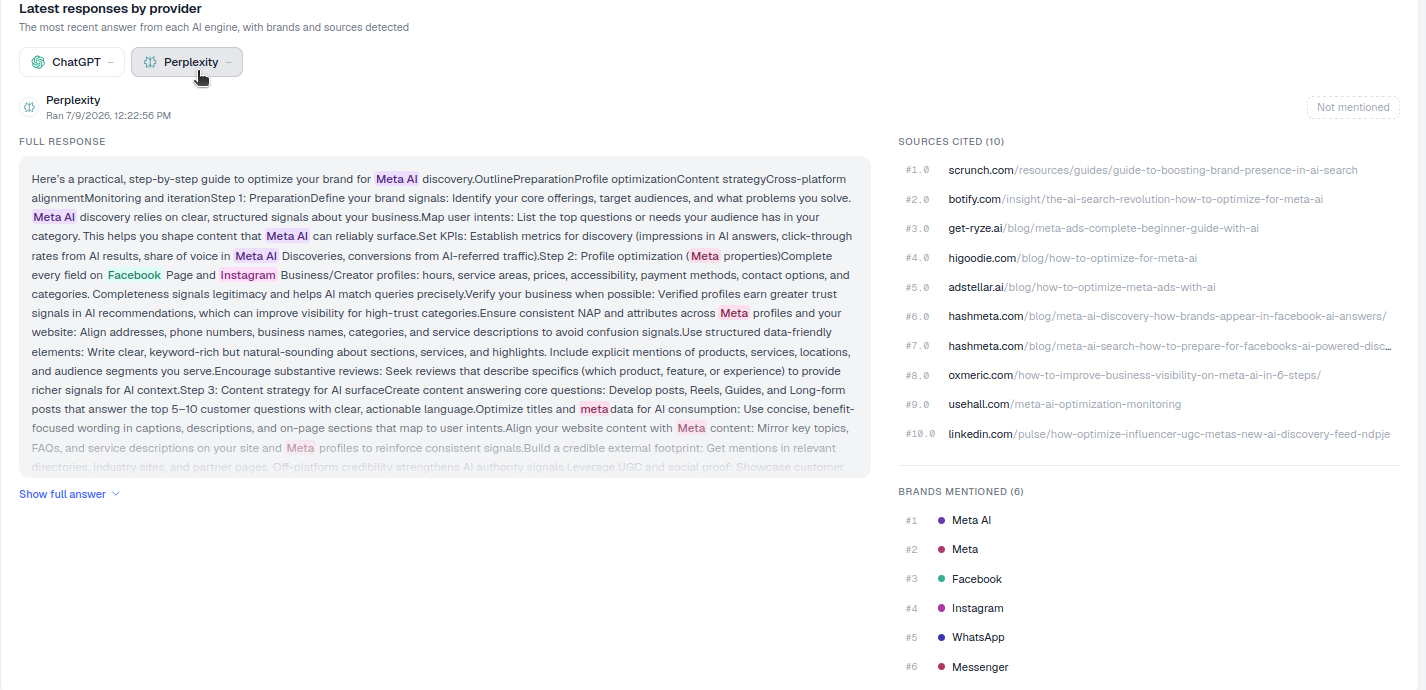
Scroll down the prompt detail page to Latest responses by provider, subtitled “The most recent answer from each AI engine, with brands and sources detected.” You reach the prompt detail page by clicking through from any tracked prompt in your prompt list, the same view that shows citation rate and share of voice trends for that specific question. The Latest responses panel sits below those trend charts, so by the time you scroll to it you already have the quantitative context (is this prompt improving or declining) before you read the qualitative evidence (why).
What each response shows
- A provider tab for each engine (e.g. ChatGPT, Perplexity): click to switch between them. Each provider has its own retrieval behavior and citation style, so the same prompt can produce visibly different answers depending on which tab you’re viewing.
- The run time and a mentioned / not mentioned badge telling you whether your brand appeared in that specific answer. This badge is the fastest way to confirm, at a glance, whether the citation-rate metric you saw further up the page reflects the current answer or an older one.
- The full response text, with brands highlighted inline so you can see who’s named and where: first sentence, mid-paragraph, or only in a closing list of options. Use Show full answer to expand it when the response is long.
- Alongside it, Sources cited and Brands mentioned panels list exactly what that answer drew on. Sources cited maps to the URLs the engine referenced or linked; Brands mentioned lists every named entity in the answer, not just yours, useful for seeing who you’re actually competing against for this specific question, each covered in its own guide.
How to use it
- Read the answer for a prompt you’re missing. See which sources and brands won the citation instead of you, and note whether the answer leans on one dominant source or synthesizes several. If a competitor’s page is quoted directly, that page is doing something (clarity, structure, or authority) that yours currently isn’t.
- Note the structure. AI engines tend to quote clear, direct, well-organized passages (a definition up front, a short list of specifics, a concrete number) rather than dense marketing copy. Mirror that in your own content: answer the implied question in the first sentence, then support it.
- Compare engines. Switch provider tabs to see how differently each one answers the same question, and where you’re mentioned versus not. It’s common to be well-cited in one engine and invisible in another, because each pulls from a different mix of sources and weighs freshness, authority, and phrasing differently. This is also where you’ll notice patterns worth digging into with a dedicated content gap analysis across your full prompt set rather than one question at a time.
- Act on it. Use Generate article (top of the page) to draft content aimed at exactly this question, using what you just learned about which sources and structures the engine favors. This is the same workflow behind AmICited’s SEO agents , which turn a visibility gap you’ve identified here into a published, AI-optimized page without leaving the platform.
Reading responses as part of a routine, not a one-off check
A single response tells you about a single prompt on a single day. The real value shows up when you build reading responses into a recurring habit, similar to how you’d review AI rank tracker history rather than checking your rank once and forgetting about it. A practical cadence: after any week where a prompt’s citation rate moves sharply in either direction, open that prompt’s detail page and read the current answer before you change anything else. A drop is often explained in seconds once you see that a new source has entered the answer, or that the engine has started answering the question in a way your existing content doesn’t address.
It’s also worth reading responses for prompts you already win, not just the ones you’re missing. Seeing exactly how an engine currently describes your brand (the words it chooses, the context it places you in, whether it pairs you with certain competitors) tells you what’s currently working, so you don’t accidentally break it when you next update the page the engine is drawing from. This is the practical difference between AI search visibility as an abstract goal and generative engine optimization as a repeatable process: the response panel is where the abstract becomes concrete.
Because responses regenerate on each provider’s own schedule, treat what you read as the current best evidence, not a permanent record. If you’re building a broader AI visibility reporting habit, pair this panel with the Sources cited and Brands mentioned views so you can distinguish between a prompt where you’re absent because you’re not cited anywhere, and one where you’re present but overshadowed by a stronger competing source: the two problems call for very different fixes, and both start with actually reading what the engine wrote.
Where you take this next depends on what the response tells you. If you find yourself consistently missing on prompts with a clear, answerable structure, that’s a content problem best tackled with a systematic how to get your brand mentioned in ChatGPT approach applied across your prompt library, not a one-page fix. If instead you’re mentioned but a competitor is quoted more prominently, look at what their page does differently and use Generate article to close that specific gap. Either way, the Latest responses panel is the checkpoint that turns a citation-rate number into an actual editorial decision: read the answer first, then decide what to publish.
Frequently asked questions
It shows the full, real text of the most recent answer each AI engine gave to a tracked prompt, with brands highlighted inline and a mentioned / not mentioned badge for your brand. Provider tabs (ChatGPT, Perplexity, etc.) let you switch between engines, and Sources cited and Brands mentioned panels sit alongside each response.
AI answers are non-deterministic and engines update their retrieval and ranking behavior continuously, so a single historical answer is a snapshot, not a guarantee of what the engine says now. Showing the latest response per provider means what you're reading reflects current model behavior rather than an outdated result.
A metric can tell you that your citation rate dropped, but only the actual text tells you why: whether a competitor's page now answers the question better, the engine restructured its answer around a different source, or your product was mentioned but not linked. This qualitative check is sometimes called response auditing, and it closes the gap between what happened and what to do about it.
Note which sources and brands won the citation, and whether the answer leans on one dominant source or synthesizes several: a directly quoted competitor page is doing something with clarity or structure that yours isn't. Use Generate article, at the top of the prompt detail page, to draft content aimed at exactly that question using what you learned about the sources and structures the engine favors.
More tutorials in this section
 How to Use the Fan-Out Queries Heatmap
Explore related fan-out queries for a prompt and see how well cited pages match them in AmICited’s heatmap.
Read guide →
How to Use the Fan-Out Queries Heatmap
Explore related fan-out queries for a prompt and see how well cited pages match them in AmICited’s heatmap.
Read guide →
 How to Use the Semantic Scatter Map
Explore the AI semantic scatter map to compare prompts, fan-out queries, cited URLs and your page content.
Read guide →
How to Use the Semantic Scatter Map
Explore the AI semantic scatter map to compare prompts, fan-out queries, cited URLs and your page content.
Read guide →
 Top Brands Mentioned for an AI Prompt
Use the Brand Mentions leaderboard to compare which brands AI engines name for a prompt and their citation …
Read guide →
Top Brands Mentioned for an AI Prompt
Use the Brand Mentions leaderboard to compare which brands AI engines name for a prompt and their citation …
Read guide →Ready to put it into practice?
Free check · 7-day trial · card required