


How to View Recent Citations
See your latest AI citations in the AmICited dashboard, including the cited page, AI provider and citation rank.

The Recent citations feed is your live activity log, the most recent moments an AI engine cited your brand, with enough detail to see exactly what was cited, where, and how prominently.
Quick Steps
- The Recent citations feed is a live, timestamped log of the exact moments your brand got cited, with source, engine, rank and quote.
- Find it on the Dashboard, in the Recent citations card.
- Each row shows the cited page, which AI platform cited it, your citation rank, and when it happened.
- Click through the URL’s text-fragment link to jump straight to the exact sentence an AI engine quoted.
- Use View all → for the full, filterable history when you want to spot longer-term patterns.
What is an AI citation?
An AI citation is any moment a generative AI system (ChatGPT, Perplexity, Gemini, or Google AI Overviews) names your brand, links to your page, or draws on your content while answering a user’s question. It’s the AI-search equivalent of a backlink or a search-result click, except the “result” is a sentence embedded inside a conversational answer rather than a blue link on a results page. Citations are the raw currency of AI search visibility : the more often your domain is cited, and the more prominently, the more often real people encounter your brand while researching a decision.
Citations differ from traditional rankings in an important way: there’s no fixed results page to check. Each AI engine constructs its answer dynamically, pulling from whichever sources its retrieval system judges most relevant and trustworthy at that moment, which means the same prompt can cite different sources on different days. That’s why treating citations as a one-off audit misses the point. What matters is the pattern over time: which pages get pulled in repeatedly, which engines favor you, and whether your citation frequency is trending up or down as your content and competitors’ content evolve.
Two attributes of a citation carry most of the signal. The first is position: where your source sits among the sources an engine cites for a given answer. A citation that’s ranked first is functionally different from one buried tenth in a long list; citation position has an outsized effect on whether a reader actually notices and clicks through. The second is what was actually quoted. AI engines don’t cite entire pages: they extract a specific claim, definition, or statistic and attribute it to your URL. Knowing the exact sentence that got lifted tells you which of your content is doing the persuasive work, and that’s usually a much sharper editorial signal than pageviews or generic engagement metrics.
Because citations happen continuously and silently (you’re not notified when ChatGPT quotes your pricing page), you need a system that watches for them and logs each occurrence with enough context to act on it. That’s the job of the Recent citations feed.
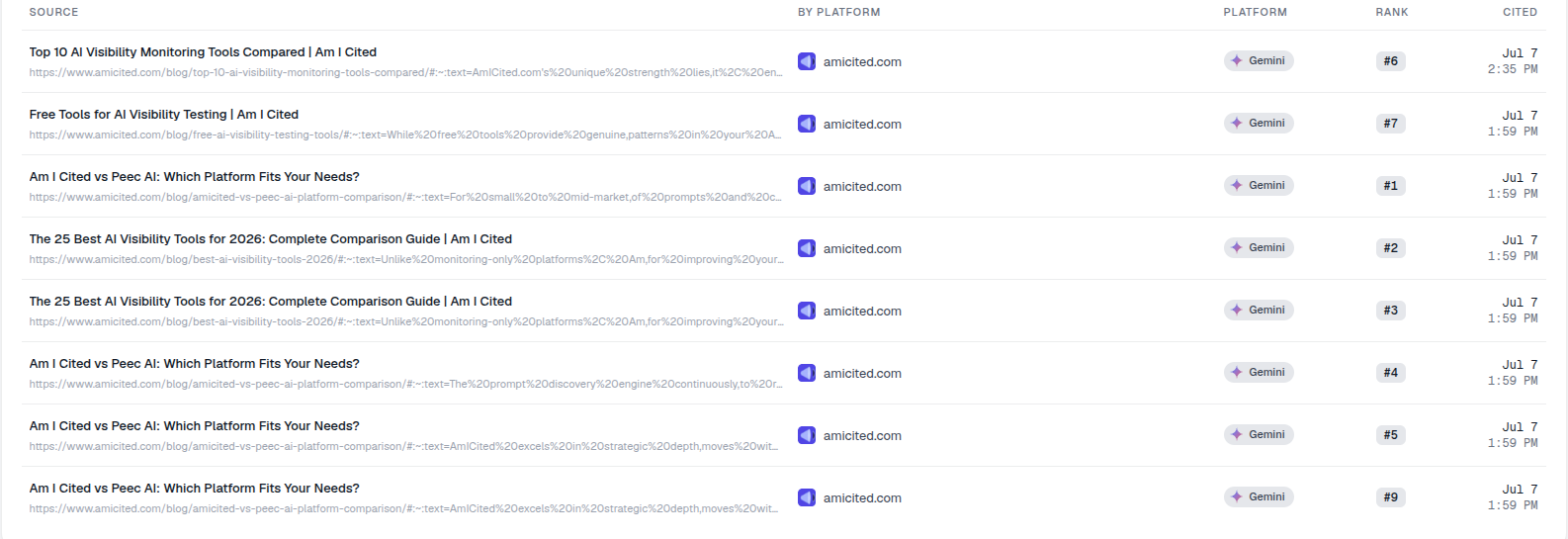
#:~:text= fragment in each source URL is the exact sentence the AI engine quoted from your page. Content that gets quoted verbatim is worth producing more of.Where to find it
Scroll down the Dashboard to the Recent citations card, subtitled “Latest times your brand was cited by an AI provider.” It sits alongside your other top-level visibility metrics so you can correlate a spike or drop in citations with what’s happening elsewhere on the dashboard, your overall share of voice , for instance, or a competitor’s newly-cited page. A View all → link opens the complete history, which is useful once you want to go beyond the handful of most-recent rows shown on the dashboard itself.
What each row shows
The feed is a table with a column for each detail, and each one answers a different question about the citation:
- Source: the title of the cited page and its URL. The URL often includes a text fragment (
#:~:text=…), a browser-native mechanism that jumps straight to and highlights the exact snippet the AI engine quoted from your page. Click through and you land precisely on the sentence that earned the citation, rather than having to hunt for it across a long article. - By platform: the domain that was cited (your brand). If you’re monitoring multiple domains or a portfolio of client sites, this column tells you at a glance which one the row belongs to.
- Platform: which AI engine produced the citation (e.g. Gemini, ChatGPT, Perplexity, or Google AI Overviews). Different engines have different retrieval behavior and different audiences, so tracking which platform is citing you helps you understand where your visibility is concentrated versus where it’s thin.
- Rank: the position your source held in that answer (e.g. #1, #6). Lower is better. This is the same citation position concept described above, logged per event so you can see whether your typical rank is improving or slipping over time.
- Cited: the date and time it happened (e.g. Jul 7, 2:35 PM). Because this is a live, timestamped feed rather than a periodic snapshot, it captures the actual cadence of your citations, useful for spotting whether a content push or PR moment translated into a visible uptick.
Together these columns turn an abstract idea, “AI cites us sometimes,” into a concrete, inspectable log you can act on page by page and platform by platform.
What it measures
The Recent citations feed measures citation events, not aggregate scores. Where a chart might tell you your citation rate rose 12% this month, this feed tells you the individual instances behind that number: which page, which engine, which exact quote, and when. That granularity matters because citation volume alone can be misleading: ten citations at rank #1 on your flagship comparison page are worth far more than ten scattered citations at rank #8 across pages nobody reads. By exposing rank and source together, the feed lets you judge quality alongside frequency, which is closer to how citation quality actually behaves as a growth lever.
It’s also, functionally, a real-time complement to your prompt-level tracking. If you’re running an AI rank tracker against a defined set of prompts, the Recent citations feed shows you the citations those prompts (and any others real users happen to trigger) are actually producing, as they happen, rather than waiting for the next scheduled check.
How to use it
- See what’s actually being quoted. The text-fragment links are gold: they show the precise sentences AI engines are lifting from your pages. Content that gets quoted verbatim is content worth producing more of. If you notice the same phrasing pattern (a clear definition, a numbered list, a direct answer to a question) recurring across multiple quoted snippets, that’s a strong hint about the content structure AI engines prefer to extract from, worth applying deliberately when you next structure content for AI citation .
- Spot your best pages. If the same URL keeps appearing near the top of the feed, that page is pulling weight: consider expanding it, keeping it fresh, or modelling new content on its structure and depth. A page that earns repeat citations across different prompts and engines is usually your strongest signal of topical authority for that subject.
- Watch rank quality. A feed full of
#1–#3ranks means you’re being cited prominently; lots of high numbers means you’re being mentioned but buried, which is a different problem to solve. If your average rank starts drifting upward (worse), it’s often a sign a competitor is displacing you on that topic, worth checking who’s now appearing above you in the same answers. - Track platform patterns. If citations cluster heavily on one engine and rarely appear on others, that imbalance is worth investigating: it can point to gaps in how your content is structured or indexed for that specific engine’s retrieval approach, or simply reflect where your topic gets asked about most.
- Click View all → for the full, filterable citation history, which is the better place to look for trends across a longer window rather than the handful of most-recent events shown on the dashboard card.
Turning the feed into action
The Recent citations feed is most valuable when you stop treating it as a passive log and start treating it as an editorial signal source. Every time a specific sentence gets quoted, you’re getting free confirmation of what an AI engine considers a citable, trustworthy answer to a real question: direct evidence for what to write more of, where to add supporting statistics, and which pages deserve a refresh before they lose their edge to a competitor. Pair it with your broader generative engine optimization strategy: use the feed to confirm which prompts and pages are already converting into citations, then use that pattern to guide new content, closing the gaps that a content gap analysis for AI search visibility can help surface at scale. Over time, a feed that’s consistently topped with high-rank citations across multiple engines is one of the clearest indicators that your AI search visibility program is working, and a feed that goes quiet is often the earliest warning sign that it’s time to revisit your content before rankings elsewhere start to slip too.
Frequently asked questions
Each row shows the cited page and its URL (with a text-fragment link), which AI platform produced the citation, your citation rank in that answer, and the exact date and time it happened. Together they turn "AI cites us sometimes" into a specific, inspectable event you can act on.
Click through the Source URL in the feed. It includes a text-fragment (#:~:text=) that jumps straight to and highlights the exact snippet the AI engine pulled from your page, so you don't have to hunt for it across a long article.
The feed logs individual citation events, which page, which engine, which quote, when, while a counter like Total Citations summarizes the aggregate rate. The feed is where you see the specific instances behind a trend, useful for spotting what's actually getting quoted rather than just knowing the rate moved.
The Dashboard card shows just the most recent events so you can correlate a citation spike or drop with other activity at a glance. Click View all to open the complete, filterable citation history when you want to look for longer-term patterns.
More tutorials in this section
 How to Read Your Visibility Score
Learn what the AmICited Visibility Score measures and how its gauge and platform breakdown show your AI …
Read guide →
How to Read Your Visibility Score
Learn what the AmICited Visibility Score measures and how its gauge and platform breakdown show your AI …
Read guide →
 How to See Your Share of Voice
Find your AmICited Share of Voice and learn how it compares with your Visibility Score.
Read guide →
How to See Your Share of Voice
Find your AmICited Share of Voice and learn how it compares with your Visibility Score.
Read guide →
 How to Use the Domain Semantic Map
Explore the AmICited Domain Semantic Map to find clusters and topic gaps across prompts, fan-out queries and …
Read guide →
How to Use the Domain Semantic Map
Explore the AmICited Domain Semantic Map to find clusters and topic gaps across prompts, fan-out queries and …
Read guide →Ready to put it into practice?
Free check · 7-day trial · card required