


How to See Which Sources an AI Answer Cited
See the ranked URLs an AI engine used to answer a prompt and learn how AmICited displays cited sources.

Every AI answer is built on sources. The Sources cited panel lists the exact URLs an engine pulled from when it answered your prompt: a ranked map of the pages you’re competing against for that question.
Quick Steps
- Open a tracked prompt’s detail page and check the Sources cited (N) list beside each provider’s response.
- Read it as a ranked list: position near the top means the engine leaned on that source more heavily.
- Compare provider tabs to see which domains show up across engines versus just one.
- If your pages are missing, treat that as a content gap and use Compare a URL to benchmark against what’s winning.
- Track the same prompt over time, since a single list is a snapshot, not a trend.
What is an AI citation?
An AI citation is a specific instance of a generative engine (ChatGPT, Perplexity, Gemini, or Google AI Overviews) drawing on a particular web page to construct its answer and, in most cases, listing that page as a source. This is different from a mention, where a brand name appears in the generated text without a corresponding source link. A page can be mentioned without being cited, and it can be cited without the brand name ever showing up in the visible answer text. Because the distinction matters so much for measurement, it’s worth understanding the difference between an AI citation and a mention before you start reading citation lists.
Each engine builds its citation list through a retrieval step that runs before (or alongside) generation: it searches the web or a pre-built index, scores the candidate pages against the query, and pulls the top-ranked results into the model’s context window. The model then writes its answer grounded in that retrieved content, and the engine surfaces the URLs it actually drew on as the cited sources. Which pages make that shortlist is governed by a mix of relevance to the query, topical authority, structural clarity (how easy the page is for a retrieval system to parse and extract answers from), and freshness. Understanding these source ranking signals is the difference between guessing at content strategy and reverse-engineering what already works.
This matters for AI search visibility because citations are the mechanism by which your brand can appear inside an AI answer at all. If your page is never in the cited-sources list, it structurally cannot be part of how the engine describes your category, your product, or your competitors. Tracking which URLs get cited, yours and everyone else’s, turns an opaque black box into a legible, ranked list you can act on. That’s what the Sources cited panel on a prompt detail page in AmICited is for: it’s the citation record for one AI answer, broken down engine by engine, refreshed every time that prompt is checked again.
Where to find it
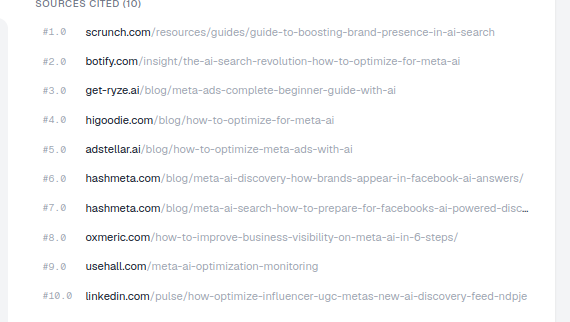
In the Latest responses by provider panel on a prompt detail page, the Sources cited (N) list appears to the right of each response, alongside the full answer text. Every prompt you track has its own detail page, and every provider tab on that page (ChatGPT, Perplexity, Gemini, Google AI Overviews, wherever you’ve enabled tracking) shows its own independent sources list, because each engine retrieves and ranks sources differently for the same question. You don’t need to dig through settings to find this: it sits directly next to the answer it belongs to, so you can read the generated text and the sources that produced it side by side.
What it shows
- A ranked, numbered list of source URLs (e.g.
#1.0,#2.0…), in the order the engine drew on them. Position in this list is itself informative: sources near the top were weighted more heavily in the engine’s retrieval and generation process than sources near the bottom. - The full path of each cited page, so you can see not just the domain but the specific article being cited. This matters because authority is rarely uniform across a whole domain: a competitor’s homepage might never get cited while one deep comparison article from the same domain shows up constantly.
- The count in the heading (e.g. Sources cited (10)) tells you how many sources fed that single answer. A short list means the engine leaned on a small, tightly-scoped set of pages, so getting into that list is harder but each slot is worth more. A long list means more room exists for a well-optimized new page to earn a place.
- Because the list is scoped to one prompt and one provider, it’s also a clean way to compare AI Overviews , ChatGPT, Perplexity, and Gemini behavior side by side for the identical question. Some engines cite far more aggressively than others, and some favor different types of publishers entirely.
How to use it
- Study the top sources. The highest-ranked URLs are the most influential, so understand what makes them citable (depth, structure, freshness, specificity). Read them the way you’d read a competitor’s highest-converting landing page: not for inspiration, but for a checklist of exactly what’s working.
- Spot patterns across engines. Switch provider tabs; if the same domains keep appearing, those are the authorities for this topic across the board, not just a quirk of one engine’s index. If the lists diverge sharply between engines, that’s a signal you need engine-specific content strategy rather than one generic page.
- Find your gap. If your pages are absent from the list, that’s the citation you’re missing. The fastest fix is content that answers this question better, more specifically, and in a format the retrieval step can parse cleanly. This is the same discipline as running a content gap analysis for AI search visibility : treat every prompt where you’re absent as a prioritized content brief rather than a one-off miss.
- Feed it back. Use Compare a URL (top of the page) to test one of your pages against these cited sources for the same prompt. This closes the loop between “here’s who’s winning” and “here’s exactly how far my page is from winning too.”
Reading a single answer versus tracking a citation trend
It’s worth being precise about what the prompt-level Sources cited list is, and isn’t. It’s a snapshot: the sources behind one specific answer, captured at the time that prompt last ran. Engines re-retrieve sources every time a prompt is checked: rankings shift as new content is published, as older pages go stale, and as the engines themselves update their retrieval logic. A single Sources cited panel tells you what happened this time; it does not by itself tell you whether a domain is a durable authority for this topic or a one-off inclusion.
That’s why this prompt-level view is meant to be read alongside your account’s aggregate data, not instead of it. If you want to know whether your AI rank tracker position on a given prompt is improving over time, or whether a competitor’s citation is a fluke or a pattern, you need the history, not just the latest snapshot. AmICited re-checks tracked prompts on a schedule specifically so that a single Sources cited list becomes one data point in a trend line rather than an isolated fact. If you’re new to reading these metrics as a system rather than one page at a time, it’s worth working through how to measure AI search visibility with the metrics and KPIs that actually move the needle. Citation count, citation position, and share of voice all mean something different, and conflating them leads to the wrong optimization priorities.
What to do once you’ve found the gap
Finding a cited-sources list you’re missing from is the diagnostic step, not the fix. The fix is publishing (or restructuring) a page that answers the underlying prompt more directly and more completely than what’s currently winning. Look at what the top-ranked cited pages have in common: are they FAQ-formatted, do they lead with a direct answer before the supporting detail, do they cite their own sources and data, are they recently updated? Those patterns are your brief. Teams that do this systematically, reading Sources cited lists across dozens of prompts and turning the recurring gaps into a content backlog, are effectively running generative engine optimization as a continuous loop rather than a one-time audit, and AmICited’s SEO agent workflow exists specifically to turn a list of “prompts where I’m not cited” into drafted, published pages without that translation step being manual.
For the domain-level version of this (your top sources across all prompts, aggregated rather than one answer at a time) see the Sources section and the dashboard’s Top cited sources widget. That view answers a different question: not “who won this one answer” but “who wins consistently across my whole topic space,” which is the better lens for deciding where to invest content effort next. Once you’ve identified the domains and page types that repeatedly outrank you in Sources cited lists, the next useful move is usually to book a demo or start tracking your own prompt set in AmICited so the gap-finding described above runs automatically, on a schedule, across every question that matters to your category, rather than you re-checking answers by hand every time you wonder whether your latest published page finally broke into the citation list.
Frequently asked questions
It's a ranked list of the exact URLs an AI engine drew on to answer one specific prompt, shown beside that provider's response on the prompt detail page. Position matters: sources near the top were weighted more heavily by the engine's retrieval process than sources further down, and the count in the heading tells you how many pages fed that single answer.
Because ChatGPT, Perplexity, Gemini, and Google AI Overviews each run their own retrieval step against the same question, scoring and selecting candidate pages independently. That's why every provider tab on a prompt detail page has its own Sources cited list, and why comparing tabs side by side reveals whether an engine favors different publishers for the identical query.
It means that specific answer was built entirely from other pages, so your content structurally couldn't be part of how the engine described the topic. Treat the absence as a content gap: study the top-ranked pages that did get cited, then use Compare a URL to see exactly how your page stacks up against them for that prompt.
No. It's a snapshot of one answer at the moment that prompt last ran, and engines re-retrieve sources every time a prompt is checked again. To know whether a domain is a durable authority or a one-off inclusion, you need to read it alongside your account's aggregate data and citation trends over time, not as a single isolated reading.
More tutorials in this section
 How to Use the Fan-Out Queries Heatmap
Explore related fan-out queries for a prompt and see how well cited pages match them in AmICited’s heatmap.
Read guide →
How to Use the Fan-Out Queries Heatmap
Explore related fan-out queries for a prompt and see how well cited pages match them in AmICited’s heatmap.
Read guide →
 How to Use the Semantic Scatter Map
Explore the AI semantic scatter map to compare prompts, fan-out queries, cited URLs and your page content.
Read guide →
How to Use the Semantic Scatter Map
Explore the AI semantic scatter map to compare prompts, fan-out queries, cited URLs and your page content.
Read guide →
 Read AI Responses to a Tracked Prompt
Read the latest AI response for a tracked prompt, including the brands and sources detected by AmICited.
Read guide →
Read AI Responses to a Tracked Prompt
Read the latest AI response for a tracked prompt, including the brands and sources detected by AmICited.
Read guide →Ready to put it into practice?
Free check · 7-day trial · card required