What Is Google’s AI Optimization Guide?
Google has published an official guide called “Optimizing your website for generative AI features on Google Search” on Google Search Central. When we checked it on 12 October 2026, it showed a last-updated date of 10 July 2026. A companion page, “AI features and your website”, explains how AI Overviews and AI Mode choose the links they show.
Most advice about AI Overviews comes from agencies and tools. This one comes from Google. It is short, and it contradicts a lot of what circulates, so it is worth reading before you change your content or your site. Google edits these pages, so re-check them before acting on anything below.
In one sentence: the fundamentals of SEO still apply, and a list of popular “AI SEO” tactics is not required.
Is SEO Still Relevant for AI Overviews and AI Mode?
Yes, and Google says so directly: “In short, yes! The best practices for SEO continue to be relevant because our generative AI features on Google Search are rooted in our core Search ranking and quality systems.”
Its guide ends with the same message: prioritize effective SEO over “AEO/GEO hacks”. That does not make AI visibility a non-issue. It means that for Google’s two AI surfaces, the work you already do for Search is the work that counts.

Ready to Monitor Your AI Visibility?
Track how AI chatbots mention your brand across ChatGPT, Perplexity, and other platforms.
How Pages Get Into AI Overviews and AI Mode
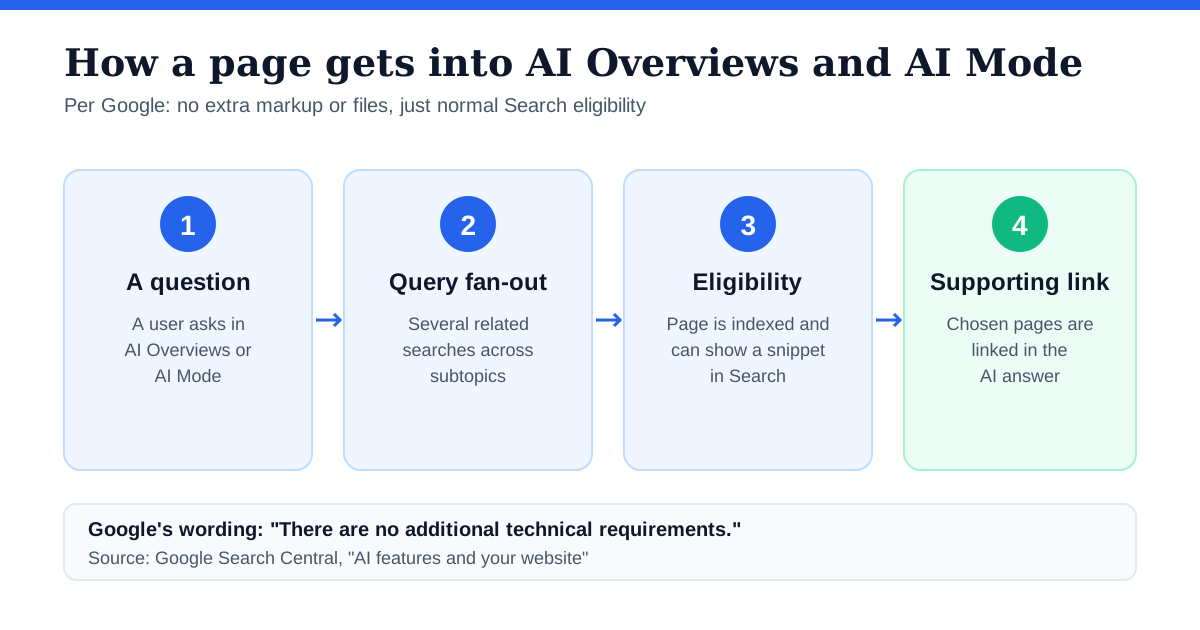
Google’s “AI features and your website” page describes the mechanics:
- Query fan-out. AI Overviews and AI Mode issue “multiple related searches across subtopics and data sources” to build an answer, which lets them show “a wider and more diverse set of helpful links” than a normal search.
- Eligibility. To appear as a supporting link, a page must be “indexed and eligible to be shown in Google Search with a snippet” and meet the normal Search technical requirements.
- No extras. Google says: “There are no additional technical requirements.”
Two practical consequences. First, if a page is blocked from indexing or from showing snippets, it cannot be a supporting link. The usual controls (noindex, nosnippet, data-nosnippet, max-snippet and robots.txt for Googlebot) apply. Second, query fan-out means one page can be pulled in for a subtopic of the question, not only for the headline query, so covering the supporting questions in your topic matters.
What You Don’t Need to Do for Google AI
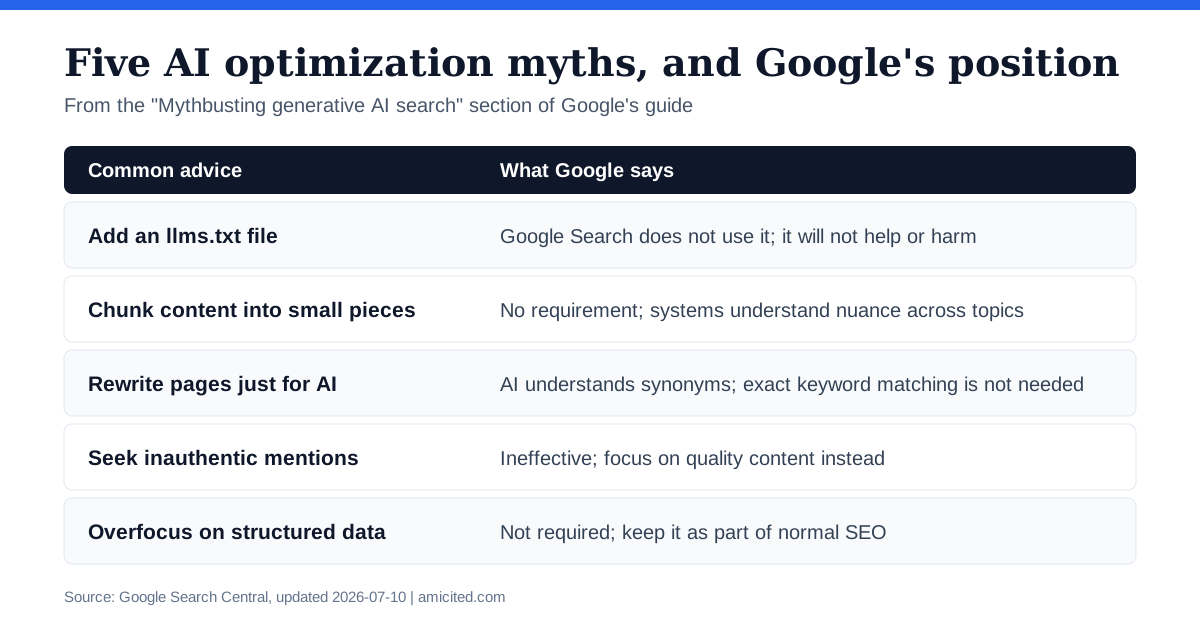
The guide has a “Mythbusting” section listing things you do not need. Here is what each one means in practice.
Do You Need an llms.txt File for Google?
No. Google says Google Search does not use llms.txt or other “special” markup files, and that creating them will not help or harm your visibility. The AI features page repeats the point: you don’t need “new machine readable files, AI text files, or markup” to appear.
That statement is about Google Search. It does not tell you whether ChatGPT, Perplexity or Claude read the file. We have not seen a major AI platform confirm that it uses llms.txt for citations; our analysis of llms.txt covers the evidence. If you want one for other tools, Google says it will not hurt, but do not expect it to move Google AI visibility.
Do You Need Schema Markup for AI Overviews?
Not as a requirement. The AI features page says there is “no special schema.org structured data that you need to add”, and the guide warns against overfocusing on structured data. Structured data still supports normal SEO and rich results, so keep marking up what applies. Just do not treat FAQ or HowTo markup as a switch that unlocks AI citations.
Should You Chunk Content for AI?
No. Google says there is no requirement to break content into small pieces, because its systems understand nuance across several topics on a page. Write for readers first: clear paragraphs, headings and sections that help someone follow the page.
What About Rewriting for AI or Chasing Mentions?
- Rewriting just for AI: Google says its systems understand synonyms and general meaning, so exact keyword matching is not necessary.
- Inauthentic mentions: Google calls this ineffective. Its advice is to focus on high-quality content, which its systems pair with spam blocking.
Stay Updated on AI Visibility Trends
Get the latest insights on AI mentions, brand monitoring, and optimization strategies.
What to Do Instead
Google’s guide points to a short list:
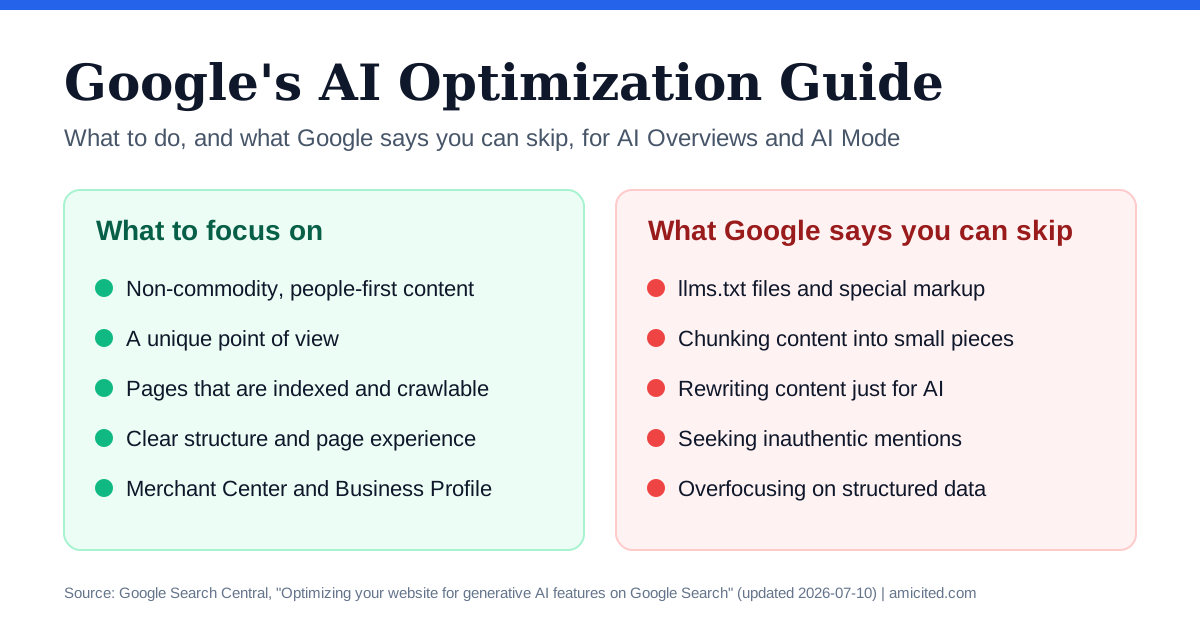
- Create non-commodity content. Google asks for content that is “helpful, reliable, and people-first”, with a unique point of view rather than a restatement of what already exists. Avoid producing large numbers of near-duplicate variations, which falls under its scaled content abuse policy.
- Organize it for readers. Clear paragraphs, headings and sections, plus high-quality images and video where they help.
- Keep a clean technical foundation. Make pages indexable and crawlable, follow JavaScript SEO best practices if you use a framework, reduce duplicate content and give people a good experience on every device.
- Use Google’s business tools. For local and ecommerce visibility, keep Google Business Profile and Merchant Center feeds accurate.
- Look ahead to agents. The guide also covers agentic experiences, such as browser agents that read pages through screenshots, the DOM and accessibility trees, and mentions protocols such as the Universal Commerce Protocol. See our guide to agentic commerce for the commerce side.
For a deeper walk through how to apply this to brand mentions, see how Google AI Overviews decide which brands to mention and our AI Overviews optimization guide .
How to Measure AI Overview Visibility
Google points to the Generative AI performance report in Search Console, which shows impressions from AI features on Google Search and Discover. It shows which of your pages appear and how that changes, but it is impressions-only and it only sees Google’s surfaces. Our explainer covers what the report shows and what it still leaves out .
Google Is Not the Only AI Engine
Google’s guide is about Google. Your buyers also ask ChatGPT, Perplexity, Gemini and Claude, and the data shows those engines differ:
- Mentions are not always links. In AmICited’s tracked-prompt data (June 24 to July 23, 2026), 57% of brand mentions carried no citation link, from 38% on Google AI Mode to 86% on Perplexity (full data ).
- Google’s own two surfaces differ. Only 12 of the top 20 cited domains appear in both AI Overviews and AI Mode, a 43% overlap (full data ).
So use Google’s guide for Google, and track the other engines separately. An AI visibility tracker runs the same prompts on a schedule across engines and reports mentions, citations and share of voice. To see where you stand today, run the free AI brand visibility report .
Quick Checklist
- Confirm your key pages are indexed and can show a snippet.
- Publish content with a point of view that is not already everywhere else.
- Organize pages with clear headings and short sections.
- Keep Business Profile and Merchant Center details accurate if you sell locally or online.
- Skip llms.txt, chunking and AI-only rewrites as Google tactics.
- Keep using structured data where it fits normal SEO, without expecting it to unlock AI features.
- Review the Generative AI performance report in Search Console.
- Track the other AI engines separately.