


How to Drill Down into a Single Source
Open any source in AmICited to see the exact pages and prompts where it was cited.

Seeing that a domain is cited a lot is useful; seeing what for is actionable. Click any source and its drill-down panel opens, showing the exact pages and prompts that source is winning citations for.
Quick Steps
- Click any domain or page row in the Cited by provider or All sources tables to open its drill-down panel.
- Check the summary line for total citations and how many pages of that source were cited.
- Open Top Pages to see which specific pages on that source earn the citations.
- Open Prompts to see exactly which of your tracked questions that source is winning.
- Filter by engine to spot whether a source’s influence is concentrated on one AI platform.
What is a source, and why does it drive AI citations?
In AI search visibility terms, a “source” is any domain (a publication, a review site, a competitor’s blog, a forum, a documentation page) that a generative engine like ChatGPT, Perplexity, Gemini, or Google AI Overviews reads from and then cites in its answer. Every time one of these engines answers a tracked prompt, it doesn’t invent the answer from nothing: it retrieves a handful of web pages, weighs them, and stitches a response together with references back to the pages it trusted most. Those references are AI citations , and the domains behind them are your sources.
This matters because citations are the atomic unit of AI visibility. A brand’s AI visibility score, its share of voice , and its rank on any given prompt are all downstream of which sources the model chose to pull from. If a competitor’s comparison page keeps showing up as a source on prompts about your category, that page is actively taking citations that could otherwise go to you. Understanding sources at the domain level tells you who is winning; understanding them at the page level tells you why.
Different engines don’t select sources the same way. ChatGPT tends to lean on a mix of authoritative publishers and structured content, Perplexity leans heavily on freshness and direct query relevance, and Google AI Overviews inherits a lot of its own search index’s ranking signals. Each platform applies its own source ranking signals (things like topical relevance, structure, freshness, and perceived trustworthiness) to decide which pages earn a citation slot. Knowing which sources dominate a prompt, and on which engine, tells you where to focus content effort instead of guessing.
The Sources page in AmICited aggregates every domain that has been cited across your tracked prompts, ranked by citation volume. But a domain-level ranking only tells you that a source is influential. It doesn’t tell you which of its pages are doing the work, or which of your prompts it’s winning. That’s what the drill-down panel is for.
Where to find it
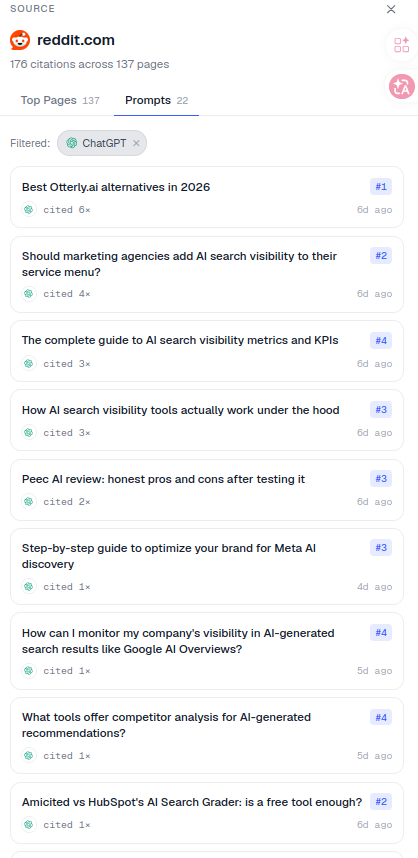
Click any row (a domain or page) in the Cited by provider or All sources tables on the Sources page. A panel slides in from the right, headed SOURCE with the domain name and a summary like “176 citations across 137 pages.” This works the same way whether the domain is a well-known publisher, a niche forum, or a direct competitor. Click it, and the panel opens with everything AmICited has recorded for that source across your tracked prompt set.
What the panel shows
- A summary: total citations and how many pages of that source were cited. This single line tells you at a glance whether a domain’s influence comes from one viral page or from broad, sustained authority across dozens of pages.
- Two tabs:
- Top Pages: the specific pages on that source that get cited, ranked by how often. This is where you see exactly which URLs the AI engines keep pulling from (a pricing comparison, a “best of” roundup, a glossary entry, a case study), so you know what kind of content on that domain is earning citations.
- Prompts: the tracked prompts this source is cited for, each with its citation rank (e.g.
#1), how many times it was cited (cited 6×) and how recently. This tab turns an abstract “this domain is influential” observation into a concrete list of the questions you’re losing.
- Filter chips (e.g. Filtered: ChatGPT) let you scope the panel to one engine, since a source’s Top Pages and Prompts can look completely different depending on whether you’re looking at ChatGPT, Perplexity, Gemini, or AI Overviews.
Together, the two tabs answer the two questions that actually matter when a source outranks you: what content is working for them, and on which of my prompts. Without this level of detail, a citation-tracking dashboard is just a leaderboard: useful for bragging rights, not for a content plan.
How to use it
- Understand a competitor’s strength. Open a domain that’s out-citing you and read its Top Pages. What content is earning those citations? Is it a single deeply-researched comparison page, a frequently updated pricing table, or a spread of dozens of blog posts? The pattern tells you whether to compete with one strong asset or a broader content programme. This is the same instinct behind a proper competitor analysis , just applied to AI citations instead of search rankings.
- Find contested prompts. The Prompts tab shows exactly which of your questions that source wins: your target list. Rather than treating “improve AI visibility” as a vague goal, you get a short, ranked list of specific prompts where a named competitor is currently beating you, complete with how often and how recently they were cited.
- Filter by engine to see whether a source’s influence is concentrated in one model. A domain that dominates Perplexity citations but barely appears in ChatGPT answers is telling you something about how that engine sources its answers, and where your own content efforts will have the most leverage.
- Check citation context, not just count. A source cited once at the top of an answer can matter more than one cited five times as a minor reference. Reading the Top Pages in context (not just counting citations) helps you judge whether a domain’s influence on a prompt is genuine authority or a passing mention.
- Act on it. Pair what you learn here with Generate article and Compare a URL to build content that can take those citations. If a competitor’s page is winning a prompt because it answers the question more directly or is structured more clearly, that’s a solvable content problem, not a permanent disadvantage.
Turning source data into a content plan
The drill-down panel is most useful when you treat it as the starting point of a workflow, not a one-off curiosity. Start by identifying the two or three sources that appear most often across your losing prompts: these are the domains actually shaping how AI engines describe your category. Then open each one’s Top Pages tab and note the content format: is it structured as a guide, a comparison table, an FAQ, a glossary entry? AI engines tend to favour content that answers a specific question cleanly, so matching or improving on that structure is usually more effective than simply publishing more volume.
From there, cross-reference the Prompts tab against your own prompt list to see which contested questions have the highest citation rank for the competing source: those are the prompts where displacing them will have the biggest impact on your overall share of voice. This is also a good moment to run a proper content gap analysis across all your losing prompts at once, rather than fixing them one at a time. If you’re still building out your prompt set, it’s worth first working out which prompts actually trigger AI to mention your brand , since a drill-down panel is only as useful as the prompt library feeding it.
It’s also worth remembering that not every engine weighs sources the same way, which is part of why citation rate and mention rate can diverge so much between ChatGPT, Perplexity, and Gemini for the same brand. A source that dominates one engine’s answers may be nearly invisible on another, so treat each filtered view as its own mini-investigation rather than assuming a single competitor’s strength is uniform across the board.
Where this fits in your broader AI visibility workflow
Drilling into a single source is a diagnostic step, not an end in itself: the value only shows up once you act on what the panel tells you. Teams running this analysis regularly tend to fold it into the same rhythm as their AI rank tracker checks: review which sources moved, note which prompts changed hands, and route the ones worth fighting for into a content brief. For agencies managing several client domains, the same panel works per workspace, making it straightforward to show a client exactly which named competitor is winning a specific prompt and why, a much stronger conversation than a generic visibility score. If you’re building out that workflow at scale, it’s worth pairing source drill-downs with SEO agents that can turn a confirmed content gap directly into a drafted, publishable page, closing the loop between “we found the gap” and “we shipped something that can close it.”
Frequently asked questions
It shows everything AmICited has recorded for one domain: a summary of total citations and how many of its pages were cited, a Top Pages tab listing the specific URLs earning citations, and a Prompts tab listing which of your tracked questions that source wins, with its citation rank and how many times it was cited.
Click any domain or page row in the Cited by provider or All sources tables on the Sources page. A panel slides in from the right, headed SOURCE, with the domain name and a summary line like "176 citations across 137 pages". This works the same for a publisher, a forum, or a direct competitor.
Because a source's Top Pages and Prompts can look completely different depending on the engine. A domain might dominate Perplexity citations but barely appear in ChatGPT answers. Using the filter chips to scope the panel to one engine at a time shows you where that source's influence actually comes from, rather than an averaged picture.
Top Pages ranks the specific URLs on that domain that get cited, showing you what content format is earning citations. Prompts lists the tracked questions that domain is cited for, with rank and citation count. Together they answer what content is working for a competing source, and on which of your prompts it's beating you.
More tutorials in this section
 How to Read Your Sources Overview Stats
Understand AmICited Sources stats: citations, domains, cited URLs, your pages, external sources and weekly …
Read guide →
How to Read Your Sources Overview Stats
Understand AmICited Sources stats: citations, domains, cited URLs, your pages, external sources and weekly …
Read guide →
 See Which AI Engines Cite Each Source
See how often each AI engine cites your top sources in AmICited’s Cited by Provider heatmap.
Read guide →
See Which AI Engines Cite Each Source
See how often each AI engine cites your top sources in AmICited’s Cited by Provider heatmap.
Read guide →
 How to Track Citations Over Time by Source
Track daily AI citations by provider, top domains or URLs with the AmICited Sources chart.
Read guide →
How to Track Citations Over Time by Source
Track daily AI citations by provider, top domains or URLs with the AmICited Sources chart.
Read guide →Ready to put it into practice?
Free check · 7-day trial · card required