


How to Set the Article Language
Choose the language for an AI-generated article in AmICited to match the market you want to reach.

If you track prompts in more than one market, your content needs to match. The Language setting, the very first step of the Generate an article flow, controls which language AmICited writes the draft in, and getting it right is the difference between a page that gets cited and one that never enters the conversation.
Quick Steps
- Open the Language dropdown in step 1 of Articles → Create a new article; it defaults to English.
- Match it to the market of the prompts you’re targeting, not your own working language or where your audience is physically located.
- AmICited writes the article natively in the selected language, headings, body, and structure, rather than translating an English draft afterward.
- Generate one article per language for multi-market topics; there’s no way to switch a finished draft’s language after the fact.
- Confirm the language in the footer summary or the Article Setup panel before moving further into the flow.
Why language matching matters for AI search visibility
AI assistants like ChatGPT, Perplexity, Gemini, and Google AI Overviews don’t translate on the fly when they decide what to cite. When a user in Germany asks a question in German, the assistant retrieves and synthesizes an answer primarily from German-language sources. It rarely reaches across languages to pull in an English page, even if that page covers the same topic in more depth. This is one of the core mechanics behind AI search visibility : your brand’s odds of being cited are tied not just to what you say, but to whether you said it in the language the retrieval system is searching.
This is a meaningful departure from how traditional SEO handled multilingual content. A well-optimized English page could sometimes still rank for adjacent international queries, especially in markets where English content was scarce. Generative engines are less forgiving. Because generative engine optimization (GEO) depends on an AI model matching a user’s query language to a source’s content language during retrieval, a language mismatch effectively removes your content from consideration before quality or authority ever get evaluated.
The practical implication is that “one article, one language” isn’t a limitation: it’s the correct mental model. If you’re tracking prompts across English, German, and French markets, you need three articles, not one article with three translations bolted on as an afterthought. Each version should be generated against the prompt tracking set for that specific market, so the vocabulary, phrasing, and framing match how people in that market actually ask AI assistants questions, not just a literal translation of the English original.
This also connects directly to share of voice : if a competitor has German-language content addressing a prompt and you only have English, they capture citations in that market by default, regardless of which brand has the stronger underlying product or the better English content elsewhere. Language selection isn’t a formatting detail: it’s a targeting decision that determines whether your content is even eligible to compete.
There’s also a subtlety worth understanding: language and market aren’t always the same thing. French is spoken in France, Belgium, Switzerland, and parts of Canada, and the prompts people type differ across those markets even when the language is identical: vocabulary, product framing, and even the AI assistant’s regional index can vary. When you’re deciding what language to generate in, use the actual language of the prompts you’re targeting as the signal, not an assumption about where your audience is physically located. If your tracked prompts for a region are phrased in English even though the region is nominally non-English-speaking (common in B2B software, where English is often the working language), generate in English for that prompt set. The goal is always to match the language the query was actually asked in, not the language you’d expect it to be asked in.
Where to find it
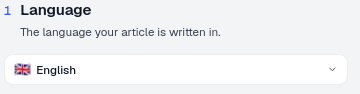
The Language setting is step 1 of the Generate an article flow (Articles → Create a new article), labelled “Language: the language your article is written in.” It’s a simple dropdown, defaulting to English.
What it controls
The Language dropdown determines the language the entire draft is generated in, not just a label applied afterward. AmICited’s SEO agent writes the article’s headings, body copy, and supporting structure natively in the selected language, rather than generating in English and machine-translating. That distinction matters: native generation produces phrasing, idioms, and terminology that read naturally to a fluent speaker and align with how questions are actually phrased in that market’s prompts, whereas a translated-after-the-fact draft often carries over English sentence structure that reads stiffly and can undercut how well an AI assistant matches the content to a query.
It’s worth being clear about what the setting does not do. It doesn’t change which prompts are shown to you in the earlier prompt-selection screen, and it doesn’t rewrite an already-generated draft. It’s set once, at the start of the flow, and applies to the article as it’s written from scratch. If you generate a draft in the wrong language, the fix is to start a new article and reselect the correct language rather than trying to edit a finished draft into a different one; the underlying generation, structure, and phrasing are built around the language chosen at step 1, not swapped in afterward.
How to use it
- Open the dropdown and pick the language for this draft.
- Match it to your prompts. If you’re targeting prompts tracked for a non-English market, choose that language so the article speaks to those buyers. Go back to your prompt list first if you’re unsure which market a given prompt set belongs to. Matching language to prompt origin, not to your own working language, is what makes the article eligible for citation.
- Generate one article per language. To cover the same topic in several markets, run the flow once per language, each targeting that market’s prompts. This produces separate drafts you can each optimize, publish, and track independently, rather than one long document trying to serve multiple audiences at once.
The chosen language appears in the footer summary (e.g. “2 prompts · Blog post · English”) and in the Article Setup panel of the editor, so you can always confirm what a draft was written in before you move further into the flow or hand it off for review.
Language selection in a multi-market content strategy
If you operate in several markets, language selection is the first of several decisions in the Generate an article flow that should all trace back to the same underlying prompt research. Before generating anything, it’s worth confirming you know which prompts trigger AI to mention your brand in each language you’re targeting. Generating a fluent, well-structured article in German is wasted effort if it isn’t built around the actual German-language prompts your target audience is asking. The Language step is where that market-specific targeting starts to take shape in the content itself.
It’s also worth remembering that language is necessary but not sufficient. A perfectly localized article still needs to be structured so AI models can actually cite it : clear headings, direct answers near the top, and content organized the way retrieval systems parse it. Getting the language right removes the first barrier to citation; getting the structure right removes the second. Together they determine whether an AI assistant can find your content, understand it, and confidently attribute an answer to it as an AI citation .
For teams managing content across many markets or client accounts at once, agencies in particular, this multiplies quickly: five markets means five prompt sets, five language selections, and five separate articles to track for citation performance over time. AmICited’s workspace structure, covered in more detail on the agency solutions page , is built around exactly this kind of parallel, per-market content operation.
A common mistake is treating the first market you launch in as the “master” version and everything else as a downstream translation task. That framing tends to produce content that reads like it was written for one audience and adapted for the rest, which is precisely the stiffness that undercuts citation eligibility. It’s more effective to treat each language as its own primary version, generated directly from that market’s prompt set, even if the underlying topic and structure mirror what you built for another market. The Language step supports this by making language a first-class input to generation rather than a setting you apply after the fact.
Where to go next
Once you’ve generated a draft in the right language, the next question is whether it’s actually getting picked up by the AI assistants you’re targeting in that market. That’s where it’s worth pairing this step with your visibility monitoring: track the prompts tied to each language separately, watch for citations appearing in that market’s AI answers, and use an AI rank tracker to see where each localized article lands relative to competitors already established in that language. Language selection is a one-time choice per article, but the payoff, being the source an AI assistant reaches for when someone asks a question in their own language, is what makes the rest of your GEO work in that market count.
Frequently asked questions
Match it to the language of the prompts you're targeting, not your own working language or where your audience is physically located. If you track prompts in English, German, and French markets, generate a separate article for each language rather than one article with translations bolted on, since AI assistants retrieve and cite primarily from sources in the query's own language.
It writes natively. AmICited's SEO agent generates the headings, body copy, and structure directly in the selected language rather than generating in English and machine-translating afterward. Native generation produces phrasing and terminology that reads naturally and matches how people actually ask questions in that market.
No. The Language setting is chosen once at step 1 and applies to the article as it's written from scratch; it doesn't rewrite an already-generated draft. If you pick the wrong language, start a new article and reselect the correct one rather than trying to edit the finished draft into a different language.
Check the footer summary at the end of the Generate an article flow (for example, "2 prompts · Blog post · English") or the Article Setup panel in the editor. Both surfaces show the language a given draft was generated in, so you can confirm it before publishing or handing it off for review.
More tutorials in this section
 How to Choose Prompts to Target
Choose tracked prompts for an AI-generated article in AmICited to focus its topic and citation goals.
Read guide →
How to Choose Prompts to Target
Choose tracked prompts for an AI-generated article in AmICited to focus its topic and citation goals.
Read guide →
 What Content Types Can You Generate?
Explore AmICited content types, from blog posts and FAQs to landing pages, comparisons, glossaries and …
Read guide →
What Content Types Can You Generate?
Explore AmICited content types, from blog posts and FAQs to landing pages, comparisons, glossaries and …
Read guide →
 How to Use the Article Editor
Tour the AmICited Article Editor, including its writing canvas, formatting tools, GEO score, outline and …
Read guide →
How to Use the Article Editor
Tour the AmICited Article Editor, including its writing canvas, formatting tools, GEO score, outline and …
Read guide →Ready to put it into practice?
Free check · 7-day trial · card required