


AI Brand Visibility by Platform
See where your brand appears across ChatGPT, Gemini, Perplexity and Google AI Overviews with AmICited’s By Platform widget.

Your brand doesn’t have one AI presence, it has four, and they rarely match. A brand can dominate Gemini answers while being nearly invisible in ChatGPT, or vice versa, because each engine runs its own model, retrieves from its own index, and weighs sources differently.
Quick Steps
- The By platform widget breaks your AI visibility down by engine, with a bar, an exact percentage, and a trend arrow for each.
- Find it by scrolling down the Dashboard to the By platform card.
- The four percentages always sum to 100% of your tracked mentions for the period, so it’s a full accounting, not a sample.
- Prioritize your laggard engine, but balance exposure so no single engine’s algorithm change can wipe out most of your visibility.
- Use the All AI Models filter to isolate one engine and see exactly which prompts and sources drive its number.
What is platform-level AI visibility?
AI visibility is the general term for how often, and how prominently, a brand is surfaced when someone asks an AI assistant a question relevant to that brand, whether that’s a direct mention, a product recommendation, or a citation with a linked source. Platform-level AI visibility narrows that question to a single engine: what fraction of your total AI presence comes from Gemini specifically, versus ChatGPT, Perplexity or Google AI Overview?
This distinction matters because “AI search” is not one system. ChatGPT (built on OpenAI’s models), Perplexity (its own retrieval and ranking stack), Gemini (Google’s model, often pulling from Google’s search index and Knowledge Graph), and Google AI Overview (a distinct surface embedded directly in Google Search results) each have different training data, different real-time retrieval methods, and different editorial tendencies about which sources they trust. A site that’s heavily cited in Wikipedia and structured data might do well in Gemini and AI Overview, which lean on Google’s index, while a site with strong forum and community presence might over-perform in Perplexity, which weights fresher, more conversational sources. This is part of what analysts call generative engine optimization (GEO ): the practice of making a brand’s content legible and citable to these different retrieval systems, as distinct from traditional SEO’s single-index assumption.
The metric that captures this per-engine split is sometimes called a multi-platform AI score or, more commonly, a per-platform share of voice: the percentage of your total AI mentions or citations that originate on each individual engine, rather than a blended average across all of them. Two brands can have the identical overall AI visibility score and still be in completely different competitive positions: one with a broad, resilient footprint, the other dangerously dependent on a single engine’s algorithm or sourcing preferences continuing to favor them. Distinguishing between those two situations is only possible once you break total visibility down by platform.
Why this matters strategically: if 80% of your citations come from one engine, you’re carrying concentrated risk. A model update, a change in how that engine selects and weights sources, or a shift in its default data providers can cut your AI presence sharply overnight, and you’d have no fallback in the other engines to cushion the loss. Spreading your presence more evenly across engines is the AI-visibility equivalent of not putting all your SEO eggs in one search engine’s basket.
The By platform widget
The By platform widget on your AmICited dashboard answers this exact question for your brand: where is my presence actually showing up? It breaks your AI visibility down across each engine with a labelled bar, an exact percentage, and a trend arrow, turning the abstract idea of “multi-platform visibility” into a concrete, per-engine readout you can act on.
Where to find it
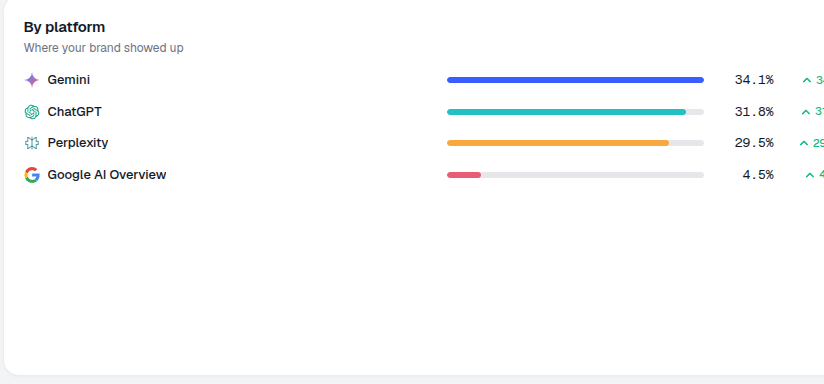
Scroll down the Dashboard to the By platform card, subtitled “Where your brand showed up.” In the example it lists Gemini 34.1%, ChatGPT 31.8%, Perplexity 29.5%, Google AI Overview 4.5%, each with a colored bar and a small change indicator (e.g. ▲ 34.1). These four percentages always sum to 100% of your tracked mentions across the current reporting period, so the widget is a full accounting of your presence, not a sample.
What it measures
Each bar represents the share of your total tracked brand appearances (across every prompt and every run in your AmICited workspace) that occurred on that specific engine during the selected period. It doesn’t just count raw mentions; because engines are queried different numbers of times depending on your prompt set and monitoring cadence, the widget normalizes to a percentage so the four platforms are directly comparable regardless of how many runs each contributed. This is what makes the widget different from a raw mention count: a small, precise data set (Google AI Overview, in the example above) can still be meaningfully compared against a larger one (Gemini) because both are expressed as a share of the same whole.
How it differs from the gauge breakdown
This is the fuller companion to the compact per-platform list next to your AI visibility score gauge:
- The gauge breakdown is a quick glance while you read your score, useful for a fast check, but limited in what it can show alongside the score itself.
- The By platform widget gives you the exact percentages, longer bars for easier visual comparison, and trend arrows so you can see how each engine’s share is moving relative to the previous period, not just what it is right now.
Use the gauge when you want a fast pulse check; use the By platform widget when you’re actually deciding where to invest optimization effort.
How to read it
- The bars make the relative gaps obvious: in the example, Gemini, ChatGPT and Perplexity are close together, while Google AI Overview trails far behind at 4.5%. That gap is the signal: it tells you immediately which engine is under-indexing your brand relative to the others.
- The percentages are each engine’s share of where your brand appeared, not an absolute count, so a rising percentage on one platform can happen even if your raw mentions there stayed flat, if the total pool of mentions shifted.
- The trend arrows show whether your presence on each engine is rising or falling versus the previous period, which is what turns this from a static snapshot into an ongoing AI rank tracker for your platform mix. A single reading tells you where you stand; the trend tells you whether your recent content and technical work is actually moving the needle on a specific engine.
Reading the widget well means treating the bars and the arrows as two different questions: the bars tell you where you are today, the arrows tell you which direction you’re heading. A platform with a small bar but a strong upward arrow is a different strategic situation than a platform with a small bar and a flat or declining arrow: the first is early traction worth reinforcing, the second is a genuine blind spot.
Why platforms diverge
It’s worth understanding why the bars are rarely even, because that shapes what you do about it. Google AI Overview draws heavily on Google’s existing search index and structured data, so sites with strong traditional SEO (clean schema markup, established domain authority, solid Google rankings) tend to do disproportionately well there. Perplexity leans more on real-time web retrieval and often surfaces forums, review sites and recent content, so a brand with an active community presence or frequent publishing cadence can outperform its traditional SEO profile there. ChatGPT and Gemini sit somewhere in between, blending trained-in knowledge with retrieval, which means brand consistency and broad content coverage across the web tend to matter more than any single technical factor. None of this is fixed: platform-specific ranking factors shift as these engines update their models and retrieval methods, which is exactly why the trend arrows matter as much as the current percentages.
How to use it
- Prioritize the laggard. The engine with the lowest bar is your clearest growth target. Investigate what content or sourcing pattern that specific engine rewards and check whether your site currently satisfies it.
- Balance your exposure. If one engine dominates your presence, you’re vulnerable to its model or sourcing changes. Work toward a more even spread so no single algorithm update can wipe out most of your AI visibility at once.
- Filter to confirm. Use the All AI Models filter at the top of the page to switch the whole dashboard to a single engine and investigate why a platform is low: which prompts and sources are driving it. This turns the widget from a diagnosis into an investigation: once you isolate a platform, you can see the exact prompts where you’re missing and the sources that engine cited instead of you.
- Track the trend, not just the snapshot. A platform sitting at 5% isn’t necessarily a crisis if the arrow is climbing steadily, but a platform sliding downward, even from a healthy base, deserves attention before it becomes your new laggard.
- Cross-reference with competitors. If you have competitor tracking configured, compare your per-platform split against theirs. A competitor with a more balanced spread is typically more resilient to the next model update than one, like you might be, concentrated in a single engine.
Getting an even, resilient spread across engines isn’t a one-time fix. It’s an ongoing discipline of publishing content that satisfies each engine’s retrieval preferences and periodically re-checking whether your balance has shifted. If you’re deciding which engine to prioritize first, our guide on how to choose an AI visibility monitoring platform walks through the tradeoffs, and the deeper breakdown of AI share of voice explains how to translate this widget’s percentages into a strategy for closing the gaps. If Perplexity specifically is your laggard, our framework for evaluating brand visibility in Perplexity covers what that engine rewards that others don’t. And if you’re building the broader business case for treating this as a program rather than a one-off check, AmICited’s AI visibility feature page and the for brands solution overview show how the By platform widget fits into a full monitoring and reporting workflow across your whole prompt set.
Frequently asked questions
It breaks your total AI visibility down by engine, with a labelled bar, an exact percentage, and a trend arrow for each of Gemini, ChatGPT, Perplexity, and Google AI Overview. You'll find it by scrolling down the Dashboard to the By platform card, subtitled "Where your brand showed up."
The gauge breakdown is a compact list for a fast glance while reading your overall score. The By platform widget is the fuller companion: exact percentages, longer bars for easier comparison, and trend arrows showing how each engine's share is moving versus the previous period, meant for deciding where to invest, not just a quick check.
The widget normalizes your tracked brand appearances into a share of the total, rather than a raw mention count, so all four engines are directly comparable regardless of how many runs each contributed. That's why it's described as a full accounting of your presence for the period, not a sample.
Yes, it's a concentration risk. If one engine dominates your presence, a single model update or sourcing change on that platform could sharply cut your AI visibility overnight with no fallback elsewhere. Aim to balance your exposure across engines so no single algorithm change can wipe out most of your visibility at once.
More tutorials in this section
 How to Read Your Visibility Score
Learn what the AmICited Visibility Score measures and how its gauge and platform breakdown show your AI …
Read guide →
How to Read Your Visibility Score
Learn what the AmICited Visibility Score measures and how its gauge and platform breakdown show your AI …
Read guide →
 How to See Your Share of Voice
Find your AmICited Share of Voice and learn how it compares with your Visibility Score.
Read guide →
How to See Your Share of Voice
Find your AmICited Share of Voice and learn how it compares with your Visibility Score.
Read guide →
 How to Use the Domain Semantic Map
Explore the AmICited Domain Semantic Map to find clusters and topic gaps across prompts, fan-out queries and …
Read guide →
How to Use the Domain Semantic Map
Explore the AmICited Domain Semantic Map to find clusters and topic gaps across prompts, fan-out queries and …
Read guide →Ready to put it into practice?
Free check · 7-day trial · card required