


How to View All Cited Sources
Browse domains cited across AI engines in AmICited’s All Sources table, with URLs, citations and share data.

The All sources table is the complete, ranked directory of every source AI engines cite for your topics, one row per domain (or page), with the numbers that tell you who matters most.
Quick Steps
- The All sources table ranks every domain AI engines cite for your topics, with citations, share and engine coverage per row.
- Find it lower on the Sources page, with a By domain / By URL toggle.
- Locate your own you row to see your rank and share against every competitor at once.
- Scan the Engines column to spot sources with broad, cross-platform credibility versus single-engine niche players.
- Click any row to drill into the exact pages and prompts behind its citation count.
What is an AI citation, and why does a “sources” table matter?
An AI citation is any time a generative engine (ChatGPT, Perplexity, Gemini, or Google AI Overviews) names, links to, or draws on a specific page or domain while answering a user’s question. Unlike a traditional search-engine ranking, a citation isn’t a slot on a results page; it’s a piece of evidence the model chose to surface (or synthesize from) when constructing its answer. A brand can be “cited” even when it doesn’t hold the top position in the response, and a page can influence an answer’s wording without ever being named outright. That distinction is why raw mention counts alone don’t tell the full story, and why a structured, sortable record of every cited source, not just your own, is essential to understanding your standing.
This matters because AI answers are assembled from a pool of sources the model (or its retrieval layer) has decided are trustworthy and relevant to a given prompt. Some domains show up constantly because they’re broadly authoritative: think established publications, review aggregators, or category-defining reference sites. Others appear only for a narrow slice of topics where they happen to have the most specific, well-structured content. Knowing which sources dominate your topic space, how concentrated or fragmented that landscape is, and where your own domain ranks within it is the foundation of any AI search visibility effort: you cannot improve a position you haven’t first measured.
This is also where the concept of AI Source Selection becomes practically useful. Engines don’t cite randomly: they weigh signals like topical relevance, content structure, freshness, and perceived credibility when deciding which pages to pull into an answer. A master sources table is the closest thing to a scoreboard for that selection process: it shows you, empirically, which domains are winning the selection game for your prompts right now, across every engine that’s tracked, rather than asking you to infer it from a handful of manual searches.
Because citations compound (a source that’s cited often tends to keep getting cited, since engines treat prior citation as a weak trust signal), the earlier you identify where you stand in this ranked list, the sooner you can act on it. That’s the job this table does inside AmICited: it turns a fuzzy, anecdotal sense of “who AI seems to trust in our space” into a ranked, filterable, engine-by-engine dataset.
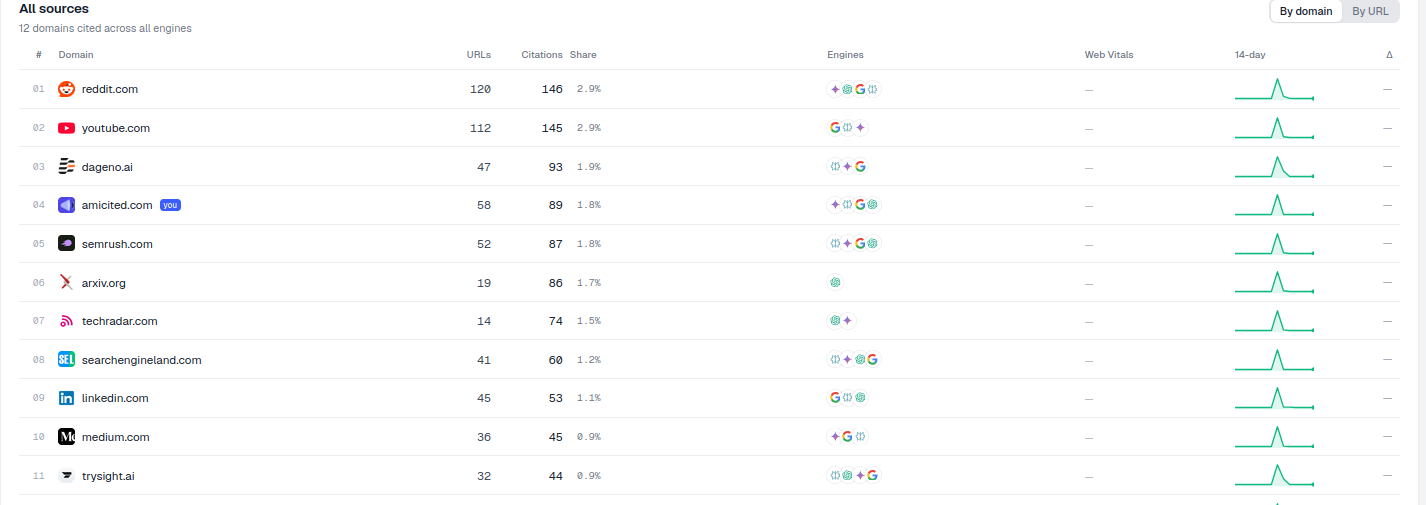
Where to find it
It’s the All sources table lower on the Sources page, headed with a count like “12 domains cited across all engines,” with its own By domain / By URL toggle. The By domain view rolls everything a source publishes into a single row, which is the fastest way to see overall influence. The By URL view breaks that same domain down page by page, which is more useful when you want to know exactly which piece of content on a competitor’s site, or your own, is doing the citing work, rather than just knowing the domain as a whole is active.
What each column shows
- #: the source’s rank by citations. This is a simple ordinal ranking across every domain (or URL) that appears at least once in the citations behind your tracked prompts.
- Domain (or Page): the source, with your own flagged you, so you never have to hunt for your row in a long list.
- URLs: how many distinct pages of that source were cited. A high URL count paired with a high citation count tells you a domain has broad, distributed coverage rather than a single lucky page carrying all of its visibility.
- Citations: total citations across all engines. This is the raw volume figure that the ranking (#) and the Share percentage are both derived from.
- Share: that source’s percentage of all citations for your topics. This is the same underlying concept as share of voice in traditional brand tracking, adapted for AI answers: instead of measuring share of impressions or share of shelf, it measures share of citations across the exact set of prompts you’re monitoring.
- Engines: small icons showing which AI engines cite it. A source with icons for all tracked engines has cross-platform credibility; a source with just one icon may only be favored by that engine’s particular retrieval or indexing behavior.
- Web Vitals and a 14-day sparkline: page-health and recent-trend context, with a Δ change indicator, so you can see at a glance whether a source’s citation volume is climbing, falling, or holding steady over the last two weeks, and whether its underlying pages are technically healthy enough to keep earning that attention.
What it measures
Structurally, the All sources table is answering one question for every domain in your topic space: how much of the AI conversation about these topics does this source own, and through which engines? It aggregates every citation event recorded across your tracked prompts, regardless of which engine produced it, into a single, comparable ranking. That aggregation is what makes it different from looking at one engine’s results in isolation: a domain that looks dominant in ChatGPT alone might actually be a mid-tier player once Perplexity, Gemini, and AI Overviews are folded in, or vice versa.
Because the table also surfaces URLs per domain, it doubles as a rough proxy for a source’s domain authority within your specific niche, not the traditional backlink-based metric, but a citation-based equivalent: how much of that domain’s overall footprint is trusted enough by AI engines to be pulled into answers across many different pages, versus concentrated in one or two standout URLs.
How to use it
- See the whole landscape. This is the master list: everyone competing for citations on your topics, ranked from the most-cited source down. Scanning the top ten rows gives you an instant read on whether your category is dominated by a handful of authoritative players or spread thinly across many niche sources.
- Find your position. Locate your you row: your rank and share against everyone else. This single number is the honest starting point for any GEO ( generative engine optimization) initiative: it tells you exactly how much ground you have to make up, and against whom.
- Scan the Engines column to see which sources have broad influence (cited by many engines) versus niche ones. Sources cited across every engine are worth studying closely, their content, structure, or authority signals are working universally, which makes them useful benchmarks for what “citable” looks like in your space.
- Drill in. Click any row to open its drill-down panel and see the exact pages and prompts behind its numbers. This is where the table moves from a leaderboard to a research tool: instead of just knowing a competitor has a 20% share, you can see precisely which of their pages are earning citations and on which prompts, which is the raw material for a proper content gap analysis.
- Track movement over time. The 14-day sparkline and Δ indicator let you catch emerging sources early: a domain climbing quickly in citation share is often a signal that it recently published something an AI engine now treats as a go-to reference for that topic, which is worth investigating before it entrenches further.
Use it together with Cited by provider above: that table shows the per-engine breakdown, while All sources gives you the ranked, at-a-glance directory. Together, running a citation share analysis across both views is how you separate “we’re weak everywhere” from “we’re strong on Gemini but invisible on Perplexity”, a distinction that changes what you do next far more than a single blended score ever could.
Once you know who’s winning the citation race in your space, the next useful step is connecting that ranking back to the specific queries driving it: the All sources table tells you who, but pairing it with your prompt-level data tells you why, which is exactly what you get when you track brand mentions in ChatGPT and the other engines side by side. From there, teams typically move from observation to action: using the drill-down panel to reverse-engineer what a top-ranked competitor’s cited pages are doing right, then closing that gap with better-structured content of their own. If you’re building the broader measurement habit rather than a one-off check, it’s worth pairing this table with an AI rank tracker view of your own prompt-level rankings, so you’re watching both your absolute citation share and your relative position on the prompts that matter most to your business.
Frequently asked questions
It ranks every domain (or, in By URL view, every page) that AI engines cited across your tracked prompts, aggregated across every engine into one comparable list. Each row shows its rank by citation count, total citations, share of all citations, and which engines cite it.
Look for your row flagged you in the table, it's marked so you don't have to hunt for it in a long list. That row shows your rank position and your Share percentage against every competitor cited for the same topics, all in one place.
By domain rolls up everything a source publishes into a single row, the fastest way to judge a competitor's overall influence. By URL breaks that same domain down page by page, which is more useful when you need to know exactly which specific piece of content is earning the citations.
A high citation count from just one engine reflects that engine's particular retrieval behavior, not broad credibility. Icons across all tracked engines (ChatGPT, Perplexity, Gemini, AI Overviews) show a source is trusted universally, making it a stronger benchmark for what "citable" content looks like in your space.
More tutorials in this section
 How to Read Your Sources Overview Stats
Understand AmICited Sources stats: citations, domains, cited URLs, your pages, external sources and weekly …
Read guide →
How to Read Your Sources Overview Stats
Understand AmICited Sources stats: citations, domains, cited URLs, your pages, external sources and weekly …
Read guide →
 See Which AI Engines Cite Each Source
See how often each AI engine cites your top sources in AmICited’s Cited by Provider heatmap.
Read guide →
See Which AI Engines Cite Each Source
See how often each AI engine cites your top sources in AmICited’s Cited by Provider heatmap.
Read guide →
 How to Drill Down into a Single Source
Open any source in AmICited to see the exact pages and prompts where it was cited.
Read guide →
How to Drill Down into a Single Source
Open any source in AmICited to see the exact pages and prompts where it was cited.
Read guide →Ready to put it into practice?
Free check · 7-day trial · card required