


How to Switch Between Domain and URL Views
Switch between domain and URL views on the AmICited Sources page to inspect cited websites or individual pages.

The same citation data answers two different questions: which sites shape AI answers, and which exact pages do. The By domain / By URL toggle flips your Sources views between the two.
Quick Steps
- Find the By domain / By URL toggle in the top-right of the Cited by provider and All sources tables on the Sources page.
- Use By domain to see which whole sites earn AI citations in your category.
- Switch to By URL to see exactly which individual pages are doing the work.
- Your choice persists across both tables and your session, so filters and date range stay put as you switch.
- Zoom out to spot competitors, then zoom in to benchmark their specific winning pages against your own.
What is a citation source, and why does its grain matter?
Every time ChatGPT, Perplexity, Gemini, or Google AI Overviews answers a question by referencing outside material, it draws on a source: a specific web page it read, summarized, or linked to as part of forming that answer. When AmICited logs an AI citation , it doesn’t just record “Reddit was cited” or “your competitor was cited.” It records the exact URL the AI engine pulled from. That distinction, domain versus page, is the difference between a bird’s-eye view of the competitive landscape and a ground-level view of the content actually winning.
A domain (also called a referring domain
) is the whole website: reddit.com, g2.com, yourcompetitor.com. Grouping citations by domain tells you which publishers an AI model trusts enough to pull from repeatedly. It’s the equivalent of asking “who are the outlets that keep showing up in AI answers about my category?” A URL, by contrast, is one specific page on that domain: a single Reddit thread, a single G2 comparison page, a single blog post. Grouping citations by URL tells you which pieces of content are actually doing the work. Two pages on the same domain can perform completely differently: one thread on reddit.com/r/saas might be cited in dozens of AI answers while a thousand other Reddit threads are never surfaced at all. Aggregating everything under “reddit.com” hides that variance; looking at URL structure
and individual pages reveals it.
This matters for AI search visibility because AI models don’t cite domains: they cite documents. The underlying source ranking signals that determine whether a page gets pulled into an answer operate at the page level: freshness, structure, direct answer-ability, authority signals on that specific piece of content. A domain-level view is useful for strategic questions (which publishers should I pitch, which competitors keep showing up), but it can’t tell you why a specific page won. Only the URL-level view, and the actual page itself, can do that. AmICited’s By domain / By URL toggle exists precisely so you can move fluidly between these two altitudes without switching tools or exporting data twice.
Where to find it
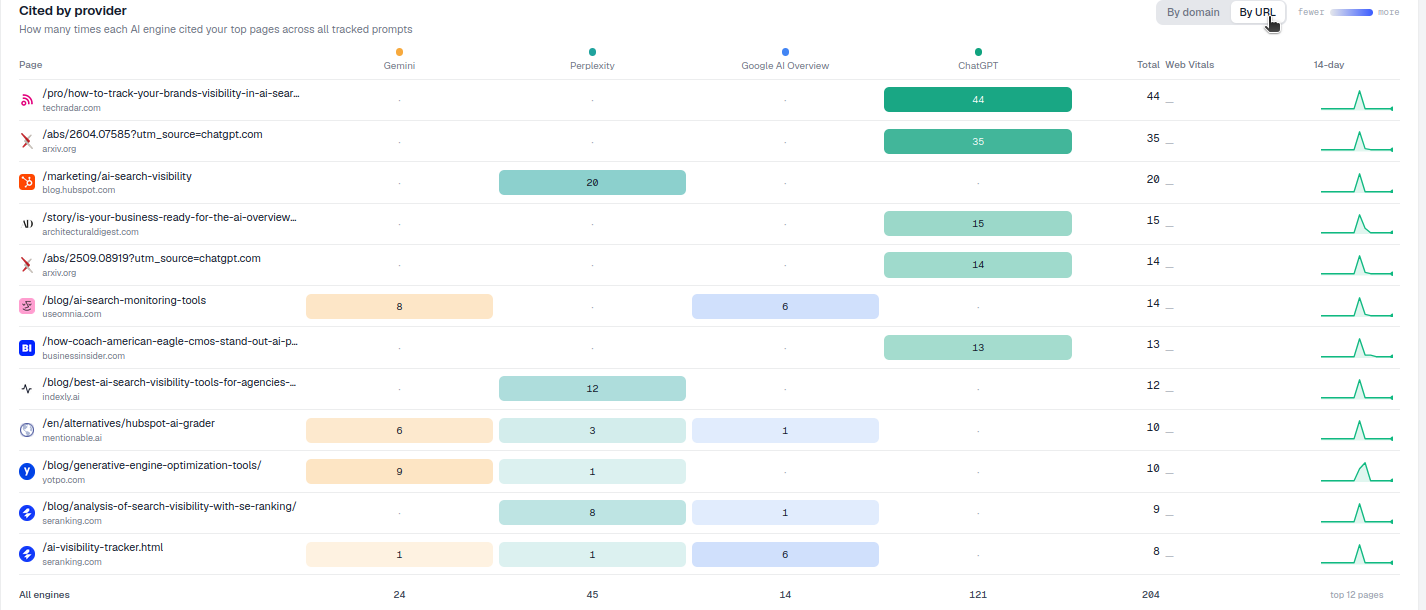
The By domain / By URL toggle sits in the top-right of both the Cited by provider table and the All sources table on the Sources page. It applies to whichever table you’re looking at, and it persists across your session, so if you switch to By URL while reviewing the Cited by provider table, the All sources table will reflect the same grain until you change it back. This is the single control point for the level of detail across the entire Sources page, so there’s no need to reconfigure filters or re-run a report to change altitude.
What each view shows
- By domain: each row is a whole site (e.g.
reddit.com), aggregating every page on that domain that has ever been cited. Citation counts, share of voice , and per-engine breakdowns all roll up to the domain. This is best for seeing the competitive landscape at a site level: which publishers, forums, review platforms, and competitor domains are consistently earning AI citations in your category. - By URL: each row is a single page (e.g.
reddit.com/r/yourindustry/comments/...), so you see the exact articles, threads, or listings being cited, with their own individual citation counts and engine breakdowns. This is best for content benchmarking: understanding what a specific winning page actually contains, how it’s structured, and how often it personally gets pulled into answers, independent of how its parent domain performs overall.
Everything else on the page (the per-engine heatmap columns showing which AI engines (ChatGPT, Perplexity, Gemini, AI Overviews) cited each row, the totals, and the sparklines tracking citation trend over time) stays exactly the same. Only the grain of the rows changes. That consistency matters: it means you can toggle back and forth without losing your place, your date range, or any filters you’ve already applied, and directly compare a domain’s aggregate trend against the trend of its single best-performing URL.
How to use it
- Zoom out with By domain to answer “who are my citation competitors?” This is where you’ll typically start a competitive review, scanning the domain list to see which publishers, review sites, and rival brands are consistently earning citations in your space, and how that compares to your own domain’s citation volume.
- Zoom in with By URL to answer “which pages are winning the citations, and what do they do well?” Once a domain catches your attention in the aggregate view, switch to By URL and filter or search to see exactly which of its pages are driving that citation count. A domain with a high citation total might owe all of it to a single exceptional page, or it might be earning citations broadly across dozens of pages. Those are very different competitive situations, and only the URL view distinguishes them.
- Benchmark against real pages. In By URL, open a top-cited page and compare it to your own with the prompt-level Compare a URL tool. This turns an abstract “we should improve our content” instinct into a concrete, side-by-side comparison against the page an AI engine is actually choosing to cite for a given prompt: useful input for a structured content gap analysis .
- Watch your own pages. In By URL you can see exactly which of your URLs are getting cited, and which of your important pages, despite being relevant and well-written, aren’t showing up at all. That gap is often the clearest signal of where to focus content or technical work next.
Reading the two views together
The two views aren’t really alternatives: they’re a workflow. Domain-level data tells you where to look; URL-level data tells you what to learn. A common pattern is to start each review cycle in By domain to catch any shifts in the competitive landscape (a new domain suddenly appearing near the top, an existing competitor’s citation share climbing), then drop into By URL for any domain that moved, to see whether the change is driven by one new standout page or a broader pattern across many pages. That second read is what turns a citation-tracking habit into an actual content strategy, rather than just a scoreboard.
It’s also worth remembering that a domain’s aggregate citation count can be misleading on its own. A large publisher with hundreds of pages might accumulate a high domain-level total simply through volume, while a smaller, more focused domain earns fewer total citations but at a much higher rate per page. The By URL view is what lets you tell these two situations apart, and it’s the same underlying data AmICited uses to power prompt-level tracking of how ChatGPT and Perplexity cite sources for the specific prompts you monitor.
Once you’re comfortable moving between the two grains, the Sources page stops being a static report and becomes a diagnostic tool. Pair it with AmICited’s broader AI visibility tracking to see how source-level shifts correlate with your own citation rate over time, or use the domain view as an input into agency-style competitive reporting if you’re managing AI search visibility across multiple client accounts. If you’re still building out your core tracking setup, it’s also worth pairing this page with AmICited’s AI rank tracker , which shows where your brand ranks within AI answers rather than just whether a source was cited. Together, rank and source-level data give you both the “are we winning” and the “why” in one place.
Frequently asked questions
By domain aggregates every citation to a whole site, like reddit.com, so you can see which publishers or competitors are trusted enough to be pulled from repeatedly. By URL breaks that same data down to individual pages, so you can see exactly which specific articles or threads are earning the citations, since one page on a domain can vastly outperform the rest.
No. The toggle only changes the grain of the rows; your date range and any filters you've applied stay exactly as they were. Your choice of domain or URL view also persists across your session and applies to both the Cited by provider and All sources tables at once.
Start with By domain to spot which sites are consistently earning citations in your category, then switch to By URL once a domain catches your attention. That second step tells you whether its citations come from one exceptional page or are spread broadly across many, which changes how you'd respond competitively.
The By domain / By URL toggle sits in the top-right of both the Cited by provider table and the All sources table on the Sources page. Switching it in one table updates the other to match, so you're always viewing both tables at the same level of detail.
More tutorials in this section
 How to Read Your Sources Overview Stats
Understand AmICited Sources stats: citations, domains, cited URLs, your pages, external sources and weekly …
Read guide →
How to Read Your Sources Overview Stats
Understand AmICited Sources stats: citations, domains, cited URLs, your pages, external sources and weekly …
Read guide →
 See Which AI Engines Cite Each Source
See how often each AI engine cites your top sources in AmICited’s Cited by Provider heatmap.
Read guide →
See Which AI Engines Cite Each Source
See how often each AI engine cites your top sources in AmICited’s Cited by Provider heatmap.
Read guide →
 How to Drill Down into a Single Source
Open any source in AmICited to see the exact pages and prompts where it was cited.
Read guide →
How to Drill Down into a Single Source
Open any source in AmICited to see the exact pages and prompts where it was cited.
Read guide →Ready to put it into practice?
Free check · 7-day trial · card required