


How to Filter Domains on the Semantic Map
Filter domains on the AmICited Domain Semantic Map by citation count to focus on your brand or a competitor.

Every AI answer that cites a source is really casting a vote for a domain, and over hundreds of prompts, those votes form a pattern worth reading.
At a Glance
- The DOMAINS panel beside the Domain Semantic Map lists every domain in your map, ranked by citation count.
- Your own domain is flagged you, so you can gauge your standing against the pack at a glance.
- Search, hover, or click a domain to locate, highlight, or hide it on the map.
- Use All / None to reset the view or build your own custom comparison.
- Citation count is a raw leaderboard, not a percentage; pair it with share of voice for the normalized view.
What is a domain semantic map?
A domain semantic map is a visual layout of every website an AI engine has cited while answering your tracked prompts, arranged so that domains cited in similar contexts sit closer together. It’s built on semantic search principles: rather than grouping domains alphabetically or by raw traffic, the map clusters them by meaning, which topics they get cited for, and how often those topics overlap with the topics your brand competes on. The result is less a list and more a terrain: dense clusters mark contested ground where many sources compete for the same citation, while isolated points mark niches with a single dominant source.
Each domain on the map carries a citation count, a tally of how many times AI engines (ChatGPT, Perplexity, Gemini, Google AI Overviews) referenced that domain across all the prompts you track. This is the raw material behind AI citation analysis: every time a model names a source, links to it, or draws a fact from it in a generated answer, that’s a citation, and the count is simply the sum of those events for a given domain. Citation counts matter because they’re the clearest available signal of source pool composition: which websites a given AI model treats as trustworthy enough to pull from repeatedly for your topic area. A domain that shows up dozens of times isn’t necessarily the most authoritative site on the internet; it’s the site AI models have learned to lean on for this specific set of prompts, which is a subtly different and more actionable thing to know.
This distinction is central to generative engine optimization work. Traditional SEO asks “where do I rank on a results page.” GEO asks “which sources get pulled into the generated answer, and how often is mine one of them.” The domain semantic map answers that question visually, plotting your own domain alongside review sites, competitor sites, forums, and publishers that share your topical territory, while the citation-count list translates the same data into a sortable leaderboard. Read together, they let you see both where you sit relative to the sources AI engines trust, and how much citation volume separates you from them.
Because a real map can carry hundreds of domains, the raw picture gets noisy fast, which is exactly the problem the domain filter list beside it is built to solve.
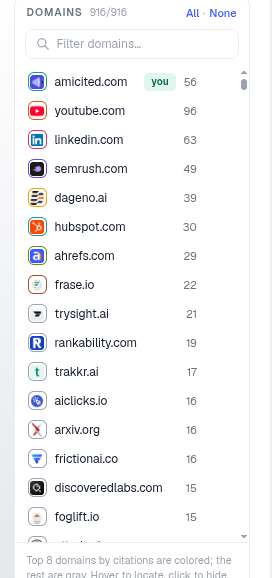
The panel to the right of the Domain Semantic Map is a domain filter and locator. It lists every domain that appears in your map, ranked by how many times it was cited, and lets you control which domains are shown.
Where to find it
It’s the DOMAINS panel on the right-hand side of the Domain semantic map card on the Dashboard. The header shows how many domains are currently shown out of the total (e.g. 916/916) with quick All · None toggles, so you always know whether you’re looking at the full picture or a filtered subset.
What the list shows
- Each row is a domain with its citation count, the number of times AI engines cited it across your prompts. In the example, amicited.com is flagged you with 56, followed by youtube.com (96), linkedin.com (63), semrush.com (49) and so on. That ordering is effectively a leaderboard of the sources competing for the same citations your brand is trying to earn.
- Your own domain is highlighted with the you badge so it’s easy to find without scanning the whole list, useful the moment you want to check your position relative to the pack.
- The note at the bottom explains the coloring: “Top 8 domains by citations are colored; the rest are gray. Hover to locate, click to hide.” Limiting full color to the top 8 keeps the map legible: those are the domains driving most of the citation volume, while the gray long tail represents the many sources that get cited only occasionally.
- Domains here can be almost anything an AI model treats as a credible source: your own site, direct competitors, review platforms, marketplaces, forums like Reddit, video platforms like YouTube, or industry publishers. Seeing a non-competitor domain (say, a review site or YouTube) at the top of the list is itself informative: it tells you that a third-party channel, not a competitor’s own site, is currently the default answer AI engines give for your topic.
How to use it
- Search with the Filter domains… box to jump to a specific domain, handy when the list runs into the hundreds and you already know the domain you’re after.
- Hover a domain to locate its points on the map without changing anything else, so you can see exactly which prompt clusters that domain is being cited for.
- Click a domain to hide it, so you can declutter the map and focus on the domains you care about. Use None then re-add just your brand and one competitor to compare their footprints directly, a fast way to see whether you and a specific rival are being cited for the same topics or genuinely different ones.
- Use All / None to reset or clear the whole selection quickly, which is the fastest way to move between “show me everything” and “show me nothing, let me build my own view.”
- Read the counts as a leaderboard: the domains at the top are the ones AI engines lean on most for your topics, i.e. the sources you’re competing with for citation volume, whether or not they’re a competitor in the traditional business sense.
What it measures, and why it’s not the same as share of voice
It’s worth being precise about what the citation count next to each domain does and doesn’t tell you. It’s a raw count of citation events for that domain across your tracked prompt set, not a percentage, and not adjusted for how many total citations exist across all domains. For that normalized view (what proportion of total citations across your prompts belong to your brand versus each competitor), you want share of voice , which AmICited surfaces elsewhere on the dashboard. The domain list and the map are best used to explore the landscape of sources (who’s in it, how they cluster, how concentrated the top tier is), while share of voice gives you the single competitive number to track over time.
Reading the two together is where the real insight is. If your domain has a healthy citation count but sits in a sparse part of the map, far from where the highest-volume clusters are, that can mean you’re being cited reliably but for narrower or less-contested topics, a different strategic problem than being outcited head-to-head by a rival occupying the same cluster. Conversely, if a competitor’s citation count is climbing in the same cluster your brand occupies, that’s an early warning worth investigating in more detail, for instance, by pulling the specific prompts driving that competitor’s citations to see what content or pages AI engines are pulling from.
Using the domain filter for competitive analysis
The filter list is also a lightweight competitive-analysis tool in its own right. Because it’s just a sorted list of domains and counts, you can use it to answer questions like: which non-competitor domains dominate my space (and are therefore worth a digital PR or partnership push), how concentrated is the top of the list (a handful of domains capturing most citations, versus a long, even tail), and which domains newly appear or disappear as you add or remove prompts from your tracked set. Hovering each of the top few domains and watching where their points land on the map will often reveal whether a competitor’s strength is broad (cited across many of your topic clusters) or narrow (cited heavily, but only in one or two specific areas), a distinction that should shape whether you respond with a broad content push or a targeted one.
This is also where an AI search visibility mindset pays off: the goal isn’t simply to appear in the list, but to move up it in the clusters that matter to your business, and to understand why the domains ahead of you are there. A domain with a high citation count and strong topical spread is functioning, in effect, as a default reference source for AI engines answering your prompts, the position most brands tracking their AI visibility score are ultimately trying to reach for their own domain.
Where to go next
Once you’ve used the domain filter to see who you’re really competing against for citations, the natural next step is to track how that picture changes over time rather than treating it as a one-off snapshot. Pairing the semantic map with a proper AI rank tracker lets you watch your own citation position move week over week instead of just eyeballing a single count, and if you manage visibility across several brands or client accounts, the same domain-level view scales into a portfolio tool worth exploring through AmICited for agencies . If the list keeps surfacing the same handful of unfamiliar domains at the top of your topic clusters, that’s usually a sign it’s time to dig into why AI models trust those sources so consistently, a good next read is how AI models decide what to cite in the first place, so the domains you’re currently losing citation share to become a roadmap for where to close the gap.
Frequently asked questions
It's a domain filter and locator. It lists every domain that appears on the Domain Semantic Map, ranked by citation count, with your own domain flagged "you". The header shows how many domains are currently shown out of the total, with All / None toggles to control which ones display.
Click None to clear the selection, then re-add only your domain and the competitor you want to compare. This declutters the map so you can see whether the two of you are being cited for the same topic clusters or genuinely different ones, without hundreds of other domains in the way.
No. Citation count is a raw tally of citation events for that domain, not a percentage and not adjusted for total citations across all domains. Share of voice, shown elsewhere on the dashboard, is the normalized view of what proportion of total citations belong to you versus competitors. Use the domain list to explore the landscape, and share of voice to track competitive standing over time.
AmICited colors only the top 8 domains by citation count; the rest render gray to keep the map legible. Those top 8 are driving most of the citation volume, while the gray long tail represents domains cited only occasionally. Hover any domain in the list to locate it, or click to hide it.
More tutorials in this section
 How to Read Your Visibility Score
Learn what the AmICited Visibility Score measures and how its gauge and platform breakdown show your AI …
Read guide →
How to Read Your Visibility Score
Learn what the AmICited Visibility Score measures and how its gauge and platform breakdown show your AI …
Read guide →
 How to See Your Share of Voice
Find your AmICited Share of Voice and learn how it compares with your Visibility Score.
Read guide →
How to See Your Share of Voice
Find your AmICited Share of Voice and learn how it compares with your Visibility Score.
Read guide →
 How to Use the Domain Semantic Map
Explore the AmICited Domain Semantic Map to find clusters and topic gaps across prompts, fan-out queries and …
Read guide →
How to Use the Domain Semantic Map
Explore the AmICited Domain Semantic Map to find clusters and topic gaps across prompts, fan-out queries and …
Read guide →Ready to put it into practice?
Free check · 7-day trial · card required